EasyManua.ls Logo

FJDynamics FJD Trion P1 - Maintenance and Troubleshooting; Maintenance; Common Faults and Solutions

FJDynamics FJD Trion P1
39 pages
Print Icon
To Next Page IconTo Next Page
To Previous Page IconTo Previous Page
Loading...
© 2023 FJDynamics. All rights reserved. 30
FJD Trion P1 LiDAR Scanner User Manual
5 Maintenance and Troubleshooting
5.1 Maintenance
1. Wipe P1 with a clean cotton cloth and put it in the case after use.
2. Avoid rough actions, such as impact, bending, throw, and disassembly, on P1, and do
not put debris on it.
3. Do not disassemble P1 on your own. If a fault occurs, contact the local dealer.
4. Hot swapping is prohibited. Do not plug or unplug the cable when P1 is powered on.
5. At a certain time interval, shake the LiDAR module gently to check for abnormal
sounds. If any abnormal sound is heard, check the screws of the LiDAR module. Anti-
loosening measures are taken for all the P1 screws so that they do not loosen easily.
However, to ensure safety, if any screw is loose, contact the local dealer.
6. Only qualified personnel can repair P1.
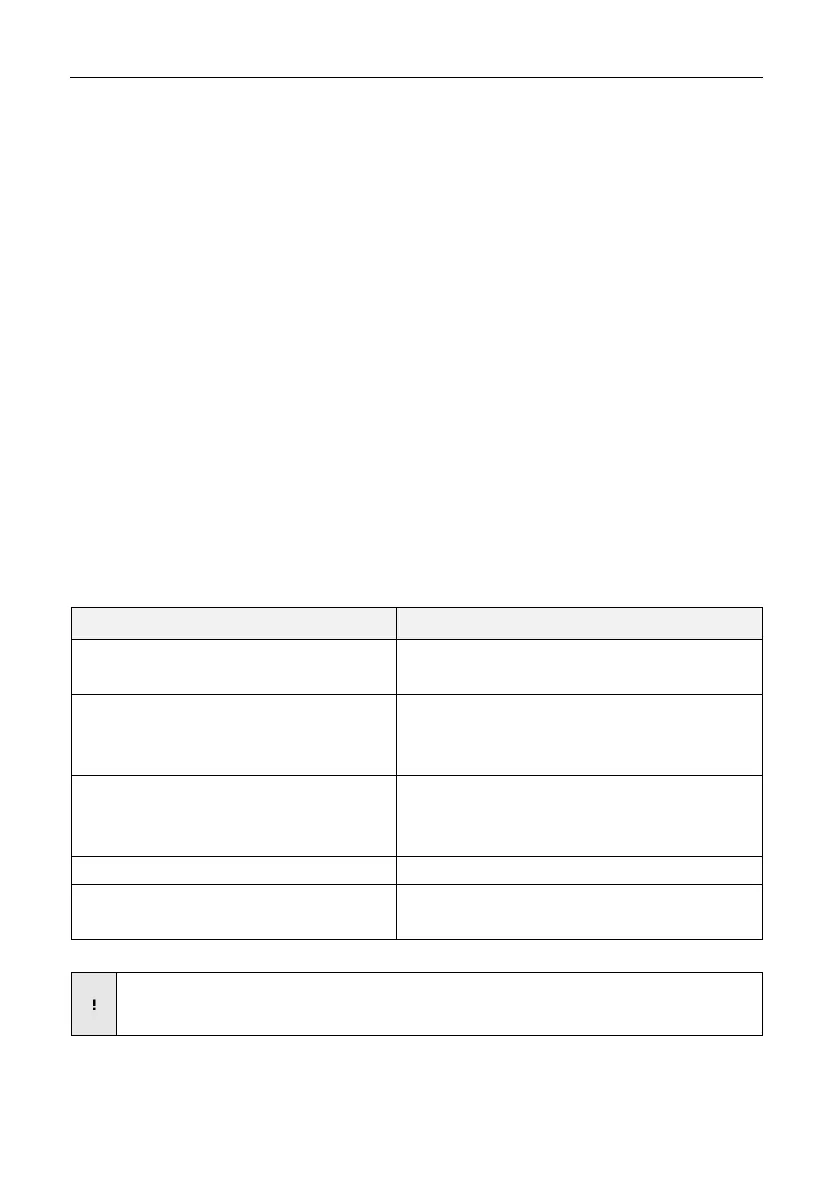
5.2 Common Faults and Solutions
Fault
Solution
P1 cannot be powered on.
Check whether the battery is properly installed.
Ensure that the battery power is sufficient.
The phone or PC cannot detect the Wi-Fi signal
of P1.
Check the available storage of P1.
Disable the cellular data service on the phone, and try
again.

The phone or PC cannot access the scanning
screen.
Check whether the phone or PC is connected to the P1
Wi-Fi.
Refresh the screen and try again.
Initialization fails.
Keep P1 still, and avoid vertical movement.
P1 shuts down during use.
Check whether the battery level is low.
Check whether the battery is properly connected.
Note: Above are the common faults. If your problem persists, contact our customer
service.