FlashCut CNC Section 6 Drive Settings
Setting the Current
The maximum current for the motor you have selected is set automatically
when you set the rotary switch. But you may want to reduce the current to
save power or lower motor temperature. This is important if the motor is not
mounted to a surface that will help it dissipate heat or if the ambient
temperature is expected to be high.
Step motors produce torque in direct proportion to current, but the amount of
heat generated is roughly proportional to the square of the current. If you
operate the motor at 90% of rated current, you’ll get 90% of the rated torque.
But the motor will produce approximately 81% as much heat. At 70%
current, the torque is reduced to 70% and the heating to about 50%.
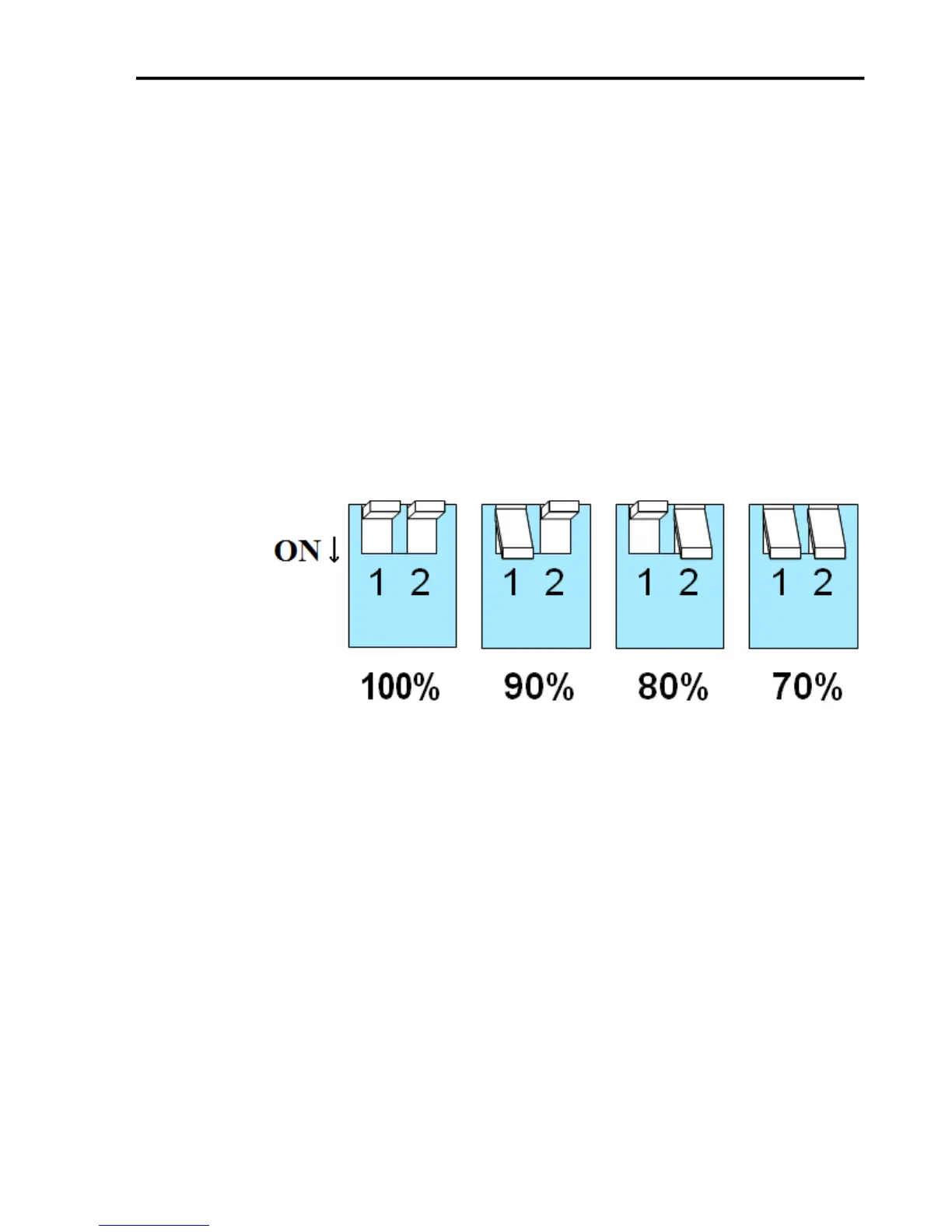
Two of the small switches on the front of the drive are used to set the percent
of rated current that will be applied to the motor: SW1 and SW2. Please set
them according to the illustration below. The factory default setting is 70%.
Setting Idle Current
Motor heating and power consumption can also be reduced by lowering the
motor current when it is not moving. The drive will automatically lower the
motor current when it is idle to either 50% or 90% of the running current.
The 50% idle current setting will lower the holding torque to 59%, which is
enough to prevent the load from moving in most applications. This reduced
motor heating by 75%. In some applications such as those supporting a
vertical load, it is necessary to provide a high holding torque. In such cases,
the idle current can be set to 90% as shown below. The default setting is for
50% idle current.


 To Next Page