FlashCut CNC Section 6 Drive Settings
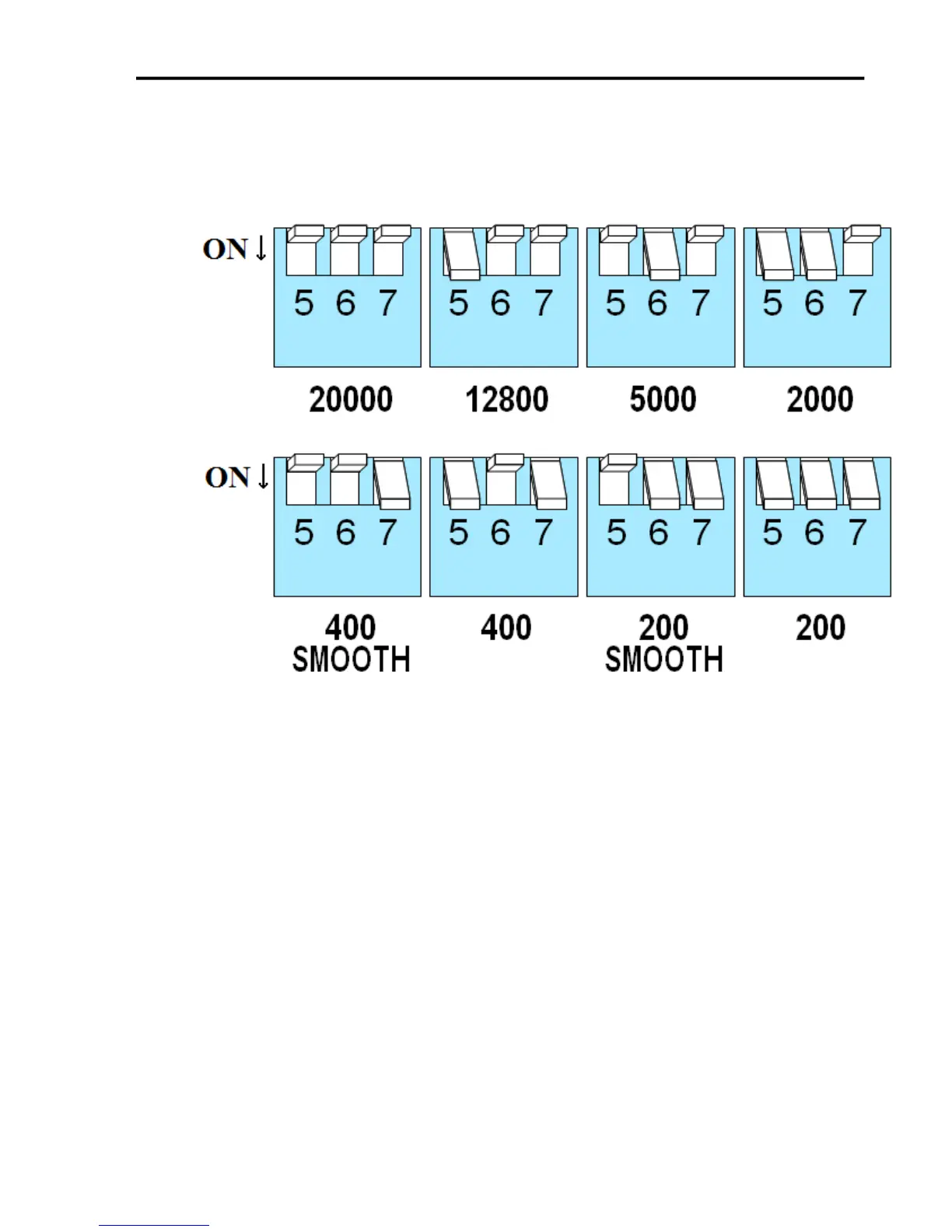
100,000 steps/sec.Six different settings are provided in the drive module, as
shown in the table below. Please choose the one that best matches the
capabilities for your system.
At lower step resolutions such as 200 steps/revolution (full step) and 400
steps/revolution (half step), motors run a little rough and produce more
audible noise than when they are microstepped (2000 steps/revolution and
beyond). The drives include a feature called “microstep emulation”, also
called “step smoothing”, that can provide smooth motion from coarse
command signals. If you select “200 SMOOTH or 400 SMOOTH”, this
feature is automatically employed to provide the smoothest possible motion
from a less than ideal signal source.
Because a command filter is used as part of the step smoothing process, there
will be a slight delay, or “lag” in the motion. If this delay is objectionable for
your application, please choose the non-filtered setting “200” or “400”. The
chart on the next page shows an example of the delay that can occur from
using the step smoothing filter. If you are using the smoothing feature, you
must have all axis in the same smoothing mode, otherwise there will be a
timing problem with multi-axis interpolation.


 To Next Page