Q3. Is leveling required after nozzle replacement?
4. Power up the printer, click [ ] to enter the loading interface, and follow the on-screen
instructions to complete filament loading (refer to 4.1.1). Filament coming out of the new
nozzle smoothly indicates a successful nozzle replacement.
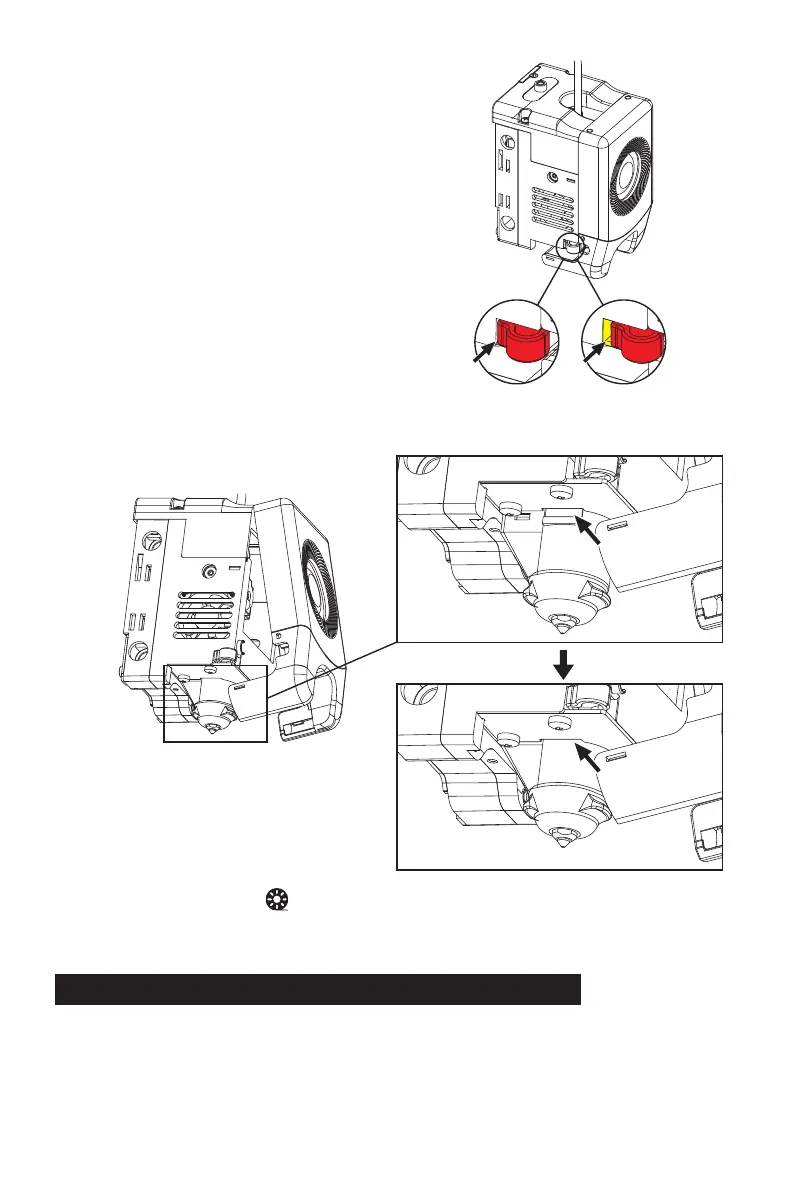
Whether it is installed in place is judged as follows:
1. Ensure the nozzle is pressed to the bottom
firmly during installation.
2. Check if it is properly installed:
a. Check the red buckle positions on the
left and right.
b. Check if the nozzle slot is flush with the bottom of the extruder (if your view is obstructed,
you can remove the front cover of the extruder to observe).
√
X
32
Yes. It is recommended to perform automatic leveling to ensure high print quality as slight errors
may occur during nozzle installation. The equipment defaults to the leveling operation before
each print.















 To Next Page