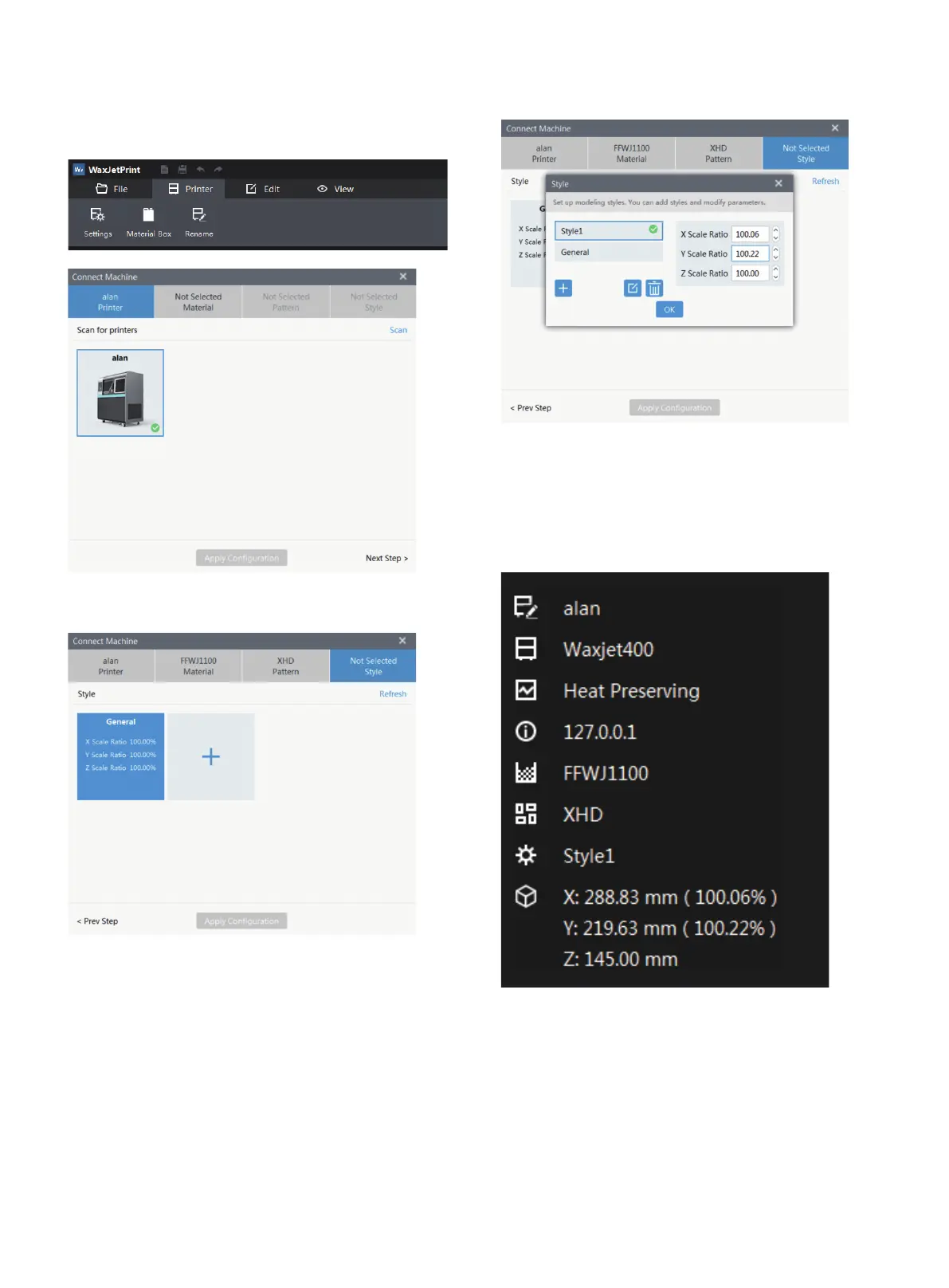
Set the shrink scale
1. Open the WaxJetPrint client software and select Print >
Setting >Connect machine.
2. Choose the printing mode.
3. Click + to add a new model, enter the new XYZ, then click
yes and save the setting.
4. The printer has defaulted to a new set of shrink compensa-
tion values. The information window in the lower right corner
shows the corresponding new maximum printable dimen-
sions for the XYZ based on each shrink compensation values.
You can now use these shrink compensation values when
01 02 03 04 05 06 07 08
09 10 11 12 13 14 15 16 17
18 19 20 21 22 23 24 25 26
27 28 29 30 31 32 33 34 35
36 37 38 39 40 41 42 43
44 45 46 47
48 49 50 51
52 53 54
55 56 57 58 59 60 61
62 63 64 65 66 67 68 69
70 71 72 73 74 75 76 77
78 79 80 81 82 83 84 85
86 87 88 89 90 91 92 93
94 95 96 97 98 99 100 101
102 103















 To Next Page