10
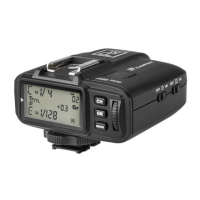
• Group Settings
1. Long press the <GR> Button to set the exposure values for all the groups in
any mode simultaneously.
2. The settings of the groups which are in the same MODE with the current
group will blink. Turn the Select Dial to change the settings.
3. If the current group is in the M MODE, all the other groups which are in the
M MODE will change their power output value simultaneously. The power
output value is changeable from 1/1 full power to Min. power in 0.3 stop in-
crements, until one of the group’s setting turns to the maximum (1/1) or the
minimum (Min.). If the current group is in the TTL MODE, all the other groups
which are in the M MODE will change their FEC amount simultaneously. The
FEC amount is changeable from -3 to 3 in 0.3 stop increments, until one of
the group’s setting turns to the maximum (3) or the minimum (-3). If the
current group is in the -- MODE (ash o), the amounts will not change.
4. Short press the <GR> Button again to conrm the setting.
• Test Flash
1. Press the <TEST> Trigger Button to test re the ash.
2. Fully press the <TEST> Trigger Button, and the Status
Indicator Lamp turns red and the ash connected to the
receiver should ash.
3. The settings on the transmitter will synchronize
with the receiver.


 To Next Page