5
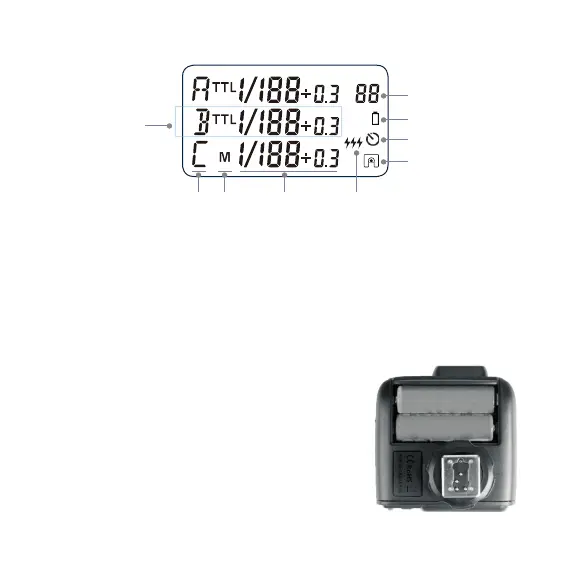
Transmitter Panel
Installing Batteries
Slide the battery compartment lid of the transmitter.
Insert two AA batteries (sold separately) as indicated.
Low Battery Indicator
When the battery power gets too low for a stable
signal (<2.4V), the battery warning lamp blinks quickly.
Please replace both batteries of the same type and
strength, as low power leads to misres and dimin-
ished range.
E
H
G
I
D
A. Output Settings per Group in the M mode;
FEC Settings per Group in the TTL mode
B. Mode Settings
C. Group
D. Currently Selected Group (method 2)
E. Channel Settings
F. Multi Mode Icon
G. Synchronization Delay Setting Icon w
H. Low Battery Indicator
I. Single Contact Mode Icon
C B A F


 To Next Page