9
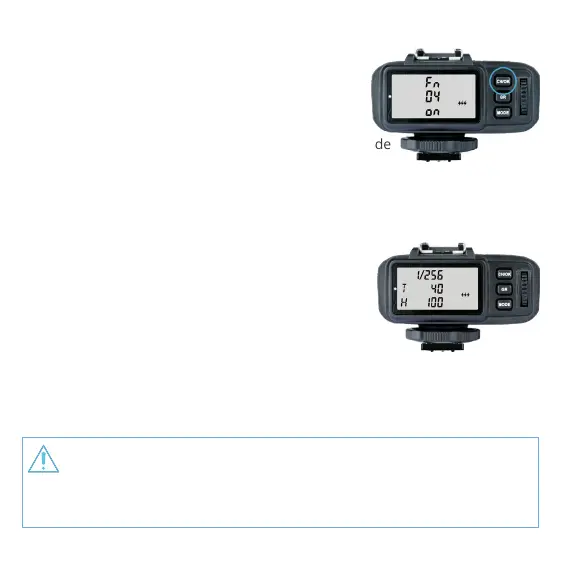
• Multi Flash Group ON/OFF Settings
1. Initiate the Multi Flash <MODE> in the C.Fn Custom
Functions (set C.Fn-04 as 1).
2. Short press the <GR> button to select the group.
Click to scroll through the modes forwardly and
double-click to scroll through in reverse sequence.
3. Short press the <MODE> Button to change the mode
of selected group.
4. The current group’s mode will be changed by the order of on/--
(-- represents OFF, which means that the current group will not re ashes
in this mode).
• Multi Flash Parameter Setting
1. Enter into Multi Flash mode before setting
parameters.
2. Press the <MODE> Button to enter Multi Flash
parameter setting menu.
3. The LCD displays the parameters: P (output value),
T (ash times) and H (ash frequency).
4. Short press the <GR> Button to choose the settings. Turn the Select Dial to
change the selected blinking setting values. Continue to press the <GR> Button
until all the amounts are set. Then, short press the <MODE> Button to exit.
As ash times are restricted by ash output value, automatic settings may be forced as
a default value. The times that transmitted to the receiver device are Multi Flash in real
time settings, which are not related to the camera’s shutter speed setting. To guarantee
the successful use of stroboscopic mode, please use the formula below to calculate the
shutter speed. Number of Flashes / Firing Frequency = Shutter Speed


 To Next Page