11
Scanning Large Originals
For originals larger than 4x6 inches, you can take multiple scans of the original, then stitch
them together later on your computer using Flip-Pal
®
EasyStitch software. (see How to Stitch
Large Originals in Chapter 4.)
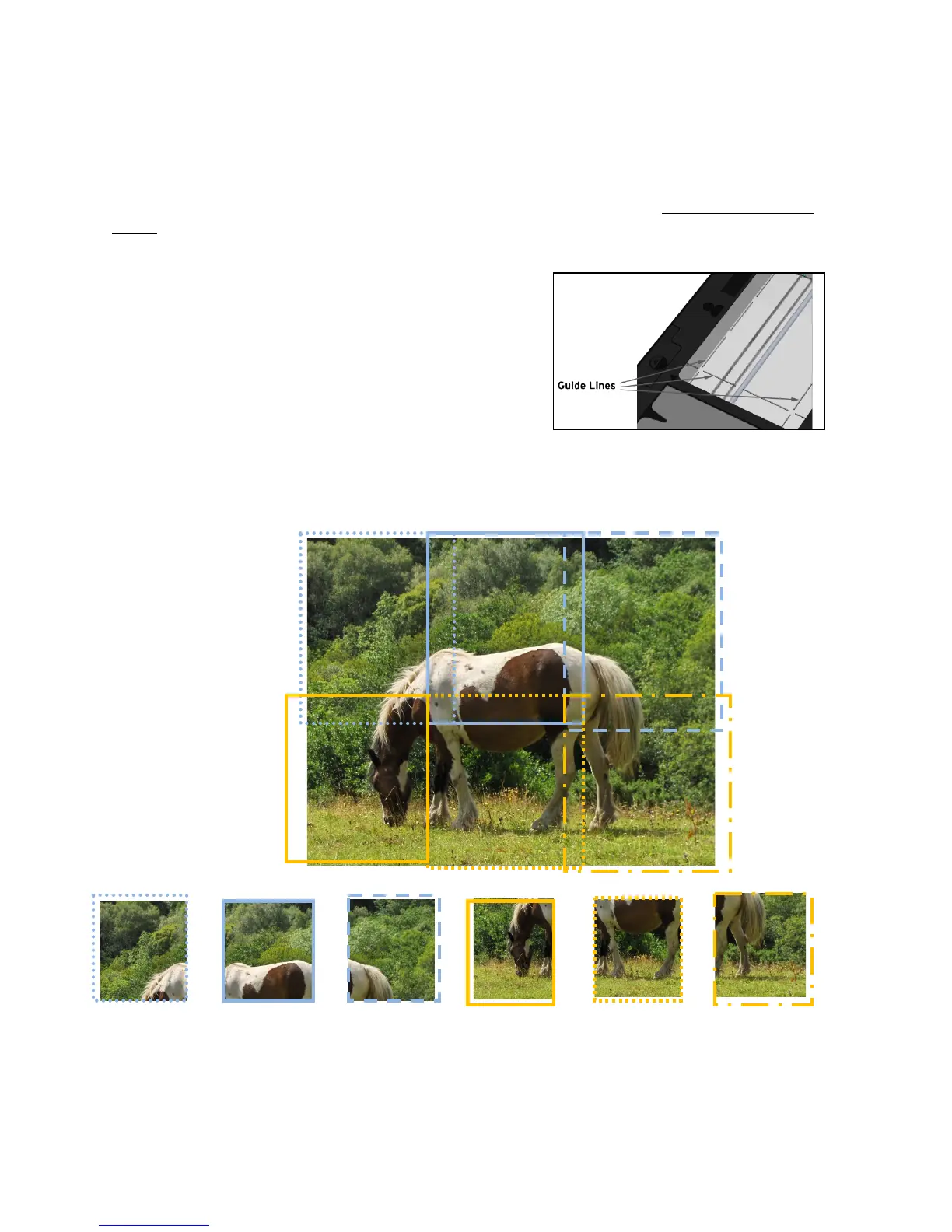
Remove the lid and flip the scanner over. Make multiple scans, allowing at least 1 inch or
more overlap between adjacent scans. The overlaps need not be aligned or spaced precisely;
the stitching software compensates for that. It is OK to scan past the edge of the photo. Be
sure to keep the scanner still during each scan.
You can use the lines etched in the bottom window to
align the overlaps.
If you are scanning something like a framed photo it is acceptable to rotate the scanner along
one edge to capture the entire image. The EasyStitch software will rotate individual scans as
needed to ensure proper stitching of the final image.
Example:
These scans can then be stitched together to form one image.


 To Next Page