8
Menu and Status Bar
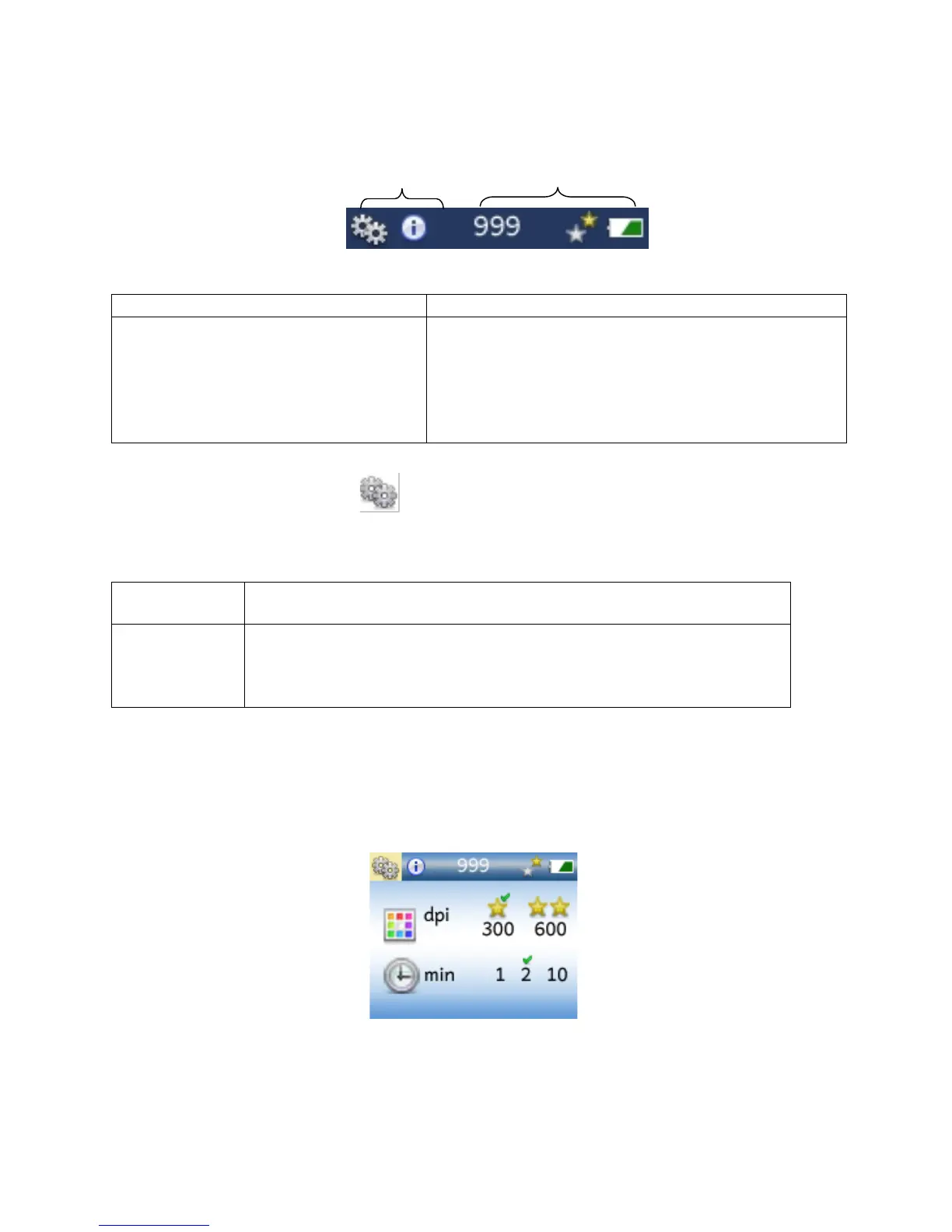
The bar at the top of the screen shows menu choices and status icons:
1. Custom Settings:
• Resolution
• Power-Saver Timer
2. Quick Tips:
Reminders on how to use the scanner.
3. Estimated Scans Remaining:
4. Resolution Indicator:
• 1 yellow star: 300 DPI: fastest scan, smaller file
• 2 yellow stars: 600 DPI: more detail, good for
enlargements
5. Battery Life Indicator
Customizing Settings
There are two settings that you can customize:
1 star = 300 DPI*
2 stars = 600 DPI
1, 2*, or 10 minutes before scanner powers down when not in use.
Use a shorter setting to help preserve battery life. Use the 10-minute
setting when transferring a large number of scans with a wireless SD
memory card (available from third parties).
*Default Settings
To access the Settings menu, press UP ARROW from either the Home or Review Screen, then
press DOWN ARROW to get into the settings menu. You will see the following screen.
Current settings are indicated with a green checkmark.


 To Next Page