ELIOS 2 USER MANUAL Page 39 of 106
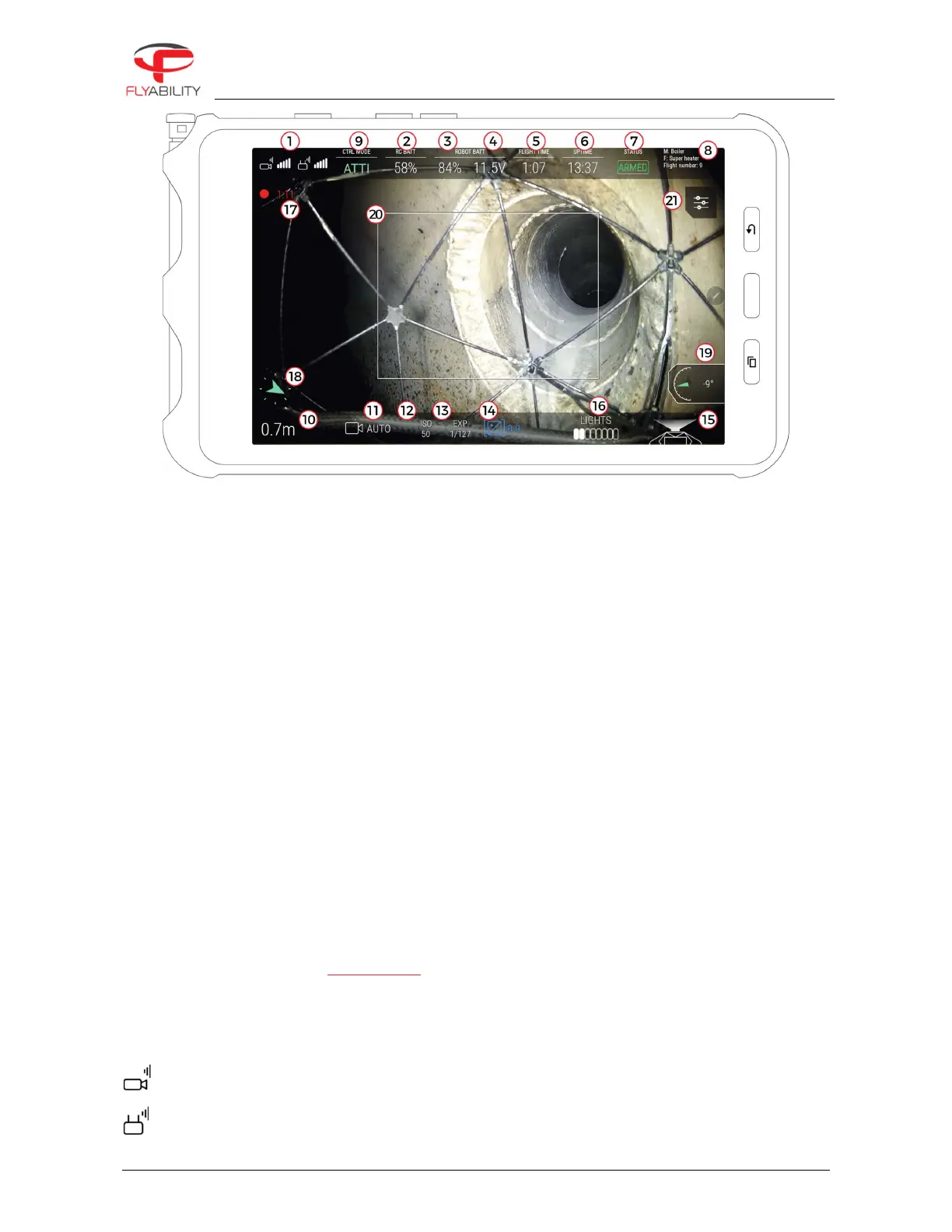
Figure 8: ELIOS 1 cockpit
1.
Signal strength (left: video reception quality / right: command transmission quality)
2.
Remote controller battery charge
3.
Aircraft battery charge
4.
Aircraft battery voltage
5.
Flight time
6.
Uptime (time elapsed since the battery is plugged in)
7.
Flight status
8.
Mission and flight information
9.
Control mode
10.
Altimeter (tap to reset the altitude to zero)
11.
ELIOS 1: Camera mode
ELIOS 2: Camera recording resolution
12.
Camera ISO
13.
Camera exposure time
14.
Camera exposure value
15.
LED lights status
16.
LED lights power indicator
17.
Camera recording duration
18.
Heading (tap to reset the heading and use the current aircraft heading as the new reference)
19.
Payload info (camera pitch, front distance to surface, ground sampling distance)
20.
Thermal camera field-of-vision frame
21.
Settings button (opens settings menu)
22.
Available space remaining on CAM SD card.
6.2.2.1
SIGNAL STRENGTH
Signal quality reading includes:
Video reception quality
Command transmission quality



 To Next Page