ELIOS 2 USER MANUAL Page 52 of 106
Two buttons are at your disposal:
1-
Refresh all information
2-
Rebind the sensors
The panel displays the status of the sensors. They can be:
-
OK: Working properly
-
UNBOUND: Working properly but not physically assigned on the aircraft
-
DAMAGED: The sensor may not be working properly. Contact support.
-
BROKEN: The sensor is not working anymore and has to be changed.
Note: It is possible to fly with damaged or broken sensors. But as the stability depends on those sensors, the
performance of the aircraft in ASSIST control mode might be reduced.
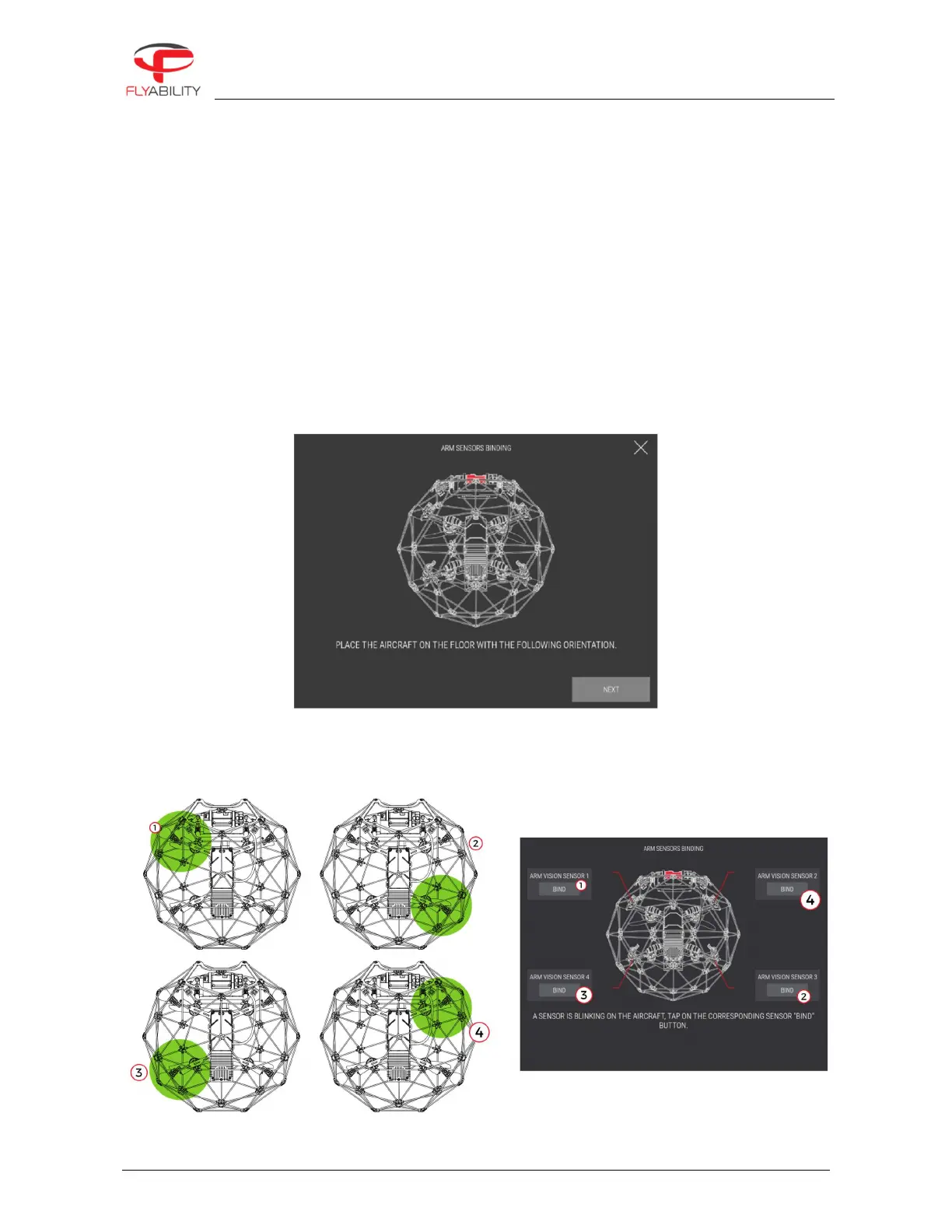
After a sensor has been replaced, it must be calibrated to its specific location on the drone. The user must
provide this information. By tapping on Bind sensor (2), the user will start the binding procedure and will be
guided through the process.
Place the aircraft as shown on the image. Once ready, the aircraft will make the sensor blink one by one. By
tapping on the Bind button of the corresponding sensor in the application, the aircraft know the position of
each sensor.



 To Next Page