ELIOS 2 system description
ELIOS 2 USER MANUAL Page 9 of 106
USB PORT
Used as a communication port with the controller, and to recharge the tablet’s battery
MULTIPURPOSE JACK
All the user to connect a headset to get better audio or add a microphone.
MICROPHONE
Records the surrounding sounds, such as the voice of the inspector for reporting.
COCKPIT APPLICATION
This app is developed by Flyability and functions as an interface with the aircraft. It displays the video
stream from the aircraft, as well as essential flight parameters and settings. For a complete overview of
its functions, please refer to the Flyability Cockpit User Manual.
Controller
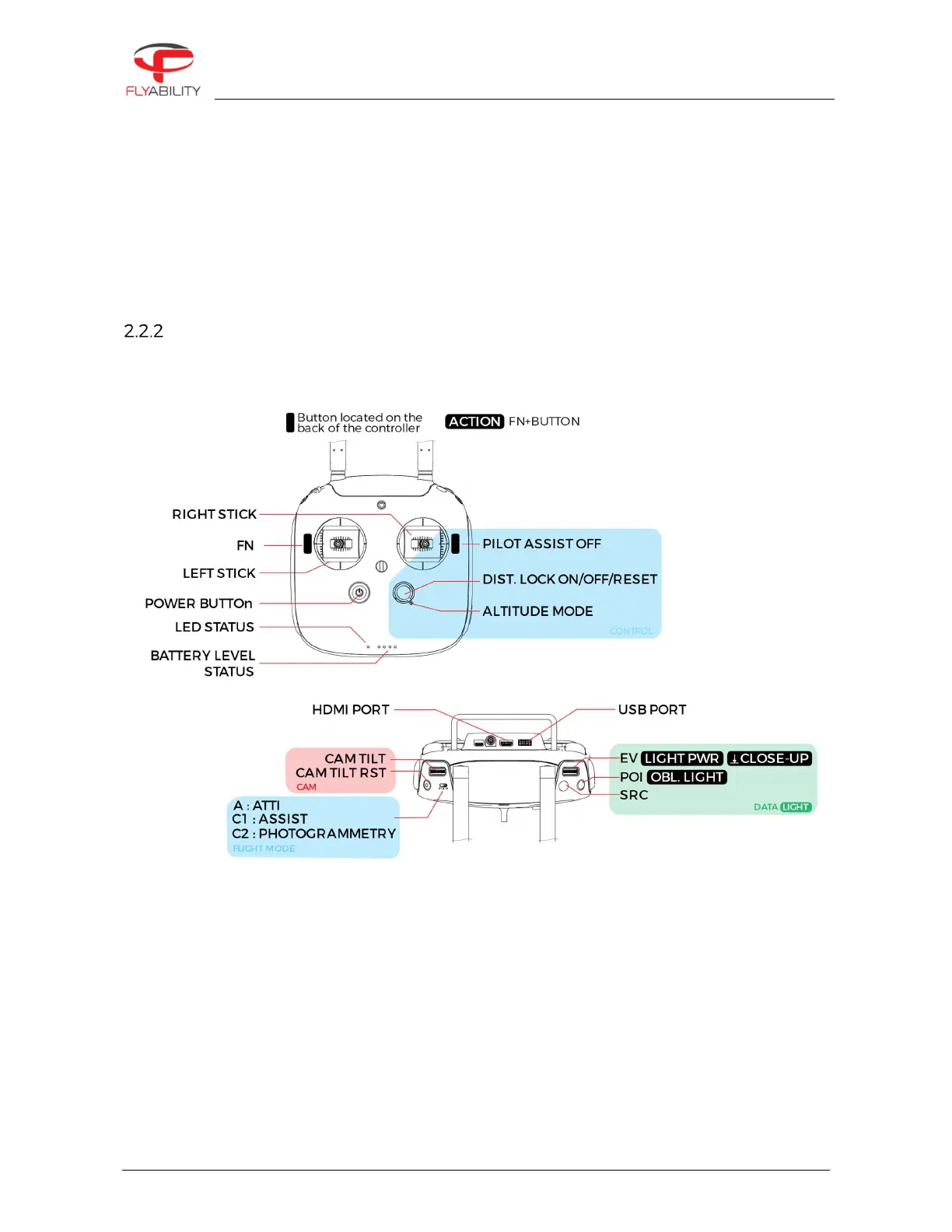
The controller gives the pilot full control of the aircraft. It is also used to change the camera and lighting
settings.
Figure 2.5: Pilot controller overview
The controller is set to Mode 2 by default consult the Cockpit App manual for information on how to switch to
other stick mapping mode.
LEFT STICK
In mode 2 (default) controls the aircraft altitude and yaw.
RIGHT STICK
In mode 2 (default) controls the aircraft horizontal motion (forward/backward, left/right).
The more you push a control stick away from its center, the faster the aircraft will follow the command.
Give gentle and measured inputs to avoid any jerky and uncontrollable behavior changes. While flying,
always keep your fingers on both control sticks to improve the reaction time and feeling for the controls.



 To Next Page