13. DESKTOPS
13.1.1 General characteristics
Device has 3 editable text desktops, allowing the pilot to see 6 flight characteristics on each of them.
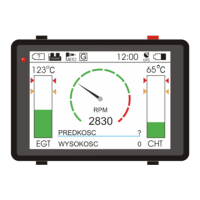
Besides, there is one, non customizable graphic desktop.
To navigate Desktops menu:
Top left button- Next - goes down the menu
Bottom left button- Previous - goes up the menu
Top right button- Set - confirms the choice
Bottom right button- Back - leaves Desktops menu
13.1.2 Graphic screen parameters
You can setup 2 parameters to be shown on main graphic screen of the device. Press Change+ or Change- buttons to
browse first parameter you want to show. After that, click Next and select second parameter. To confirm, click Save.
To leave without saving changes, press Back until you leave this menu.
13.1.3 First desktop on start (setting main screen)
Pilot can define, which of the desktops should be presented, when MotoMonitor is turned on.
Navigation:
- Next (top left) – select next desktop,
- Previous (bottom left) – select previous desktop,
- Save (top right) – confirm choice,
- Back (bottom right) – cancel edition,
Possible options:
0 – main screen is graphic desktop,
1 – main screen is text desktop number 1,
2 – main screen is text desktop number 2,
3 – main screen is text desktop number 3,
4 – main screen is text desktop number 4,
FLYelectronics All Rights Reserved Page 13


 To Next Page