15. MOTOR VALUES
Use left hand side buttons to navigate the menu - top left (Next position) and bottom left (Previous
position). Confirm selection by clicking top right button (Set). To leave Motor Values menu, press bottom
right button - Back.
15.1.1 Alarm temp. of T1/T2/EGT/CHT (overheating alert)
This setting defines maximum temperature for T1/T2 probe, over which the device will alert the pilot.
Use following buttons inside this setting:
+1/+10 (top left) – short pressing will add 1 grade Celsius to the limit value, press and hold to add 10
grades,
-1/-10 (bottom left) – analogically - short pressing will deduct 1 grade Celsius from the limit value, press
and hold to deduct 10 grades at once,
Save (top right) – save settings,
Back (bottom right) – cancel changes and exit setup,
15.1.2 Optimum temp. of T1/T2/EGT/CHT (optimal temperature)
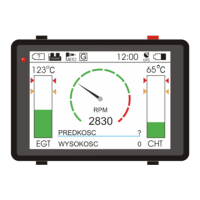
This setting allows user to set optimal value for T1/T2 input temperature. Optimal value is used as a
reference on graphic desktop's bar chart, where temperatures below optimal value are colored green.
Above it, change color to yellow and (in case of serious overheating over the predefined critical
temperature) to red.
Use following buttons inside this setting:
+1/+10 (top left) – short pressing will add 1 grade Celsius to the limit value, press and hold to add 10
grades,
-1/-10 (bottom left) – analogically - short pressing will deduct 1 grade Celsius from the limit value, press
and hold to deduct 10 grades at once,
Save (top right) – save settings,
Back (bottom right) – cancel changes and exit setup,
15.1.3 Maximum RPM
User can define maximum revolutions per minute value. This value is needed to correctly calibrate the
graphic tachometer on main desktop.
Use following buttons to set up maximum value:
+500 (top left) – add 500 RPM to the value,
-500 (bottom left)– deduct 500 RPM from the value,
FLYelectronics All Rights Reserved Page 17


 To Next Page