8. FIELDS DESCRIPTION
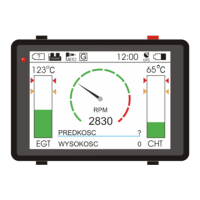
MotoMonitor has five customizable desktops, which show the flight parameters. One of the screens shows
flight data graphically, while other presents text data.
There are 22 possible fields:
"RPM: " – Revolutions per minute,
"CHT:" – Cylinder Head Temperature (°C),
"EGT:" – Exhaust Gas Temperature (°C),
"DISTANCE:" – Distance covered from start, in km (0.1 km precision),
"DURATION:" – Time of flight from starting point (HH:MM),
"SUMMARY:"- Total time of flights (HH:MM),
"SPEED:" – Flight speed in km/h,
"KM TO START:" – Distance from starting point (meters),
"KM TO START:" – Distance from selected point (meters),
"DIR START:" – Arrow showing starting point direction,
"RETTIME:" – Estimated return time (at current speed),
"ALTITUDE:" – Current altitude,
"FUEL:" – Fuel Level
1
,
"WIND SPEED:" – Speed of wind
2
,
"WIND DIR:" – Current wind direction (format - N,NNE,NE,NEE,E etc.),
"WINDIND:" - Wind indicator, shows wind direction related to flight direction (NOTE – for this
functionality to work properly,
MotoMonitor
must be installed straight in the flight direction),
"OUT TEMP:" – External temperature,
"COURSE:" - Course,
"STOPWATCH" – Stopwatch (press bottom left button to start and stop, hold to clear value)
"VARIO" – Ascent/Descent speed
"SUNRISE" – Sunrise time
"SUNSET" – Sunset time
"PRESSURE" – Atmospheric pressure
1*- Fuel level can be published in two manners:
% (percentage) – if PPG is fitted with WEMA fuel sensor,
Litres - if PPG is fitted with flowmeter,
2
FLYelectronics All Rights Reserved Page 8


 To Next Page