76
Movethe joystickleftorrighttoswitchbetween
theindividualmainmenusonthedisplay.
The following main menus are available:
Drive: Mainviewwithkeyinformationsuch
asspeed,remainingrangeetc.The
systemalwaysstartsupinthisview.
Info: Informationaboutthecurrentjourney
Fitness:Informationabouttherider’sathletic
performance
Data: Topographic data and
ambient temperature
Navi:
Navigationwithasmartphone
1.
2.
3.
4.
5.
6.
Generalvehiclesettings
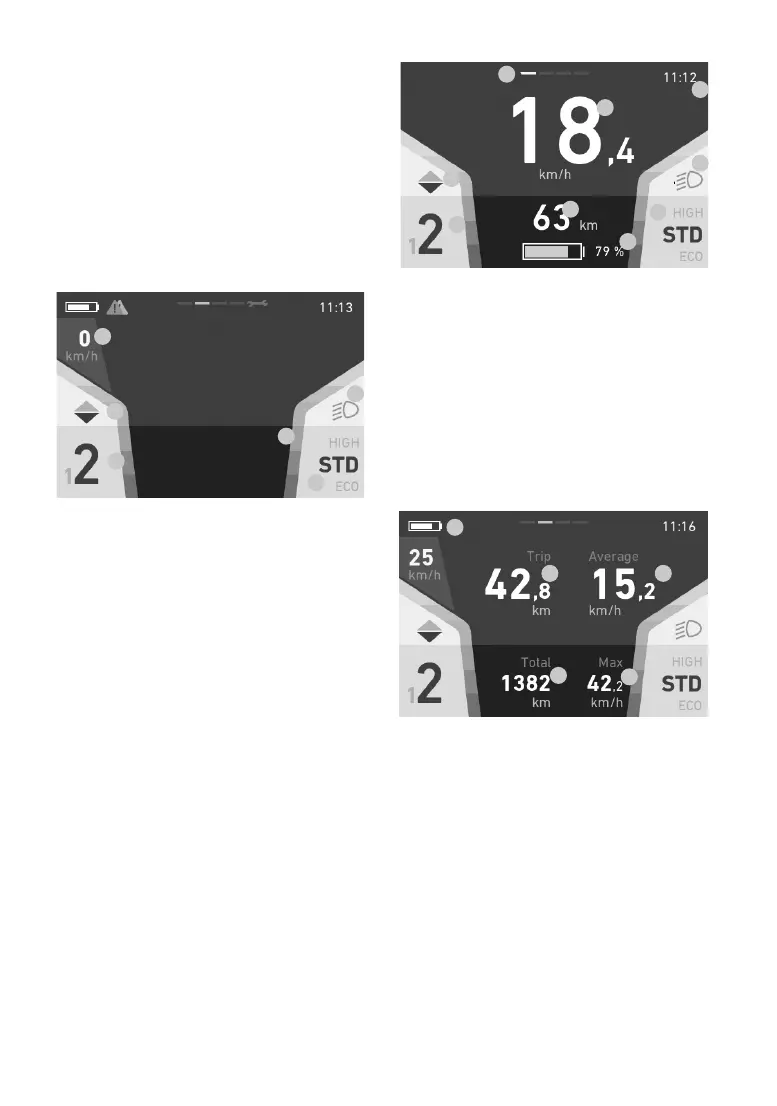
This display remains the same in all views and
shows you key settings and information on the
vehicleandthecurrentjourney.
1. Speed
2. Gearrecommendation(onlywith(2-gear)
36V
MultiSpeedmid-engine)
3. Currentmotorgear(onlywith(2-gear)
36V
MultiSpeedmid-engine)
4. Light(high/lowbeam)
5. Current assistance level
6. Colouredbars:Assistpowerindicator
Drive
1.
2.
3.
4.
4.
5.
6.
7.
8.
1. Currentspeed
2. Gearrecommendation(onlywith(2-gear)
36VMultiSpeedmid-engine)
3. Currentmotorgear(onlywith(2-gear)
36VMultiSpeedmid-engine)
4. Remainingrange/batterylevelbasedonthe
current assistance level (battery is red if
remaining range is below 20%)
5. Light(high/lowbeam)
6. Currentassistancelevel
7. Time
8. Currentscreentop-centrebar
Info
1.
2. 3.
4.
5.
1. Chargingstatus(top-leftsymbol)
2. Distancetravelledoncurrenttour(trip)
3. Averagespeedoncurrenttour(trip)
4. Totaldistancetravelled(cannotbereset)
5. Maximumspeedoncurrenttour(trip)


 To Next Page
 Loading...