11
10
normally without the drive even if the assistance
functionisnolongerbeingprovidedbythemotor.
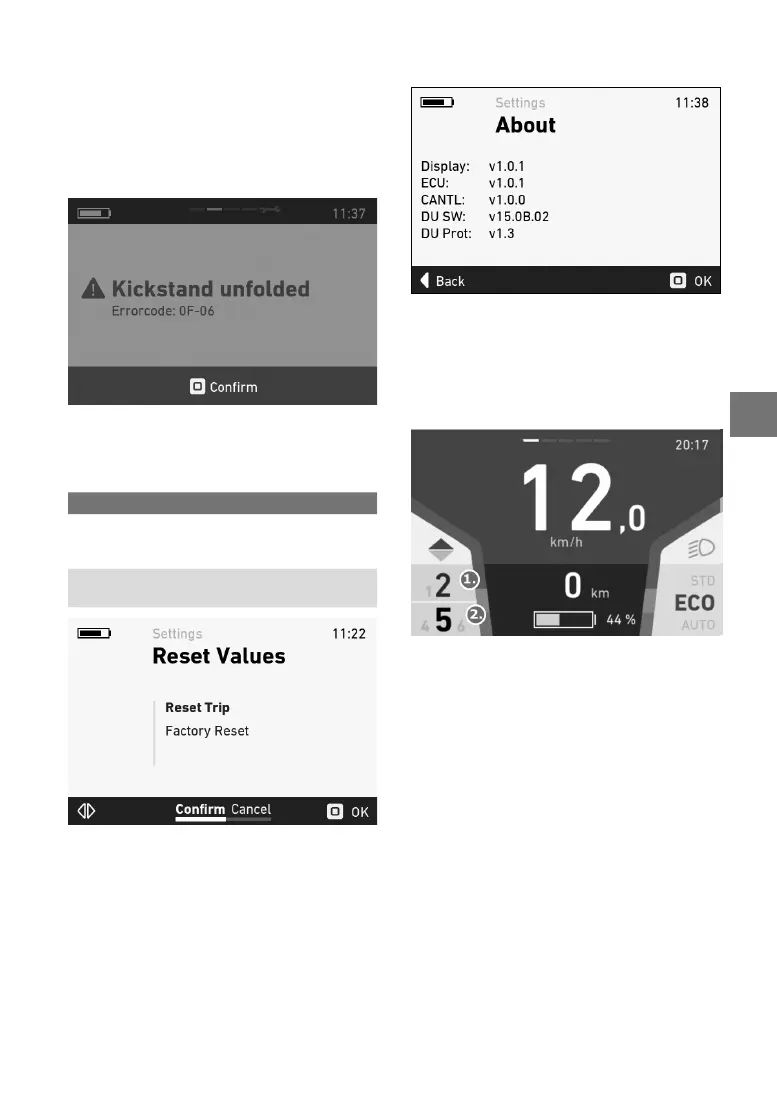
Ifanerrorisdisplayed,troubleshootitaccordingto
the measures described in the table below and/or
contactyourFLYERspecialistretailer.
You can nd information on the individual error
codesintheerrortable.
The error code gives a precise description of the
error.
Figure 17: Error display
5.5.13 Resetvalues–menu
Inthis menu, the trip data and thesystem can be
resettothefactorysettings.
Selection Description
Reset trip data
Resets the trip data
(see5.5.12Resetting
trip data)
Restorefactory
settings
Returns the system to
its default state
Figure18:Resetvalues–menu
Press the joystick to reset the data after conr-
mation.
5.5.14
Aboutmenu
The About menu shows the current software
versions
oftheindividualcomponents.
Figure19:Aboutmenu
5.5.15 ShimanoDi2
Ifthee-bikehasanelectronicShimanospeed
gear(ShimanoDi2),thecorrespondinggears
areshownonthedisplay.
1. Currently selected gear in the integrated
two-gear unit in the motor.(only in combination
withtheX1motorunit).
2. Currently selected gear in the Shimano gear
hub.
5.5.16 NuVinciH/SYNC
IfyourFLYERe-bikehasanautomaticNuVinciH/
SYNCgearhub,thehubmayneedtoberecali
-
brated.
Thisisthecaseifyoususpectthatyouare
notgettingthefulltransmissionrange.


 To Next Page