28 29
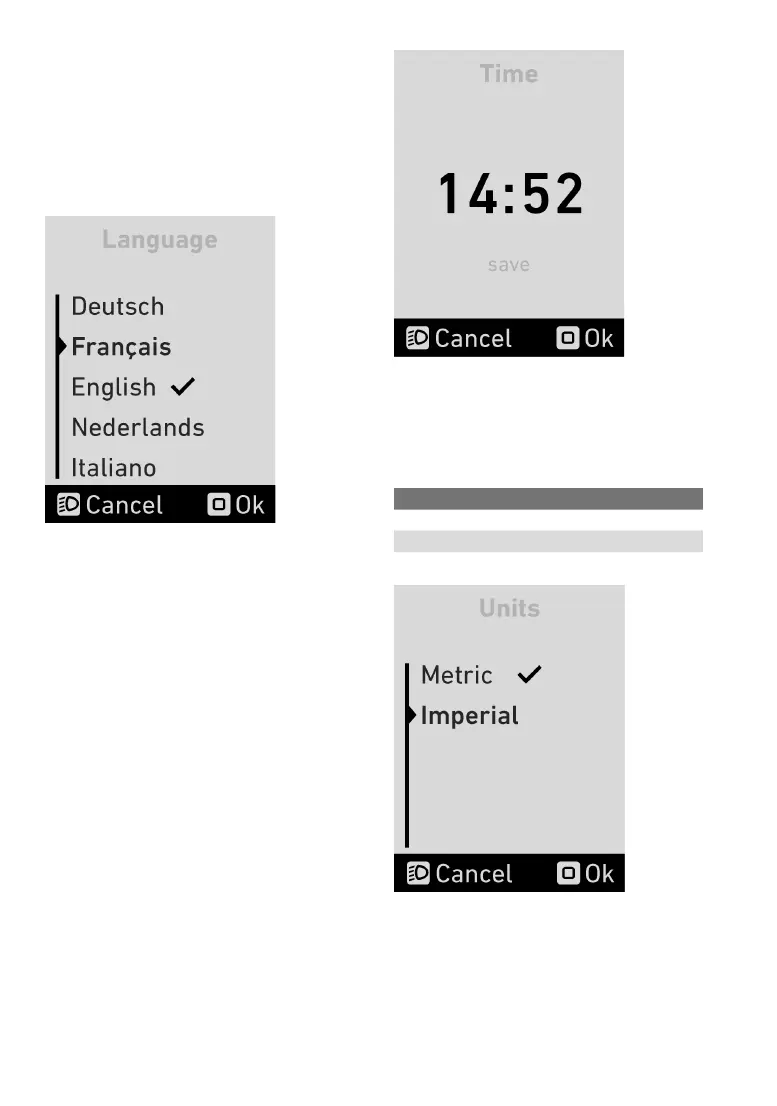
5.14 Languagemenu
You can choose from the following languages in
the language menu:
• German
• French
• English
• Dutch
• Italian
The check mark indicates which language is cur-
rently
applied.Pressthe+/-assistancelevelbut-
tons
toselectthelanguage.Toconrmtheselec-
ted
language,pressthe“Mode”button.
5.15 Timemenu
You can set the current time in the time menu.
Pressthe +/- assistancelevel buttonsto change
thenumbers.Pressthe“Mode”buttontomoveto
thenextnumber.
Once you have selected the nal number,press
the“Mode”buttontwicetosavethetimeandexit
thetimemenu.Press“Cancel”toleavethemenu
withoutsavingthetime.
5.16 Unitsmenu
In the units menu, you can switch between the
metricandBritishsystem.Thefollowingunitswill
be changed:
Metric British
Distance Kilometres Miles
Speed km/h mph
The check mark indicates which units are current-
ly
applied.Toconrmtheselectedunit,pressthe
“Mode”button.


 To Next Page