5756
FLYERe-mountainbikes
Basic setting: when the system is activated, the
lightremainsswitchedoff.Lightbuttonfunctions:
Activatethelight(highbeam)bypressingthelight
button; switch to low beam/daytime running light by
pressingthelightbuttonagain.Switchoffthelight
by pressing and holding the light button (at least
1second).Switchingbetweenlowbeam/daytime
runninglight:Automaticswitchingbasedonthein
-
tegrated
lightsensor.
FLYERwithpedalassistupto25km/h
Basic setting: when the system is activated, the light
remainsswitchedoff.Lightbuttonfunctions:Activate
the light (low beam/daytime running light) by press
-
ing the light button; switch off the light by pressing
the
lightbuttonagain.
Switching between low beam/daytime running
light:Automaticswitchingbasedontheintegrated
lightsensor.
Do not use the high beam when vehicles
are coming the other way. You should
alsoavoidusingyourhighbeamintrafc
queues,inbuilt-upareasoraroundpe
-
destrians.
IfyourFLYERhasabrakelight,checkit
regularly to make sure that it is working
properly and consult your FLYER spe
-
cialist retailer if you are unsure or have
a
problem.
The daytime running light is only to be
used for signalling to other road uses
and is switched on and off independent
-
ly
byasensor.
Cleanyourreectorsandlightsonaregu-
lar
basis.Warmwaterwithcleaninguidor
washingupliquidissuitablehere.
The lighting system is a safety-related
component and it is vital that it is in prop-
er
working condition. Check that it is
working correctly and safely at regular
intervals.
OnlyallowauthorisedFLYERspecialist
retailers to perform checks and servicing
work after failures or temporary prob
-
lems!
17. Mudguard
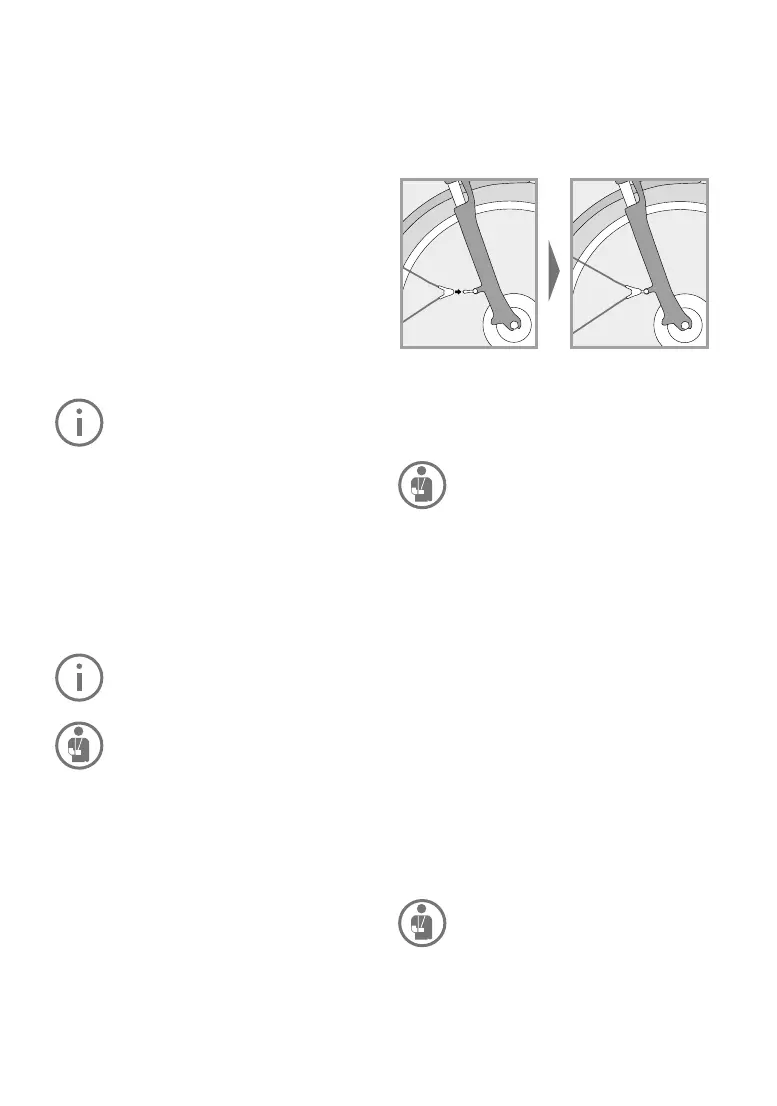
Somemudguardmodels are ttedwith a safety
fastening in case an object jams between the
mudguardandthetyre.
This releases the mudguard from its holder to
preventafall.
Youmuststopridingimmediatelyifaforeignbody
is trapped between the tyre and the mudguard.
Remove the foreign object before beginning to
rideagain.Otherwise,thereisariskoffallsand
seriousinjuries.
You may under no circumstances ride
with a loose mudguard strut, as the strut
mayjaminthewheelandblockit.The
loose ends of the holders may lead to
seriousaccidents.
Damaged mudguards must be replaced by a
FLYER specialist retailer before you ride again.
Youshouldalsoregularlycheckwhetherthebrac
-
es
arexedsecurelyinthesafetyreleases.
18. Accessoriesand
equipment
Installingaccessoriescorrectlyandcheckingtheir
compatibilitywiththeFLYERaretheresponsibili-
ty
ofthecyclist/buyer.
Onlyaccessories listed inthe FLYER catalogue
are approved for use with the FLYER by Biket-
ec
AG.Checktheaccessories’compatibilitywith
your FLYER model and the technical specica-
tions
(e.g.maximumload,installationinstructions,
etc.).
Alwaysinstallaccessories according to
theregulationsandinstructions.
• Only use add-on parts that comply
with the respective legal regulations
androadtrafcregulations.
• The use of unauthorised accessories
may lead to accidents, severe falls
and damage. You should therefore


 To Next Page