28 29
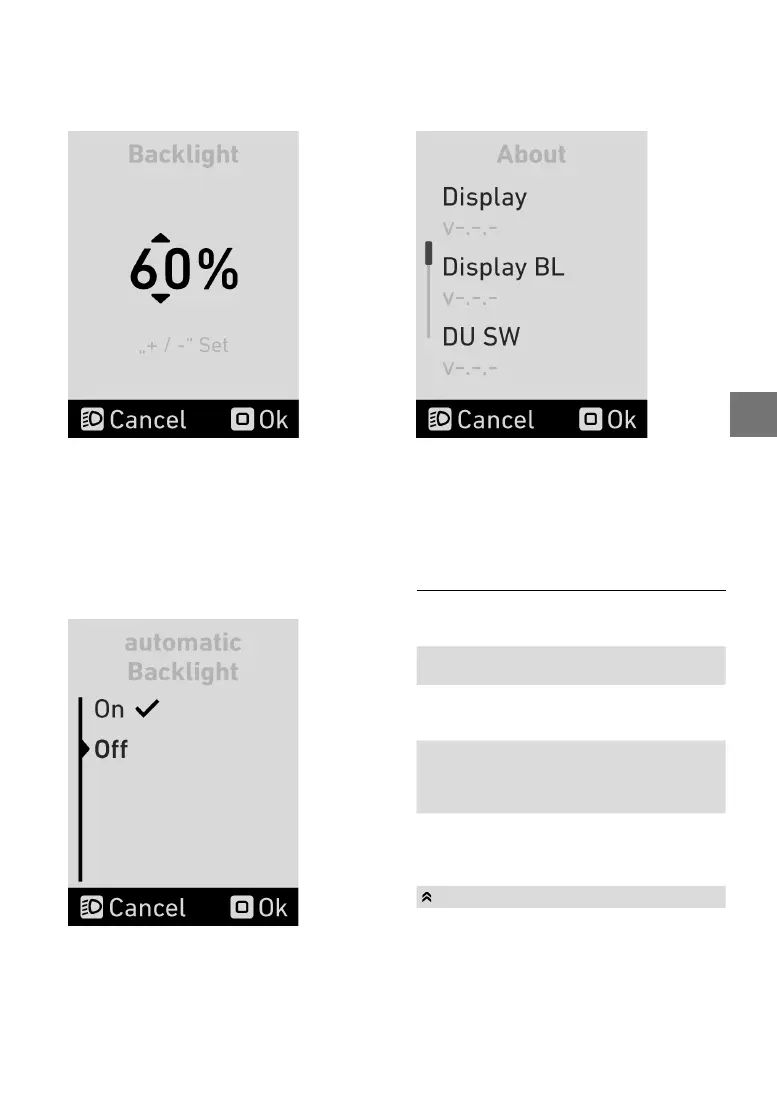
5.17 Lightmenu
Inthelightmenu,youcanadjustthedisplayback-
lighting
intherangefrom10to100%.
Press the “Mode” button twice to save the time
andexit the timemenu. Press “Cancel” to leave
themenuwithoutsavingthetime.
5.18 Automaticlight
Intheautomaticlightmenu,youcanswitchtheau-
tomatic
backlightingonoroff.
The check mark indicates which option is current-
ly
applied.Toconrmtheselectedunit,pressthe
“Mode”button.
5.19 Aboutmenu
The about menu shows the current software versi-
ons
oftheindividualcomponents.
5.20 Conguringtheassistance
modes
You can congure the assistance level via the +
and–buttonsontheFLYERRC0,RC1andRC2
remotecontroloperatingconsoles.
HIGH Maximumassistanceforactive
riding up to high pedalling
frequencies.
STD Powerful assistance level for
activeridingincitytrafc
ECO Effective assistance level with
optimumefciencyformaximum
range.
AUTO The system automatically and
independently selects the correct
assistance for the current riding
situation.
OFF Nomotorassistance.You
rideyourFLYERlikeanormal
bicycle.Allon-boardcomputer
functionsareavailable.
Pushing/setting-offaid


 To Next Page