7
EN
6
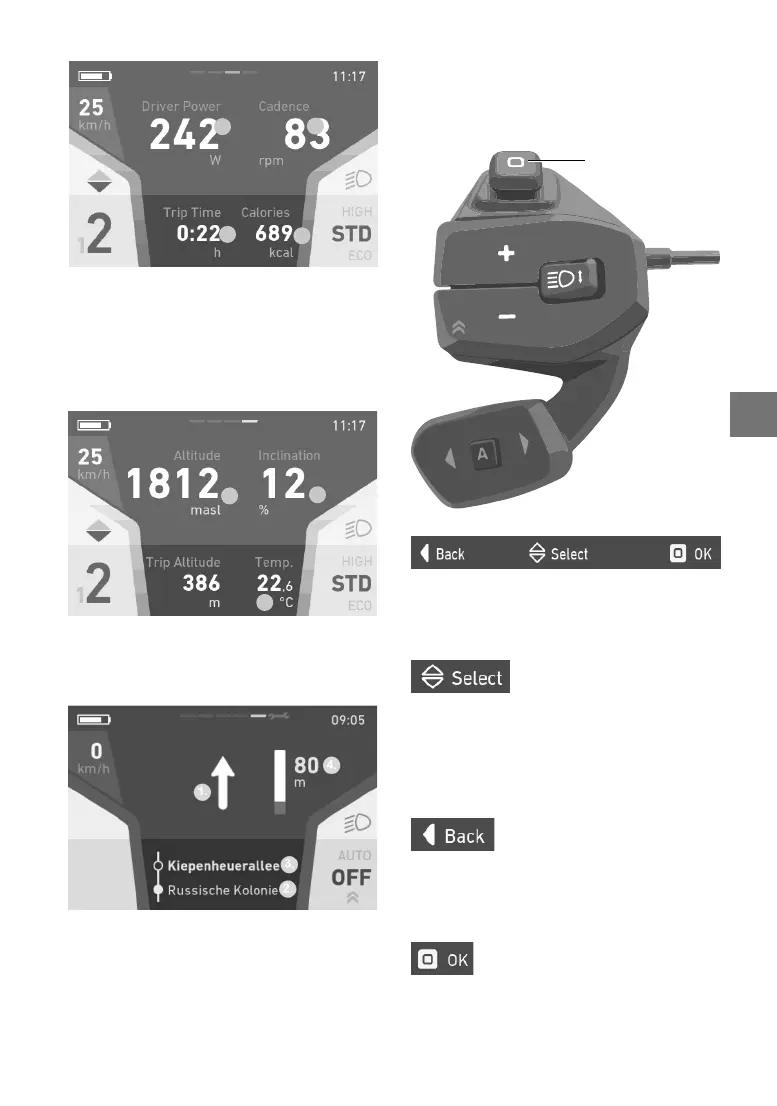
Fitness
1.
2.
3.
4.
1. Rider’scurrentpower
2. Rider’scurrentcadence
3. Ridetimeoncurrenttour(trip);ridetime
alone is measured (no speed/standstill =
not added to ride time)
4. Energyconsumedinkilocalories
Data
1.
2.
3.
1.Elevation
2.Route gradient in per cent
3.Ambienttemperature
Navi
3.
1.Navigationdirection
2.Current road
3.Road ahead
4.Distance to next navigation point
5.3 Menunavigationandsettings
Usethejoysticktonavigatethroughthemenu.
Thenavigationbarthatappears(gure1indi-
cateswhichjoystickmovementtriggerswhich
action.
Figure1:Navigationbar
5.3.1 Selectmenu
Movethejoystickupanddowntoselectthecor-
respondingmenu.
Figure2:Symbolformovingthejoystickupanddown
5.3.2 Quitmenu
Movethejoysticktothelefttoreturntothepre-
viousmenu.Movingthejoysticktotheleftinthe
main menu will close the settings menu and the
datascreenwillbedisplayed.
Figure3:Symbolformovingthejoysticktotheleft
5.3.3 Selectmenuitem
Pressthecentreofthejoysticktojumptothese-
lectedmenu.
Figure4:Symbolforpressingthejoystick
Joystick


 To Next Page