1110
5.5.8 Backlightmenu
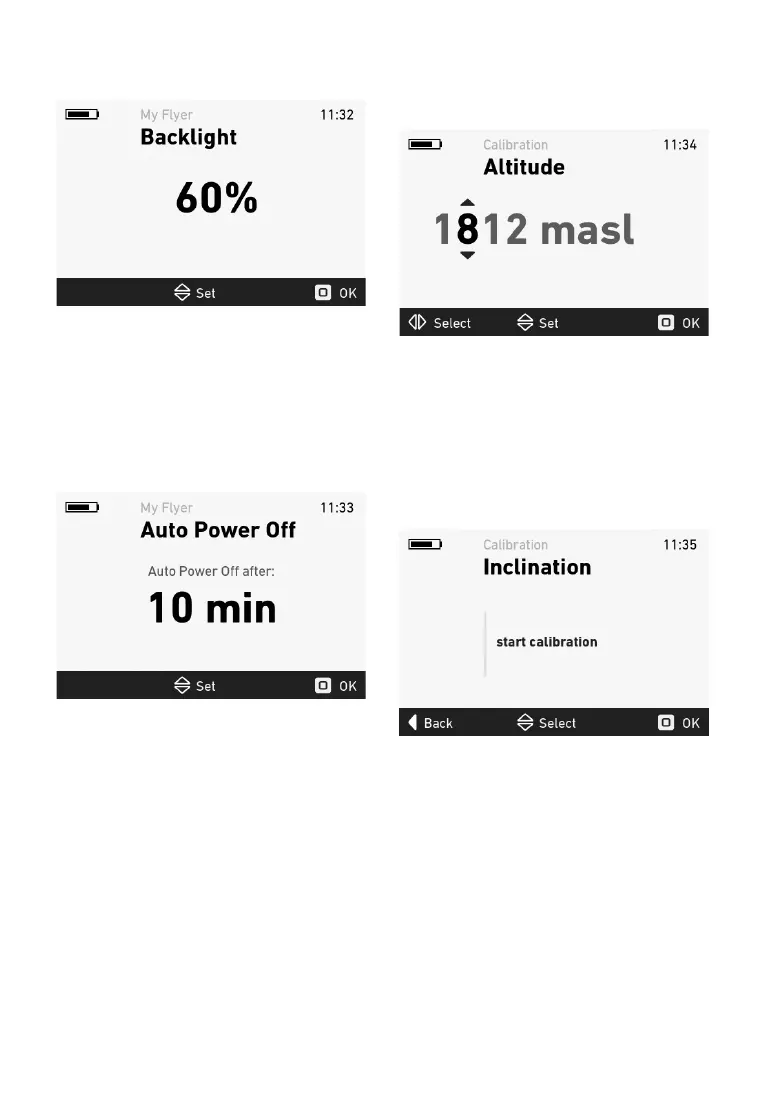
Inthebacklightmenu,youcanadjustthedisplay
backlightingintherangefrom10to100%.
Figure 13: Backlight menu
Pressthejoysticktoapplythenewsettingsafter
conrmation.
5.5.9 Automaticpoweroffmenu
Intheautomaticpoweroffmenu,youcansetthe
automatic power off time in the range from 10 to
60minutes.Thesystemwillswitchoffautomati
-
cally if the bicycle is not moved and no button is
pressed
withinthechosentime.
Figure14:Automaticpoweroffmenu
Pressthejoysticktoapplythenewsettingsafter
conrmation.
5.5.10 Elevationcalibrationmenu
Youcancorrecttheactualelevationintheeleva-
tion
calibration menu. Move the joystick up and
downtochangethenumbers.Movethejoystick
leftandrighttoswitchbetweennumbers.
Figure 15: Elevation calibration menu
Pressthejoysticktoapplythenewsettingsafter
conrmation.
5.5.11 Inclinecalibration
Before incline calibration can be started, the
e-bikemustbepositionedupright/horizontalsur
-
face.
Ifyoure-bikehassuspension,thismustrst
becorrectlyconguredandtheusermustbesit-
ting
onthee-bikeduringcalibration.
Figure16:Inclinecalibrationmenu
5.5.12 Errordisplay
Thepartsofthee-bikesystemaremonitoredatall
timesduringuseandcharging.Ifanerrorisdetect-
ed,
anerrorcodewillbedisplayedontheconsole.
To switch the console back to the standard display,
press the joystick button to acknowledge the er-
ror.
Iftheerrorcannotbeacknowledged,trouble-
shoot it according to the error table or contact your
FL
YER specialist retailer.Depending on the error
code, the assistance is automatically stopped as
necessary. You can continue to use the bicycle


 To Next Page