12 13
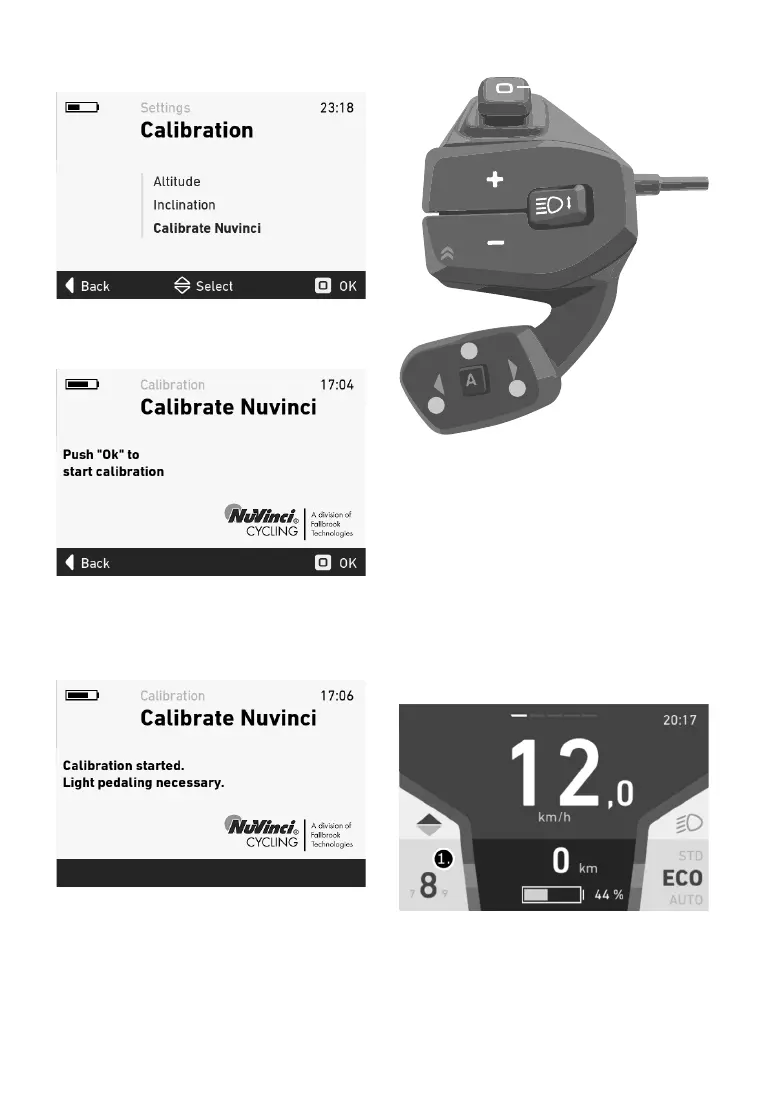
Inthesettingsmenu,selectthe“CalibrateNuvin-
ci”
submenubyclickingtheOKbutton.
Nowpress theOK button again to start the ca-
libration.
The system can only calibrate successfully if you
pedal lightly or with no force throughout the pro-
cess.
Aconrmationmessagewillappearonthe
displayifthecalibrationhasbeensuccessful.
NuVinciH/SYNCcontrol
The NuVinci gear system is controlled with the
remoteRC1.Button2canbeusedtoswitchbet-
ween
manualandcadencemode.
In manual mode, there are 12 gears (when the
X1 motor is used) or 9 gears (when the X0 motor
isused)tochoosefrom.Usebutton3togoupa
gear and button 1 to go down agear.Pressing
and holding the button enables you to change th
-
rough
severalgearsatonce.
Incadencemode,thesamebuttonscanbeused
toadjustthecadence.Itisincreasedordecrea-
sed
by5revolutionsperminute.
1.Currentlyselectedgear(manualmode)
2.
3.
1.


 To Next Page