Home
Flyer
Scooter
Mountain
Original Instruction Manual
Page 25
Flyer Mountain - Page 25
412 pages
Manual
Go to English
Save Page as PDF
To Next Page
To Next Page
To Previous Page
To Previous Page
Loading...
23
DE
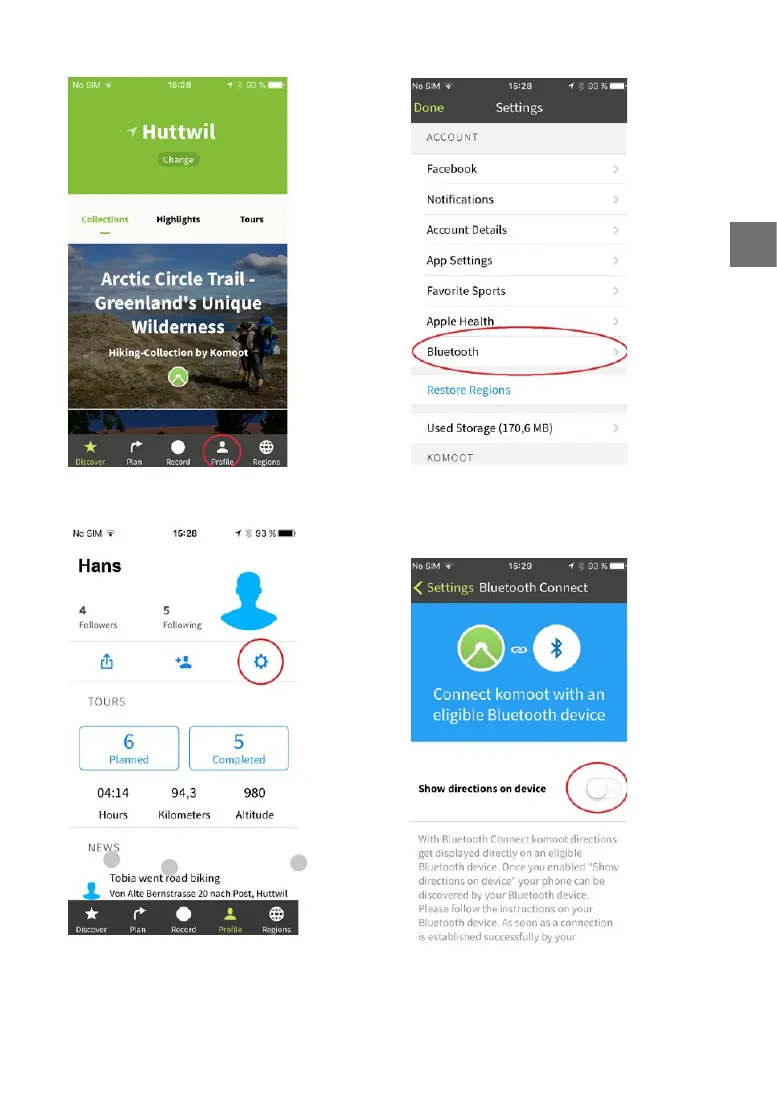
2. Benutzersymbol anwählen
3. Einstellungssymbol anwählen.
4. Untermenü «Bluetooth» anwählen.
5. «Navigation an Gerät übertragen» aktivieren.
Es können Pop-Up Meldungen erscheinen, wel
-
che zur Erteilung von Zugrisrechten auordern.
1.
2.
3.
24
26
Table of Contents
Main Page
Deutsch
5
Table of Contents
5
Vorwort
6
Begrifferklärung
6
Sicherheitshinweise
7
S Icherheitshinweise Zu Allen Elektrischen
8
Anlagen
8
Bedienung mit FLYER Display D1 und FLYER Remote Control RC1 und RC2
9
Bedienung
9
Menünavigation und Einstellung
11
Menü Auswählen
11
Menü Verlassen
11
Menüpunkt Auswählen
11
Bestätigen einer Auswahl
11
Einstellungsmenü
11
Sprachenmenü
12
Zeit Menü
12
Werte Zurücksetzen - Menü
12
Menüstruktur
12
Benutzerdefinierte Unterstützung
13
Datum Menü
13
Uhrzeitformat Menü
13
Einheiten Menü
13
Feedback Menü
14
Hintergrundbeleuchtungsmenü
14
Radumfang Menü
15
Menü
15
Service Menü
15
Automatisches Runterschalten
15
Automatische Selbstabschaltung
15
Auto-Mode Menü
16
Höhenkalibrationsmenü
16
Enviolo TR Automatiq Integrated
16
Komoot Navigation
18
Puls
18
Rohloff Menü
19
About Menü
19
Shimano Di2 Menü
19
Verbindung mit Android Smartphone
20
Verbindung mit Iphone Smartphone
24
Fehleranzeige
28
Hinweisanzeige
28
Fehlercodes System
29
Fehler Ablesen
29
Bedienung mit FLYER Display D0 und FLYER Remote Control RC0
29
Fehleranzeige
31
Hinweisanzeige
31
Einstellungsmenü
31
Menüstruktur
31
Menünavigation
31
Reset Menü
32
Sprachen Menü
32
Uhrzeit Menü
32
Einheiten Menü
33
Unterstützung Menü
33
Beleuchtung Menü
34
Automatische Beleuchtung
34
Service Menü
35
Radumfang Menü
35
Auto-Mode Menü
35
About Menü
36
Unterstützungsmodi Einstellen
36
Beleuchtung
36
Elektrischer Antrieb
36
Unterrohrakku
38
Sitzrohrakku
41
Fehlercodes Akku
45
Lagern des Akkus
46
Schiebehilfe
46
Fehlertabellen Display D1 Und D0
47
Typenschild Und Genehmigungs
52
Fahrradart
52
Typenschild für Pedelecs bis 25 Km/H
52
Sicherheitskennzeichen
52
Einsatzgebiet
53
Genehmigungsnummer für S-Pedelecs mit Tretunterstüzung bis 45Km/H
53
Bestimmungsgemässer Gebrauch
53
Verantwortungsvoll E-MTB Fahren
56
Vor Der Ersten Fahrt
57
Vor Jeder Fahrt
58
Nach Einem Sturz
59
E Instellungen Auf Den Fahrer
59
Bedienung von Schnellspannern
60
Einstellen der Sitzposition
62
Bremshebel Einstellen
67
Federelemente
67
Reifen und Schläuche
69
Felgen Prüfen
69
Reifenpanne Beheben
70
F Ahrradschaltungen
72
F Ahrradkette Und Ritzel, Riemenantrieb
73
Bremse
75
Hydraulische Bremsen
75
Scheibenbremse
76
Hydraulische Felgenbremsen
77
Rücktrittbremse
77
B Eleuchtungsanlage
78
Ebeleuchtung
78
Schutzbleche
79
Z Ubehör Und Ausstattung
79
Transport von Kindern/Kindersitze
80
Fahrradanhänger
80
Dach- und Heckträger am Auto
81
Verschleissteile
81
Herstellergarantie der FLYER AG
82
A Llgemeine Gewährleistung Und Garantie
82
Fachhändlers
82
Allgemeine Gewährleistung des
82
Inspektionsplan
83
Wartungsarbeiten und Austausch von Verschleissteilen
84
Umwelttipps
84
Français
89
Avant-Propos
90
Consignes De Sécurité
90
Les Notions Utilisées
90
C Onsignes De Sécurité Pour Tous Les
92
Commande
93
Commande À Lʼaide du FLYER Display D1 Et du FLYER Remote Control RC1
93
Et FIT
93
F Lyer Avec Entraînement Panasonic
93
Navigation Et Paramétrage
95
Quitter Le Menu
95
Sélectionner Le Menu
95
Sélectionner un Point de Menu
95
Confirmer Un Choix
96
Menu de Paramétrage
96
Menu de Remise À Zéro des Valeurs
96
Menu Langue
96
Structure du Menu
96
Menu Date
97
Menu Format Heure
97
Menu Heure
97
Menu Unité
97
Paramétrer Une Assistance
97
Menu Retour Dʼinformation
98
Menu Arrêt Automatique
99
Menu Circonférence de Roue
99
Menu Entretien
99
Menu Rétroéclairage
99
Auto Mode Menu
100
Menu Étalonnage De Lʼaltitude
100
Rétrograder Automatiquement
100
Enviolo TR Automatiq Integrated
101
Navigation Komoot
102
Puls
102
Menu Rohloff
103
Menu about
103
Shimano Di2
103
Connexion Avec Smartphone Android
104
Connexion Avec Iphone Smartphone
108
Affichage De Lʼerreur
111
Affichage Des Avis
112
Codes Dʼerreur
112
Commande À L'aide du FLYER Display D0 Et du FLYER Remote Control RC0
112
Lecture Des Erreurs
112
Affichage Des Avis
114
Messages D'erreur
114
Menu de Paramétrage
115
Menu Langue
115
Menu Reset
115
Navigation Dans Le Menu
115
Structure du Menu
115
Menu Heure
116
Menu Unité
116
Menu Assistance
117
Menu Entretien
118
Menu Éclairage
118
Menu Éclairage Automatique
118
Menu about
119
Menu Circonférence de Roue
119
Menu Mode Automatique
119
Régler Les Modes Dʼassistance
119
Entraînement Électrique
120
Éclairage
120
Batterie Sur Tube Inférieur
121
Batterie Sur Tube de Selle
125
Code D'erreur Batterie
129
Aide À la Traction
130
Stockage de la Batterie
130
Tableaux Des Erreurs
131
D Ispositions Légales
135
D'homologation
136
Labels De Sécurité
136
Plaque Signalétique Et Numéro
136
Plaque Signalétique Pour Pedelecs
136
Types de Vélo
136
Conformité D'usage
137
Numéro D'homologation des S-Pedelecs Avec Assistance Au
137
Pédalage Jusqu'à 45 Km/H
137
Usage
137
Avant La Première Utilisation
140
Pratiquer Le Mountainbike de Façon
140
Avant Chaque Utilisation
142
Après Une Chute
143
R Églages
143
Utilisation des Blocages Rapides Et
144
Réglage de la Position Assise
146
Réglage des Manettes de Frein
150
Éléments de Suspension
151
Contrôle des Jantes
153
Pneus Et Chambres À Air
153
Roues Et Pneus
153
Réparation des Crevaisons
154
Changements De Vitesse
155
Chaîne Et Pignons, Courroie
156
Freins
158
Freins Hydrauliques
158
Freins Sur Jante Hydrauliques
159
Freins À Disque
159
Frein À Rétropédalage
160
Éclairage
160
Garde-Boue
161
Accessoires Et Équipement
162
Transport Dʼenfants /Sièges Pour
162
U Tilisation Avec Charge Supplémentaire
162
Porte-Vélos de Toit Et de Hayon
163
Remorques
163
G Arantie Légale Générale Et Garantie
164
Garantie Légale Générale du
164
Pièces Dʼusure
164
Revendeur Spécialisé
164
Garantie Fabricant De Flyer Ag
165
Programme Dʼentretien
165
Respect Delʼenvironnement
167
Travaux Dʼentretien Et Remplacement des Pièces Dʼusure
167
Italiano
172
Premessa
173
Spiegazioni Dei Termini
173
Avvertenze Sulla Sicurezza
174
Tutti Gli Impianti Elettrici
175
FLYER con Sistema Propulsivo Panasonic E FIT
176
Funzionamento con FLYER Display D1 E FLYER Remote Control RC1 E RC2
176
Uso
176
Navigazione Nel Menu E Impostazione
178
Selezione del Menu
178
Selezione DI una Voce del Menu
178
Uscita Dal Menu
178
Conferma DI una Selezione
179
Menu Delle Lingue
179
Menu DI Impostazione
179
Menu Ora
179
Menu Reset Valori
179
Struttura del Menu
179
Impostazione Assistenza Personalizzata
180
Menu Data
180
Menu Formato Ora
180
Menu Unità
180
Menu Feedback
181
Menu Circonferenza Ruota
182
Menu Retroilluminazione
182
Menu Service
182
Menu Spegnimento Automatico
182
Enviolo TR Automatiq Integrated
183
Inferiori
183
Menu Calibrazione Altitudine
183
Menu Modalità Auto
183
Frequenza Cardiaca
185
Navigatore Komoot
185
Menu Rohloff
186
Menu about
186
Shimano Di2
186
Conessione con Smartphone Android
187
Conessione con Smartphone Iphone
191
Indicatore Avvisi
195
Visualizzazione Degli Errori
195
Codici DI Errore
196
Funzionamento con FLYER Display D0 E FLYER Remote Control RC0
196
Lettura Degli Errori
196
Visualizzazione Degli Errori
197
Indicatore Avvisi
198
Menu Delle Impostazioni
198
Navigazione Nel Menu
198
Struttura del Menu
198
Menu Lingue
199
Menu Ora
199
Menu Reset
199
Menu Assistenza
200
Menu Unità
200
Illuminazione Automatica Menu
201
Menu Illuminazione
201
Menu Service
201
Menu about
202
Menu Circonferenza Ruota
202
Menu Modalità Auto
202
Illuminazione
203
Impostazione Della Modalità DI Assistenza
203
Sistema Propulsivo Elettrico
203
Batteria Integrata Nel Tubo
205
Batteria Integrata Nel Tubo Della Sella
207
Codice DI Errore Della Batteria
211
Aiuto Alla Spinta
212
Conservazione Della Batteria
212
Tabelle Degli Errori Display D1 Und D0
213
D Isposizioni DI Legge
217
Marchi DI Sicurezza
218
Targhetta E Numero DI Omologazione
218
Campo D'impiego
219
Numero DI Omologazione Per S-Pedelec con Pedalata Assistita Fino a 45 Km/H
219
Tipi Biciclette
219
Uso Conforme
219
Guidare la E-MTB Responsabilmente
222
Prima Del Primo Utilizzo
223
Prima DI Ogni Utilizzo
224
Dopo Una Caduta
225
R Egolazioni In Base Al Conducente
225
Controllo DI Sganci Rapidi E Assi a Rilascio Rapido
226
Regolazione Della Posizione in Sella
228
Elementi DI Sospensione
233
Regolare la Leva del Freno
233
Controllo Dei Cerchi
235
Pneumatici E Camere D'aria
235
Ruote E Pneumatici
235
Riparare una Foratura
236
Cambi Per Bicicletta
237
A Cinghia
239
Catena E Pignone, Trasmissione
239
Freni
240
Freni Idraulici
240
Freni a Disco
241
Freni Idraulici al Cerchio
242
Freno a Contropedale
242
Illuminazione
243
Impianto DI Illuminazione
243
Accessori E Dotazione
244
Guida con Carico Supplementare
244
Parafanghi
244
Carrelli Per Bicicletta
245
Trasporto DI Bambini/Seggiolini
245
Parti Soggette a Usura
246
Per Auto
246
Portabici da Tetto E Posteriore
246
Garanzia del Produttore DI FLYER AG
247
Garanzia Legale Generale del Rivenditore Specializzato
247
Programma DI Controllo
248
Interventi DI Manutenzione E Sostituzione DI Parti Soggette a Usura
249
Suggerimenti Per L'ambiente
249
English
254
Definition Of Terms
255
Foreword
255
Safety Information
256
Systems
257
FLYER with Panasonic Drive and FIT
258
Operation
258
Operation with FLYER D1 Display and
258
Confirming A Selection
260
Menu Navigation and Settings
260
Quit Menu
260
Select Menu
260
Select Menu Item
260
Settings Menu
260
Date Menu
261
Language Menu
261
Menu Structure
261
Reset Values - Menu
261
Time Menu
261
Adjusting The User-Defined
262
Clock Format Menu
262
Units Menu
262
Backlight Menu
263
Feedback Menu
263
Wheel Circumference Menu
263
Automatic Power Off Menu
264
Automatic Gear Changes
264
Service Menu
264
Auto Mode Menu
265
Elevation Calibration Menu
265
Enviolo TR Automatiq Integrated
265
Komoot Navigation
266
Pulse
267
About Menu
268
Connection with Android
268
Rohloff Menu
268
Shimano Di2 Menu
268
Connection with Iphones
272
Error Display
276
Message Display
276
Error Codes
277
Identifying Errors
277
Operation with FLYER D0 Display and FLYER RC0 Remote Control
277
Error Display
279
Menu Navigation
279
Menu Structure
279
Message Display
279
Settings Menu
279
Language Menu
280
Reset Menu
280
Time Menu
280
Assistance Menu
281
Units Menu
281
Automatic Light Menu
282
Light Menu
282
Service Menu
282
About Menu
283
Auto Mode Menu
283
Wheel Circumference Menu
283
Configuring The Assistance Modes
284
Electrical Motor
284
Lights
284
Down Tube Battery
285
Seat Tube Battery STB
288
Battery-Related Error
292
Pushing Aid
293
Storing the Battery
293
Error Tables Display D1 And D0
294
Legal Requirements
297
Type Plate And Approval Number
298
Bicycle Type
299
Range of Use
299
Safety Symbols
299
Intended Use
300
Riding Your E-MTB Responsibly
302
Before The First Ride
303
Before Each Ride
304
Adjusting the Bike to the Rider
305
After A Fall
305
Operating Quick-Release Fasteners
306
Setting up the Seating Position
308
Setting up the Brake Levers
313
Suspension Elements
313
Checking the Rims
315
Tyres and Inner Tubes
315
W Heels And Tyres
315
Dealing With A Flat Tyre
316
B Icycle Gears
317
B Icycle Chain And Sprocket, Belt Drive
318
Brake
320
Hydraulic Brakes
320
Disc Brake
321
Hydraulic Rim Brakes
321
Back Pedal Brakes
322
L Ighting System
322
Lights
322
Mudguard
323
Accessories and Equipment
324
Bicycle Trailers
324
Riding with Additional Load
324
Transporting Children/Child Seats
324
Roof and Rear Carrier on a Car
325
FLYER AG Manufacturer's Warranty
326
G Eneral Warranty
326
General Dealer's Warranty
326
Wearing Parts
326
Inspection Plan
327
Environmental Protection Tips
328
Maintenance and Replacement of
328
Wearing Parts
328
Dutch
333
Verklaring Van Begrippen
334
Voorwoord
334
Veiligheidsinstructies
335
Eiligheidsinstructies Voor Alle Elek
336
Trische Installaties
336
Bediening
337
Bediening Met FLYER-Display D1 en FLYER-Remote Control RC1 en RC2
337
En FIT
337
F Lyer Met Panasonic-Aandrijving
337
Bevestigen Van Een Keuze
339
Instellingsmenu
339
Menu Kiezen
339
Menu Verlaten
339
Menunavigatie en Instelling
339
Menupunt Kiezen
339
Mtijd-Menu
340
Structure du Menu
340
Talenmenu
340
Waardenreset-Menu
340
Datum-Menu
341
Eenheden-Menu
341
Ondersteuning Instellen
341
Tijdweergave-Menu
341
Achtergrondverlichtingsmenu
342
Feedback-Menu
342
Automatische-Uitschakelings-Menu
343
Menu Automatisch Terugschakelen
343
Servicemenu
343
Wielomtrek-Menu
343
Auto-Mode-Menu
344
Hoogtekalibratie-Menu
344
Menu Enviolo TR Automatiq
344
Komoot-Navigatie
346
About-Menu
347
Polsslag
347
Shimano Di2
347
Menu Rohloff
348
Smartphone
348
Verbinding Met Android
348
Smartphone
352
Verbinding Met Iphone
352
Foutindicatie
356
Bediening Met FLYER-Display D0 en FLYER Remote Control RC0
357
Foutcodes
357
Fouten Aflezen
357
Weergave Meldingen
357
Foutindicatie
359
Instellingenmenu
359
Menunavigatie
359
Menüstruktur
359
Weergave Meldingen
359
Menu Reset
360
Menu Talen
360
Tijdmenu
360
Eenheden-Menu
361
Ondersteuningsmenu
361
Automatische-Verlichtingsmenu
362
Verlichtingsmenu
362
Auto-Mode-Menu
363
Servicemenu
363
Wielomtrek-Menu
363
About-Menu
364
Elektrische Aandrijving
364
Ondersteuningsmodi Instellen
364
Verlichting
364
Onderbuisaccu
366
Zitbuisaccu
368
Foutcode Accu
372
Bewaren Van de Accu
373
Duwhulp
373
Foutentabellen
374
W Ettelijke Bepalingen
378
Soort Fiets
379
Tot 25 Km/H
379
Typeplaatje En Goedkeuringsnummer
379
Typeplaatje Voor Elektrische Fietsen
379
Veiligheidskeurmerken
379
Beoogd Gebruik
380
Gebruik
380
Typegoedkeuring Voor Speedpedelecs
380
Met de E-MTB Rijden
383
Met Groot Verantwoordelijkheidsbesef
383
Vóór de Eerste Rit
384
Vóór Elke Rit
385
Berijder
386
Instellen Op de Behoeften Van de
386
Na Een Val
386
Bediening Van Snelspanners en
387
Steekassen
388
Instellen Van de Zitpositie
389
Remhendels Instellen
393
Verende Onderdelen
394
Banden en Binnenbanden
396
Controleren Van de Velgen
396
Wielen en Banden
396
Lekke Band Repareren
397
Fietsversnellingen
398
Fietsketting en Rondsel, Riemaandrijving
399
Hydraulische Remmen
401
Rem
401
Hydraulische Velgremmen
402
Schijfrem
402
Achteruittraprem
403
Verlichting
403
Spatborden
404
A Ccessoires En Uitrusting
405
Rijden Met Extra Belasting
405
Vervoer Van Kinderen/ Kinderzitjes
405
Dak- en Achterdrager Op de Auto
406
Fietsaanhanger
406
Algemene Wettelijke Garantie
407
Algemene Wettelijke Garantie Van
407
De Dealer
407
Slijtageonderdelen
407
Controleplan
408
Fabrieksgarantie Van FLYER AG
408
Milieutips
409
Onderhoudswerkzaamheden en
409
Vervanging Van Slijtdelen
409
Other manuals for Flyer Mountain
Manual
81 pages
Related product manuals
Flyer C SERIES
275 pages
Flyer GOROC
239 pages
Flyer Upstreet6
271 pages
Flyer L885
37 pages
Flyer Goroc2 Series
250 pages
Flyer Uproc EVO:X Series
250 pages



 To Next Page