29
EN
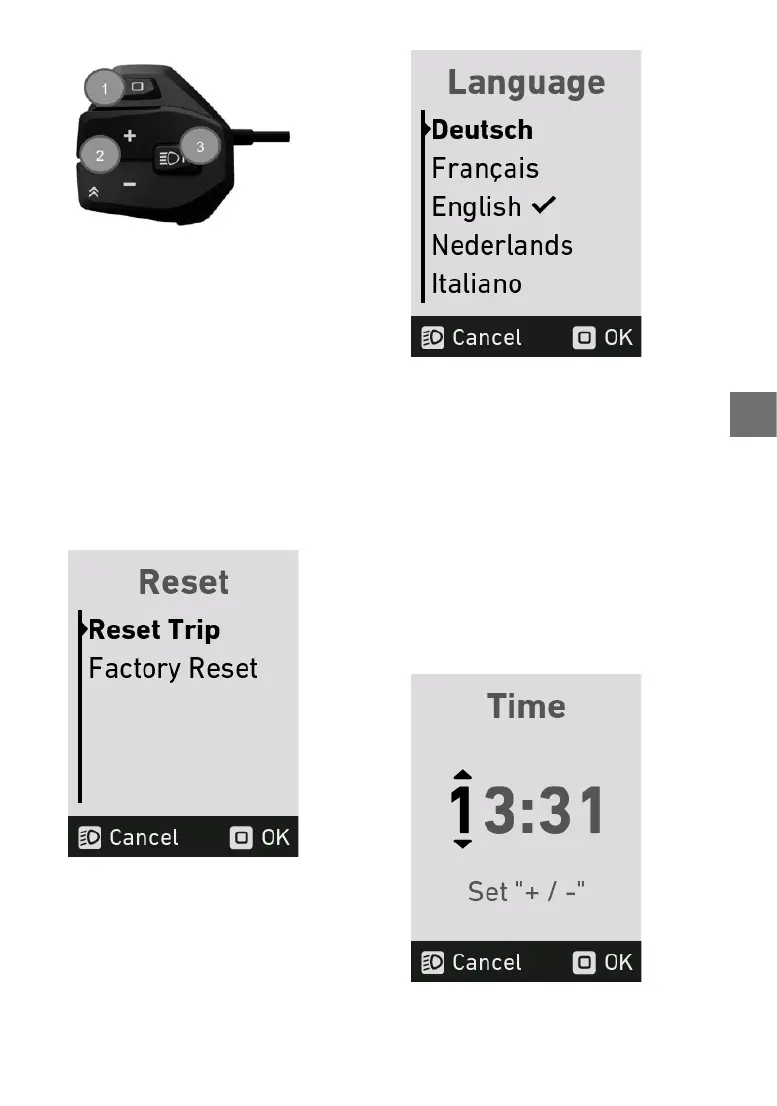
1. “Mode” button
2. +/- assistance level button
3. Light button
5.13 Reset menu
In this menu, the trip data and the system can be
reset to the factory settings.
reset Trip Resets the trip data
Factoryreset setzt das System auf den
Auslieferungsstand zurück
The following values will be reset:
– Trip distance
– Average speed
– Maximumspeed
– Ride time
Press the “mode” button to reset the data.
5.14 Language menu
You can choose from the following languages in
the language menu:
• German
• French
• English
• Dutch
• Italian
The check mark indicates which language is cur-
rently applied. Press the +/- assistance level but-
tonstoselectthelanguage.Toconrmtheselec-
ted language, press the “Mode” button.
5.15 Time menu
You can set the current time in the time menu.
Press the +/- assistance level buttons to change
the numbers. Press the “Mode” button to move to
thenextnumber.
Onceyouhaveselectedthenalnumber,press
the“Mode”buttontwicetosavethetimeandexit
the time menu. Press “Cancel” to leave the menu
without saving the time.


 To Next Page