25
FR
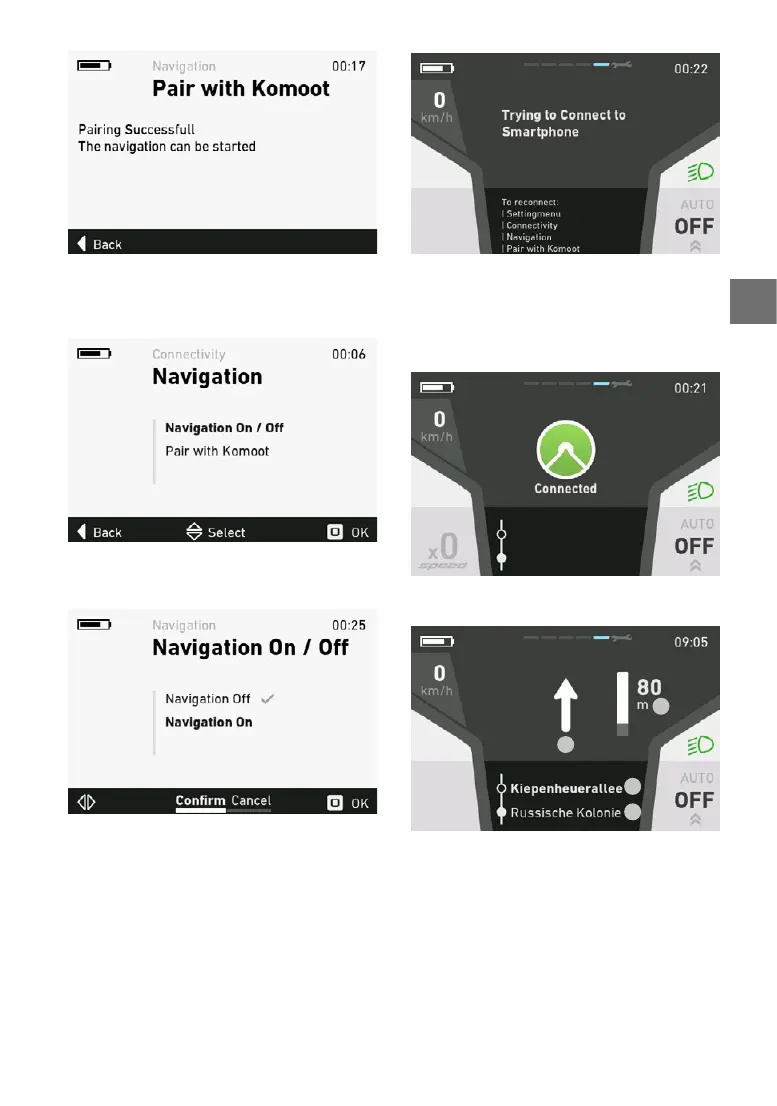
Pour activer la navigation, sélectionnez le point
«Navigationon/o»danslemenudeparamétra
-
ge.
Sélectionnez«Navigationon»etconrmezavec
OK.
L’e-bikevaessayerdeseconnecterausmartpho-
ne.
Lancezleguidagesurvotresmartphone.
Dès que l’e-bike est connecté à l’application ko
-
moot,unpictogrammedeconrmations‘ache.
L’e-bikeestenmodenavigation.
1.
2.
3.
4.
1. Sens de la navigation
2. Rue actuelle
3. Prochaine rue
4. Distance jusqu’au prochain point de navigation
Pour plus d’infos sur l’application komoot:
http://support.komoot.de/
https://www.komoot.de/about/routeplanner
5.5.25Achagedelʼerreur
Les diérentes pièces du système e-bike sont
surveilléesenpermanencependantlʼutilisationet



 To Next Page