7
FR
5. FLYER avec
entraînement
Panasonic et FIT
5.1 CommandeàlʼaideduFLYER
DisplayD1etduFLYERRemote
ControlRC1etRC2
Votre FLYER avec entraînement Panasonic se
commande à lʼaide du FLYER Remote Control
RC1ouRC2etduFLYERDisplayD1.
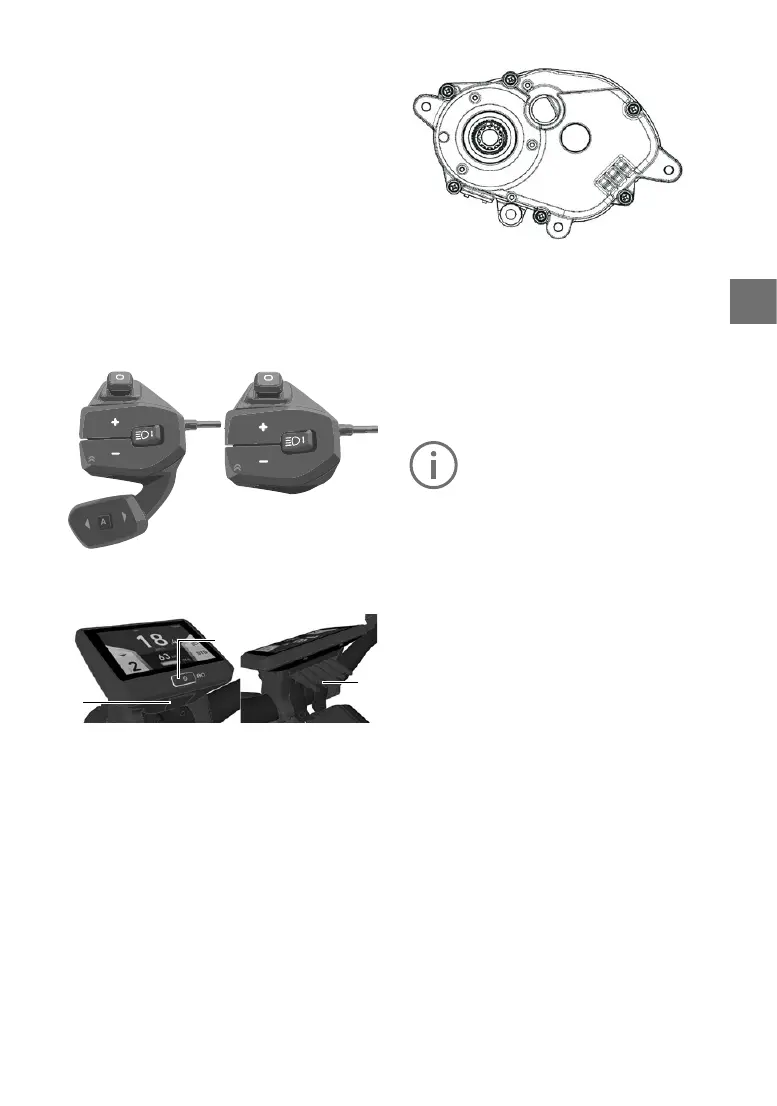
Unité de commande FLYER Remote Control
RC1 et RC2
FLYERD1display
1
2
3
1. On/obutton(pressforatleast
1secondtoswitchon)
2. USB port
3. Display connector
RC1
RC2
Unitédʼentraînement
Lʼunité dʼentraînement est un moteur dʼe-bike.
Lʼunitédʼentraînementsecommandeàlʼaidedu
FLYERRemoteControl.
5.2 Commande
Pourlamiseenmarche,appuyezsurlebouton
marche/arrêt sur lʼécran pendant au moins une
seconde.
Lemenu«Drive»sʼachesurlʼécran.
Lesystèmenesʼallumequesilabatterie
estsusammentchargée.
Pourcouperlʼassistanceélectrique,appuyezsur
le bouton marche/arrêt pendant au moins une
seconde.
Silecyclisteestinactifpendantdixminutes,lʼas
-
sistanceélectriquesʼarrêteautomatiquementpar
souci dʼéconomie dʼénergie. (Le temps jusquʼà
lʼarrêtestréglable.Consultezlepoint5.5.9pour
savoircommentfaire.)
LeFLYERDisplayD1secommandeàlʼaidedu
joystick placé sur lʼunité de commande FLYER
RemoteControl,sibienquevosmainspeuvent
rester sur le guidon pendant que vous roulez.
Pourpasserdʼunmenuprincipalàlʼautre,ilsut
dʼappuyersurlejoystickverslagaucheouvers
la droite.
Il existe quatre menus principaux:
Drive: vue principale avec les informa
-
tions les plus importantes comme
lavitesse,lʼautonomierestante,
etc.Cʼestlavuequisʼacheau
démarrage.
Info: informations actualisées sur le
trajet en cours.
Fitness: données sur la performance spor
-
tive du cycliste.
Data: informations topographiques et
température extérieure.
Navigation: navigation associée au smart
-
phone



 To Next Page