142 143
EN
5.2 Operating the bike with the
Purion control unit
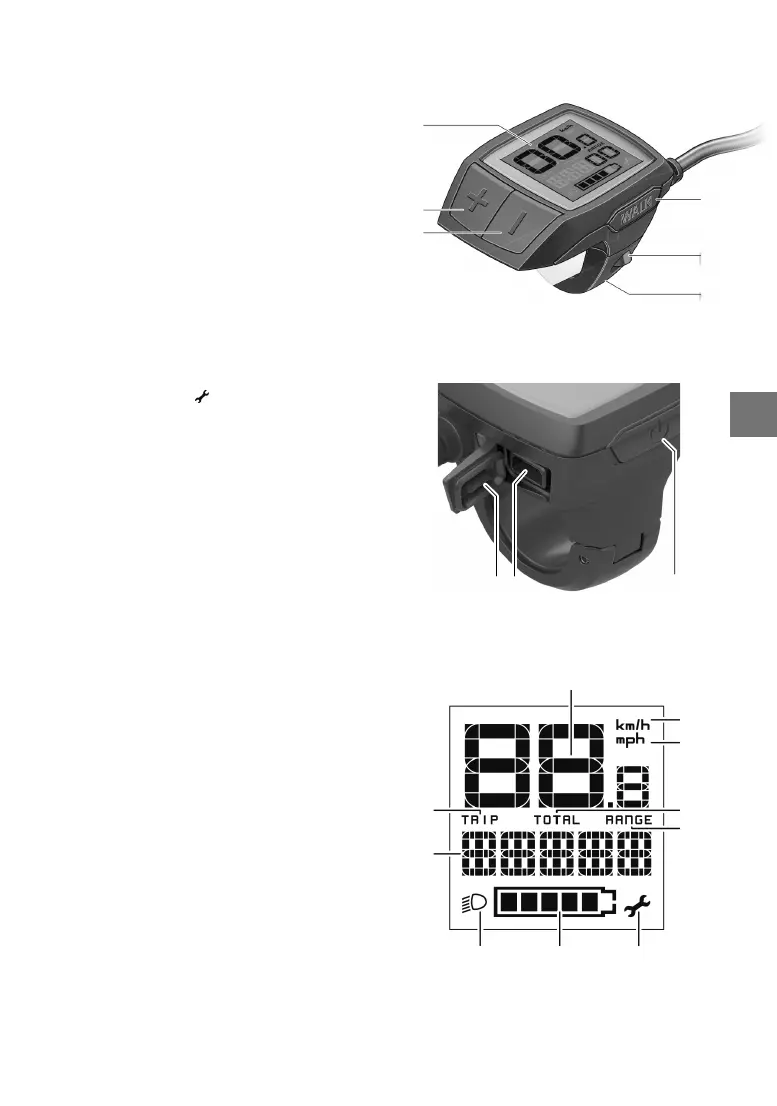
1. On/off button for on-board computer
2. «WALK» pushing aid button
3. Fastening screw for on-board computer
4. Holder for on-board computer
5. Reduce assistance button «–»
6. Increase assistance button «+»
7. Display
8. Protective cover for USB socket
9. USB diagnostic socket (for maintenance
purposes only)
On-board computer display elements
a Speedometer display
b Display in km/h
c Display in mph
d Total distance indicator «TOTAL»
e Range indicator «RANGE»
f Service display
g Battery charge status indicator
h Lighting display
i Support level indicator/value display
j Trip indicator «TRIP»
Switching on/off
The e-bike system can be switched on in the fol
-
lowing ways:
• With the e-bike battery inserted, press the on/
off button 1 on the on-board computer.
• Press the on/off button on the e-bike battery
(see battery operating instructions).
The drive is activated as soon as you put your
feet on the pedals (except for in pushing aid mode
or in support level «OFF»). The motor output is
based on the support level set in the on-board
computer.
If you take your feet off the pedals in normal op
-
eration, or once you reach a speed of 25/45 km/h,
the support is switched off by the e-bike drive.
The drive is automatically reactivated when you
put your feet on the pedals and your speed drops
below 25/45 km/h.
The e-bike system can be switched off in the fol
-
lowing ways:
• Press the on/off button 1 on the on-board com
-
puter.
• Switch off the e-bike battery using its on/off
button (see battery operating instructions).
7
6
5
4
3
2
8 9 1
f
gh
a
i
b
d
e
c
j



 To Next Page