148 149
5.5 Operating the Bike with the
Nyon Control Unit
If your FLYER is equipped with the Bosch Nyon
operating unit, then you have access to an on-
board computer with a wide range of possibilities
and functions.
In the Ride eld you can have details of your rid
-
ing style displayed, such as speed, pedalling
cadence, battery charge status, motor support,
range, distance or height prole.
In the Navigation eld, you have the option
of having the route displayed using saved map
material. When operating Nyon, you are given
three route options to choose from: the fastest,
the most efcient and the nicest route. Using its
intelligent system, your Nyon calculates the range
remaining on the basis of your riding style.
In the Fitness eld you can have the details of
your sporting performance displayed. This is cal
-
culated on the basis of pedalling cadence and
pedalling power, among other things. You can use
the Nyon to display the efciency of your training.
You can use a Bluetooth link to connect to your
smartphone, while the phone is held safely in your
pocket. If you receive an SMS, Nyon will let you
know. Do not let this lead you into any uncontrolled
reactions and only read the message when you and
your bicycle have come to a halt. Your safety is the
priority! To prevent you from being distracted when
riding, you cannot reply through Nyon; instead, you
must use your smartphone. Make sure that you do
not do this while you are riding.
Always concentrate on your riding. Do
not allow yourself to be distracted by the
information on your on-board computer.
Operation and displays Bosch Drive Unit / Nyon
As the Nyon offers a large number of functions,
only a small selection and overview of these func
-
tions can be presented in this operating manual.
For further information, refer to the enclosed op
-
erating manual for the Bosch Drive Unit / Nyon.
You can also nd details at www.Bosch-eBike.
com/nyon-manual.
The Nyon operating system includes not only the
on-board computer but also the eBike Connect
smartphone app and the eBike Connect.com on
-
line portal. These three Nyon components allow
you to use various settings and functions. Many
of the settings and functions are available on all
components, while some are available on only
two or even just one. So, for example, you can
have the training effect shown in real time only
on the on-board computer, while the training pro
-
gress display is available only via the online por-
tal. Also read the original Bosch Drive Unit/ Nyon
operating instructions enclosed.
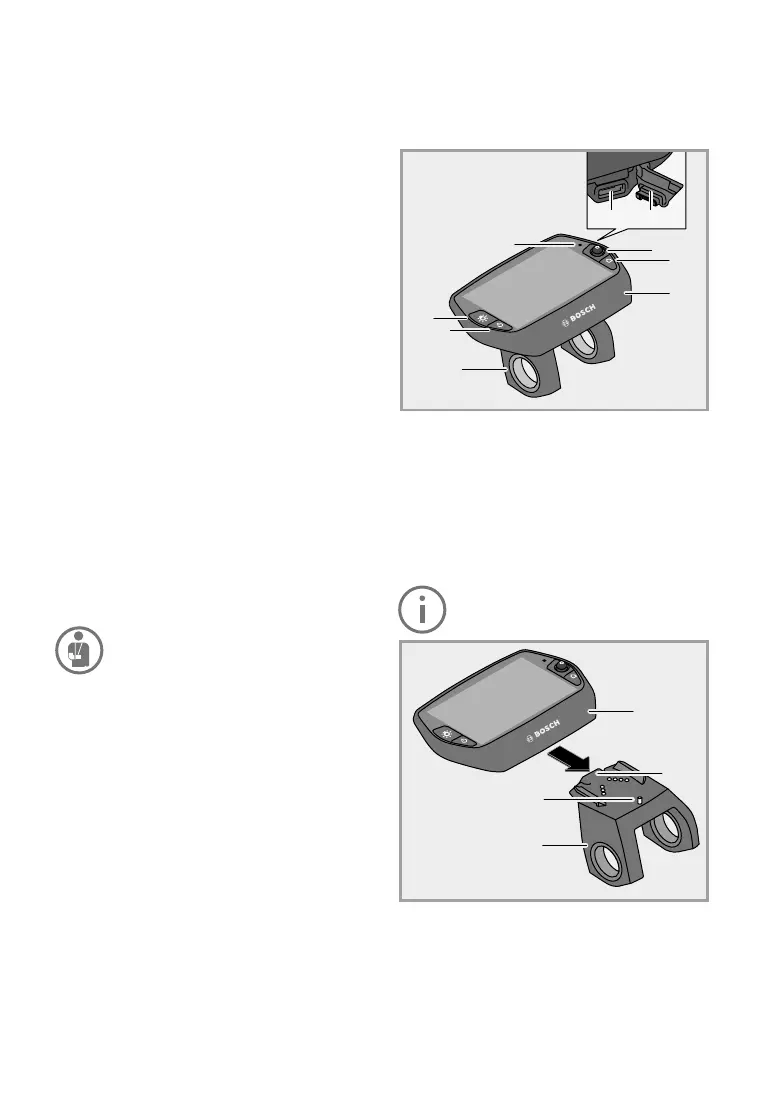
The Nyon on-board computer is comprised of two
operating units: A remote controller on the handle
-
bar and a display in the middle of the handlebar.
On-board computer
1. Joystick
2. “Home” button
3. On-board computer
4. On-board computer holder
5. On-board computer on/off button
6. Cycle lighting button
7. Brightness sensor
8. USB socket
9. USB protective cover
We would point out explicitly that Nyon is
not certicated for use in the USA.
10. On-board computer locking catch
11. On-board computer lock-screw
1
2
3
4
5
6
7
8 9
3
10
4
11



 To Next Page