150 151
”Dashboard”
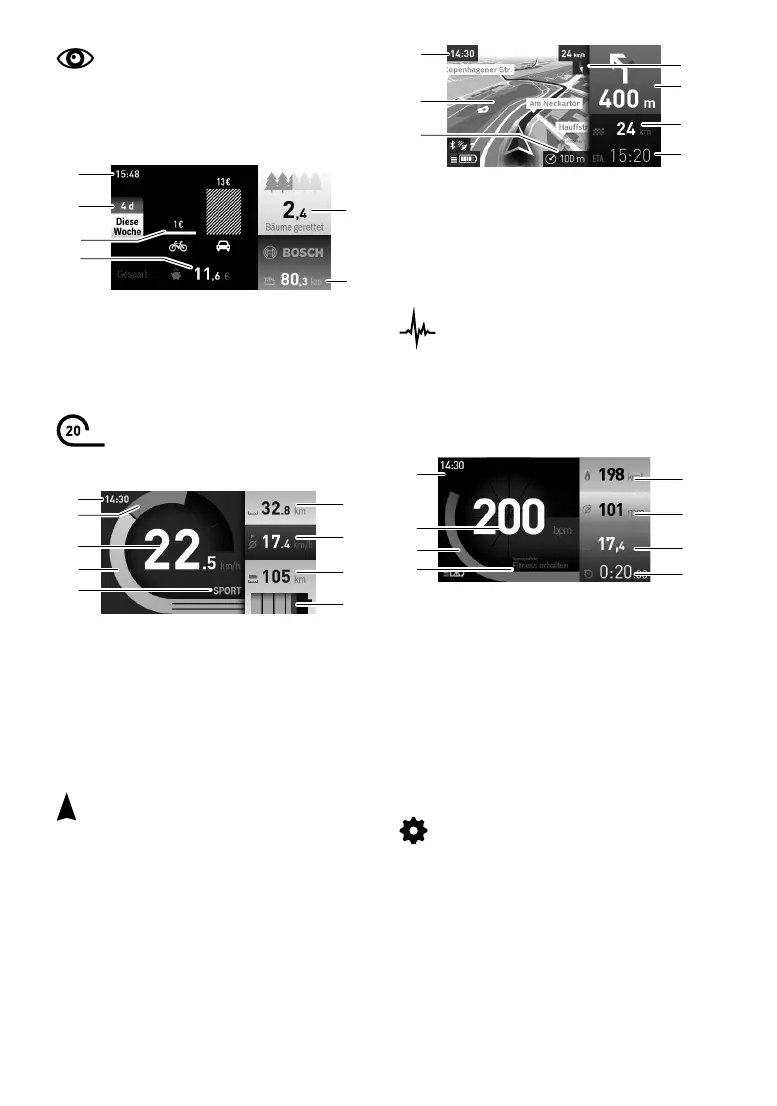
In the “Dashboard” operating mode, you
can have your FLYER ebike's statistical data dis
-
played. For example, you can see how much you
have saved by travelling with your FLYER instead
of your car (d4) or how many kilometres you have
ridden in total (d6).
d1 Time
d2 Period observed
d3 Cost
d4 Saving
d5 Trees saved
d6 Total kilometres covered by rider
“Ride”
Under the “Ride” operating mode, you
can read the current riding data of your FLYER
e-bike.
r1 Time
r2 Own pedalling power
r3 Speed
r4 Motor power
r5 Support level indicator
r6 Daily kilometre counter
r7 Average speed
r8 Range
r9 Charge status display for the FLYER battery.
“Map & Navigation”
In the “Map & Navigation” operating mode
you can access the installed map material and
display the quickest and most efcient route, or
the most scenic route, for example.
You can change the map's zoom level by pressing
the joystick or by selecting the sub-menu at the
bottom by pushing the joystick to the right.
Nyon can only be used for navigation in connec
-
tion with your bike. It is not suitable for use by
walkers or car drivers.
d1
d5
d6
d2
d3
d4
r1
r6
r7
r8
r9
r4
r3
r5
r2
n1 Time
n2 Map
n3 Zoom level
n4 Compass needle
n5 Warning of turning and distance to turning
n6 Distance from destination
n7 Estimated time of arrival at destination
“Fitness”
In the “Fitness” operating mode, you have
access to a range of information about your per
-
formance. The training effect is calculated by the
activity level recorded in the registration.
If you have a heart rate monitor connected to the
Nyon via Bluetooth, you will be able to check your
heart rate.
f1 Time
f2 Current performance/heart rate*
f3 Display of current training effect
f4 Training effect
f5 Kilocalories burned
f6 Current pedal cadence
f7 Average speed
f8 Duration
* When using a chest strap to measure heart rate (chest
strap not supplied), the current heart rate is displayed
instead of performance.
“Settings”
In the “Settings” operating mode, you can
specify the basic settings desired for your on-
board computer:
• Connections: Here you can congure a
smartphone or WiFi link, Bluetooth settings or
a heart-rate monitor.
• My eBike: If the Nyon is in its holder, you can
change the preset value for your FLYER e-
bike's wheel size by +/- 5.
• Country settings: Here you can select the
language to be used, the time zone, whether
n1
n4
n5
n7
n6
n2
n3
f1
f3
f2
f4
f5
f6
f7
f8



 To Next Page