150 151
EN
the time is displayed in 12 or 24 hour format
and whether speed and distance are to be
shown in kilometres or miles. The time is auto
-
matically updated through the GPS signal.
• Map & Navigation: congures map display
and switches on automatic adjustment of dis
-
play in response to surrounding lighting condi-
tions.
• Brightness: Adjusts display brightness
• My Nyon: Here, among other things, you can
set up a new user prole, congure the Home
button, set certain counters to 0 or reset Nyon
to its factory settings.
• Help
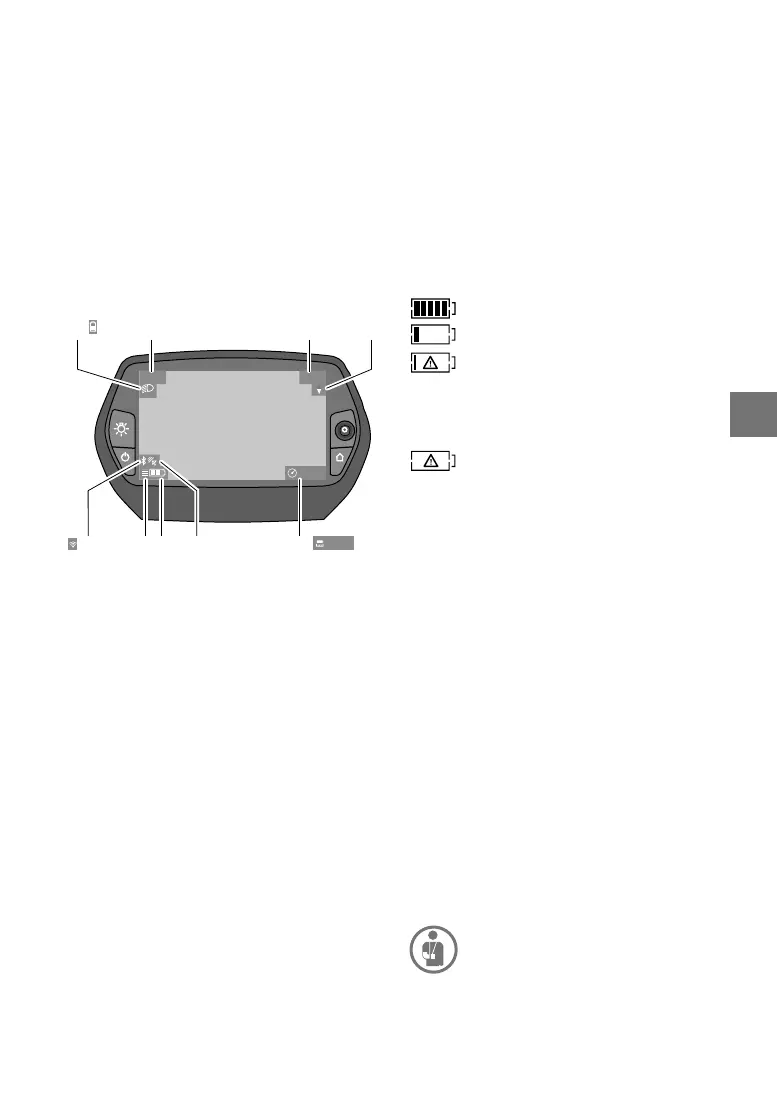
Status displays
s1 Display
Bicycle lighting/The Nyon battery charge
status display
s2 Time indicator
s3 Speed display
s4 North indicator
s5 Display Bluetooth
®
/WiFi link
s6 Support level indicator
s7 Charge status display for the FLYER battery.
s8 GPS signal indicator
s9 Zoom range/remaining range display
The status displays may vary depending on the
operating mode currently in use.
Set support modes
You can set the level of support using operating
unit 12 (ill. page 9). The following levels are avail
-
able (the selection may be restricted, depending
on the version).
• OFF: No motor support; you are pedalling your
FLYER like a normal cycle. All on-board com
-
puter functions can be called up.
• ECO: Effective electrical support with maxi
-
mum efciency to achieve maximum range.
• TOUR: Even support for touring over a wide
range.
100 m
14:30 22
km/h
s1
s5 s8
s4s2
s6 s7 s9
s3
105 km
• SPORT: Powerful, direct support for sporty rid-
ing off-road and in urban trafc.
• TURBO: Maximum support level for sporty rid
-
ing up to high pedalling cadences.
Use the “+” button on operating unit 12 (Ill. page
9) to switch to the next higher support level, and
the “-” button to move down to a lower level. Hold
the button down until you are in the desired sup
-
port level.
The battery charge status display for your
FLYER Battery can be displayed in “Ride” (r9) op
-
erating mode or with status display s7.
Each of the bars in the display corresponds to
around 20% of capacity.
The battery is fully charged.
The battery should be topped up.
There is no longer sufcient energy avail
-
able for drive system support and support
will be gradually decreased. The remain
-
ing energy is being used for the cycle
lighting and the on-board computer.
The Nyon has not yet been put in its
holder or it has been reset to its factory
settings.
Nyon has its own battery. The charge status for
this can be seen in display s1.
Power supply
If your Nyon is in its holder on your FLYER, it is
being supplied with power from the sufciently
charged battery on your FLYER e-bike.
If your Nyon is not in its holder it draws its power
from its own Nyon battery. Further details of how
the Nyon battery is charged can be read in the
enclosed drive manufacturer's operating manual.
The pushing aid/start-up aid is switched on and
off with the “Walk” button 17.
The cycle lights can be switched on and off with
button 6. The lighting symbol s1 appears when
the lighting is switched on.
If a fault should occur in the e-bike system com
-
ponents, an error code appears in the display.
Please read the original operating instructions
enclosed to the Bosch Drive Unit/Nyon.
If an error code should appear, have the
system examined by an authorised
FLYER dealer and repaired if necessary.
Nylon reset
By pressing buttons 1, 2, 5 and 6 simultane
-
ously, you can reset your Nyon if it is no longer



 To Next Page