13
EN
IftheE-bikeremainsstationaryforapproximately
10 minutes and no buttons are pressed on the
on-board computer, the E-bike system switches
oautomaticallyinordertosaveenergy.
Always switch o the E-bike system
when you park the E-bike.
If the on-board computer batteries are
empty, you can still switch on your
E-bike using the bicycle battery. Howev-
er, it is recommended that you change
the
internal batteries as soon as possi-
ble in order to avoid damage.
Indicators and settings on the on-board
computer
Symbols
andtheirmeanings
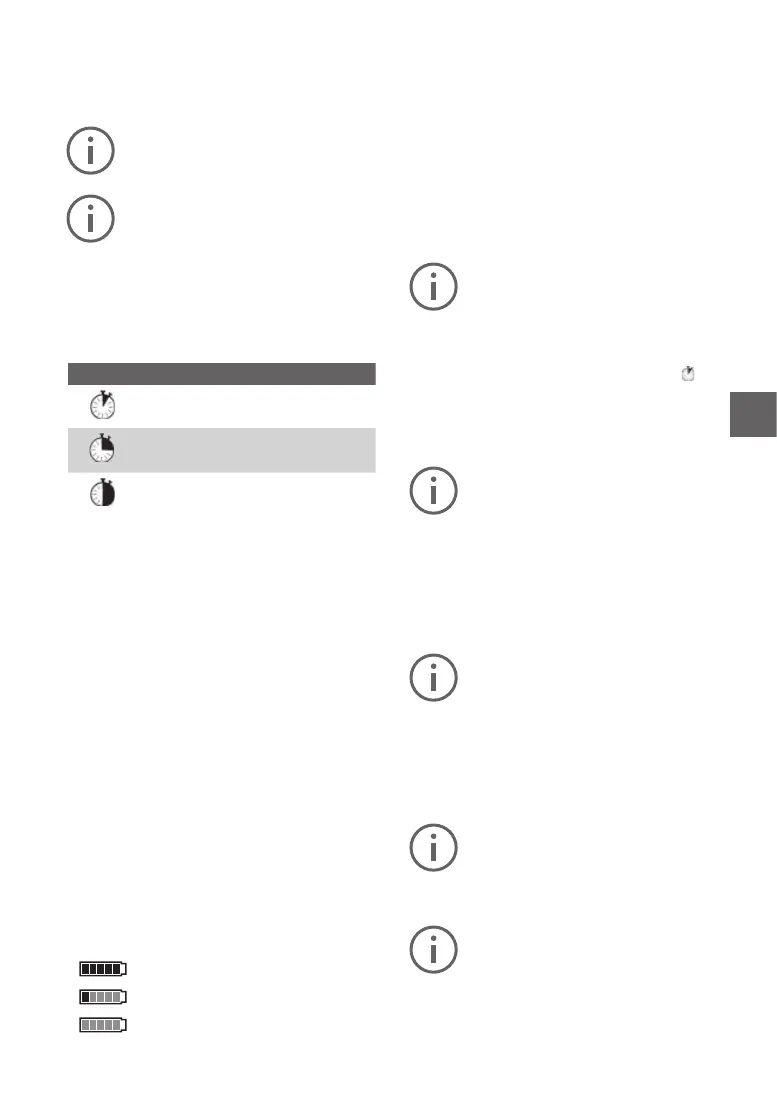
Symbol Explanation
Short button press (less than 1 sec-
ond)
Medium button press (between 1
and 2.5 seconds)
Long button press (longer than 2
seconds)
Powersupplyfortheon-boardcomputer
The on-board computer is supplied with power by
two CR2016 button cell batteries.
Changingthebatteries(seegureA)
If the on-board computer is showing «LOW BAT»
on the display, remove it from the handlebars by
unscrewing the fastening screw 3 on the on-board
computer. Open the battery compartment lid 10
using a coin, remove the used batteries and insert
new CR2016 batteries. You can obtain the batteries
recommended by Bosch from your bicycle dealer.
Make sure that the polarity is correct when insert-
ing the batteries.
Close the battery compartment and reattach the
on-board computer to the handlebars of your
E-bike using the fastening screw
3.
Batterychargeindicator
The battery charge indicator g shows the state
of charge of the E-bike battery. This can also be
readofromthebatteryitself,viatheLEDs.On
the indicator g, each bar in the battery symbol
correspondstoapproximately20%capacity:
The E-bike battery is fully charged.
The E-bike battery needs recharging.
The status indicator LEDs on the
battery go out. The capacity for drive
support is depleted and the support will be grad
-
ually deactivated. The remaining capacity is
reserved
for the lights; the display ashes. The
E-bike battery has sucient capacity remaining
forapproximately2hoursofbicyclelighting.
Activating/deactivatingthepushingaid
The pushing aid makes it easier for you to push
the E-bike. The speed in this function depends
onthegearinuseandcanreachamaximumof
6 km/h. The lower the selected gear, the lower the
speed in the pushing aid function (at full power).
Thepushingaidfunctionmayonlybe
usedtopushtheE-bike. If the wheels
of the E-bike are not in contact with the
ground when the pushing aid is in use,
there is a risk of injury.
To activate the pushing aid, briey press
the
«WALK» button on your on-board computer. Af-
ter activation, press the «+» button within three
seconds
and hold it down. The E-bike drive will
be switched on.
The pushing aid cannot be activated in
support level «OFF».
The pushing aid is switchedo as soon as one
of the following events occurs:
• you release the «+» 6 button,
• the wheels of the E-bike are blocked (e.g. due
to braking or hitting an obstacle),
• thespeedexceeds6km/h.
With certain systems, the pushing aid
can be started directly by pressing the
«WALK» button.
Adjustingthesupportlevel
You can use the on-board computer (7) tocongure
the level of assistance provided by the E-bike drive
when you are pedalling. The assistance level can
be adjusted at any time, including during your ride.
Certain versions have a preset assis-
tance level that cannot be changed. Cer-
tain models may also have fewer assis-
tance levels to choose from than are
shown here.
If the E-bike was congured with eMTB
mode ex works, the SPORT assistance
level is replaced by eMTB. In eMTB
mode, the assistance factor and the
torque are adjusted dynamically depend
-
ing on the pedal force applied to the ped-
als. eMTB mode is only available with
Performance Line CX drives.



 To Next Page