Measure Flow Rate and Capacity
Estimate Pump Capacity
The RTU can estimate the pump capacity. This estimation is useful since capacity changes
may indicate pump problems, such as a clogged pump.
Before using this function
• Obtain data on nominal capacities for all pumps. (Reference: Pump documentation).
Restriction
The pump capacity can only be estimated under certain circumstances. Thus it may take a
while for the estimations to be updated.
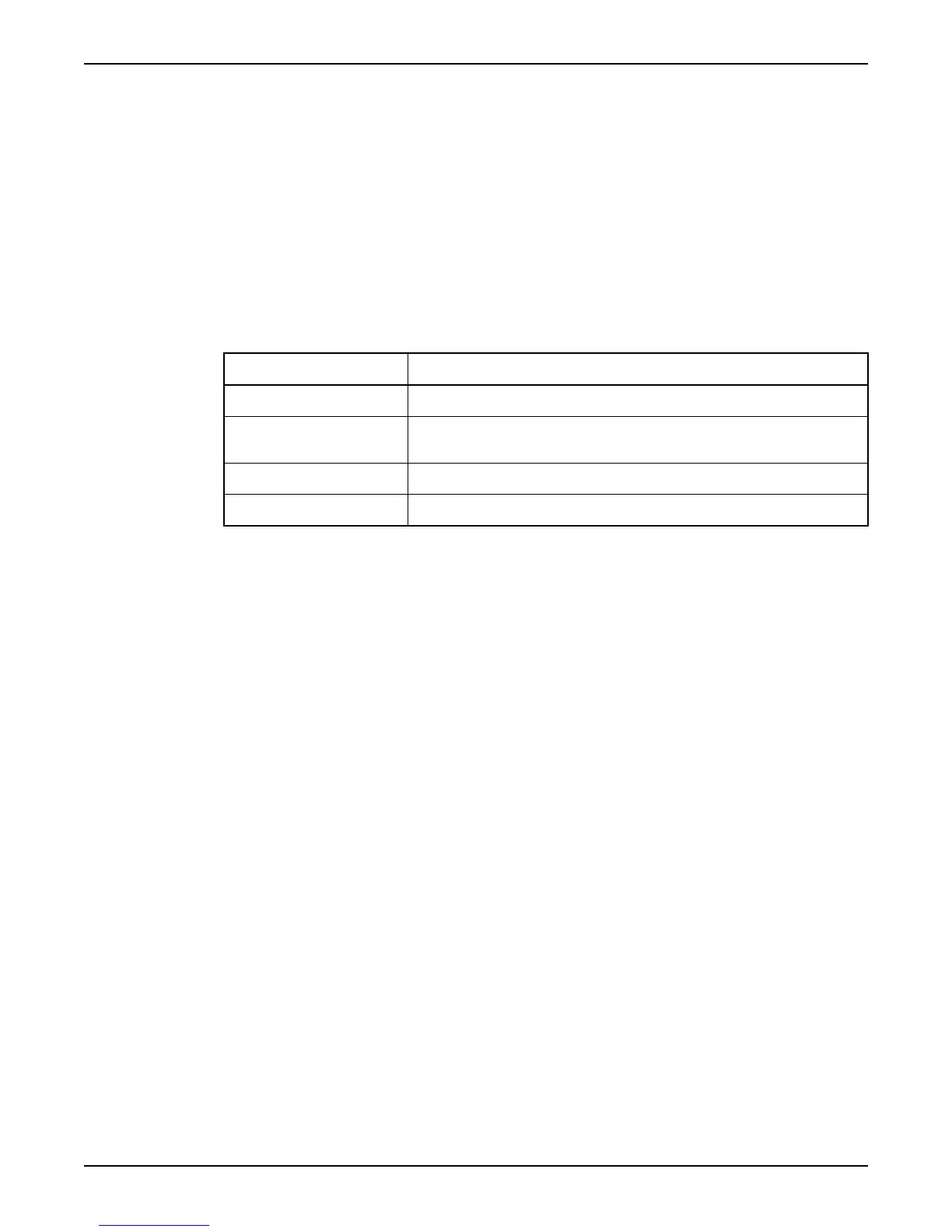
Types of capacities
Capacity Description
Nominal capacity The flow a pump is designed to handle.
Calculated capacity Pump capacity can diverge from the nominal capacity. Over time, the RTU can
estimate the pump capacity.
Capacity divergence How much the calculated capacity is allowed to diverge from the nominal capacity.
Upper/Lower level capacities Pump capacity is estimated between these two limits.
Function: Calculated capacity
When the calculated capacity:
• Exceeds nominal capacity + capacity divergence, a high capacity alarm is generated.
• Drops below nominal capacity - capacity divergence, a low capacity alarm is
generated.
Configure capacity calculations
1. Specify a sump level in the Upper level capacity menu (12_5_1).
Keep in mind. Enter a level below the lowest pump start level.
2. Specify a sump level in the Lower level capacity menu (12_5_2).
Keep in mind. Enter a level above the highest pump stop level, and below the upper
level capacity.
3. Specify nominal capacity for pump 1 in the Nominal capacity P1 menu (12_1_1).
4. Specify capacity divergence for pump 1 in the Capacity div. P1 menu (12_1_2).
5. Repeat step 3–4 for any other pump.
6. Specify sump area in the Area menu (11_1).
Disable capacity calculations
Set both upper and lower level capacities to "0".
Estimate Overflow Flow and Volume
The RTU can estimate the overflow flow and volume.
Before configuring the function
Optionally, configure a General purpose input as overflow input.
Types of overflow monitoring
Overflow calculations starts when:
• Overflow activates the overflow sensor,
or
• Sump level exceeds a specified overflow level.
Keep in mind: Overflow level is only relevant if an analogue level sensor is used.
Measure Flow Rate and Capacity
APP 541 User manual 33



 To Next Page