from any other telephone set.
During an active call, pressing one preprogrammed multi-functional key button to transfer the current telephone conversation to an unused
extension number and immediately puts the conversation on hold. The telephone system will then display the extension number of the parked
call so that the call can later be retrieved.
If no one picks up the parked call within the set time, the telephone system may ring back the parked call. This transfers the parked call back to
the person who originally parked the call.
The example below describes the steps to configuration the call park from Webpage, user can also configuration from MENU.
Adding Call Park:
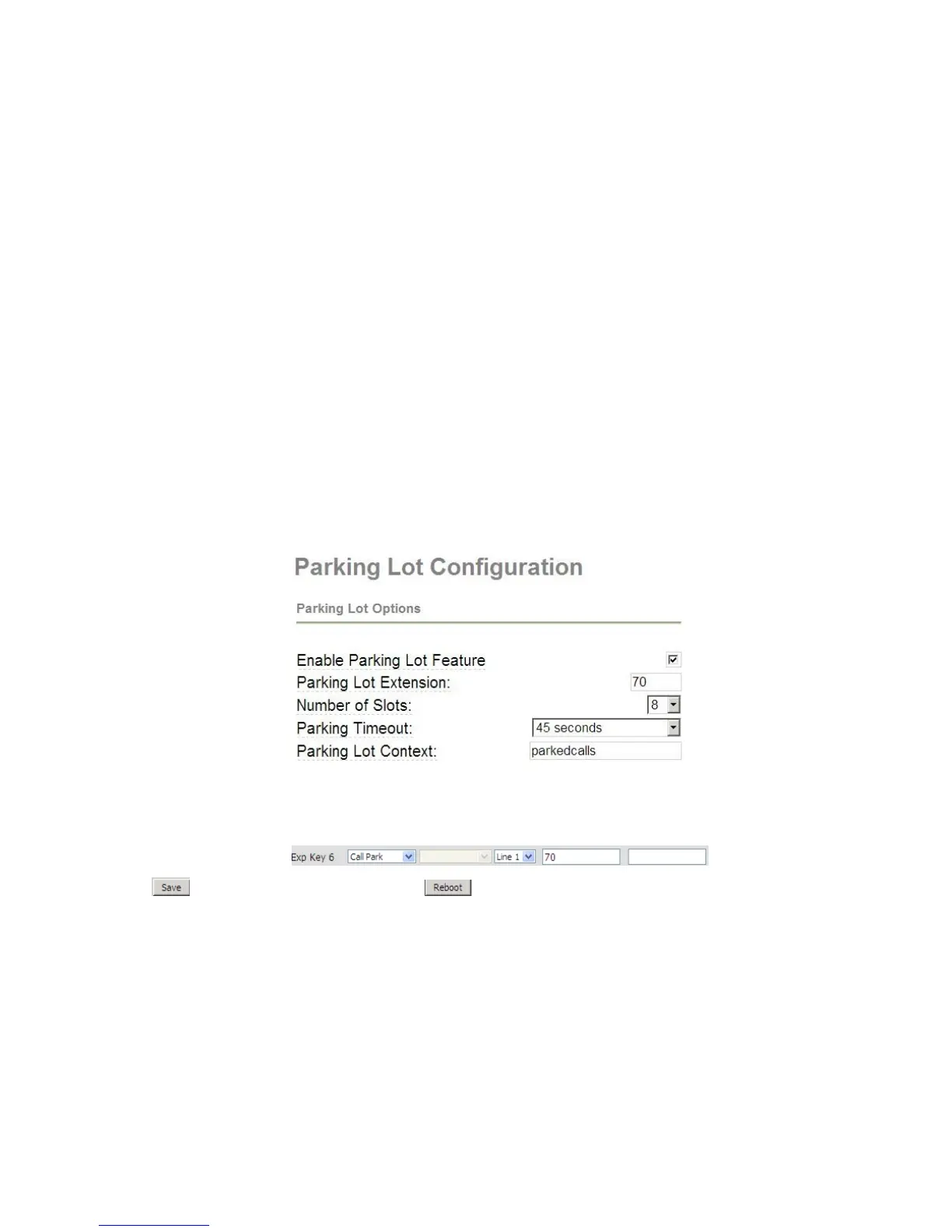
Step 1.View the parking settings in sip server, below is an example in TrixBox
Step 2.Log in the web, open Phone/Multi-functional Key webpage.
Step 3.Choose one Exp key (assuming is Exp Key 6), and configuration as follows, user can refer to 7.6.2 Multi-functional Key:
Step 4.Press button to save changes and then press button to make changes effective.
Using Call Park:


 To Next Page