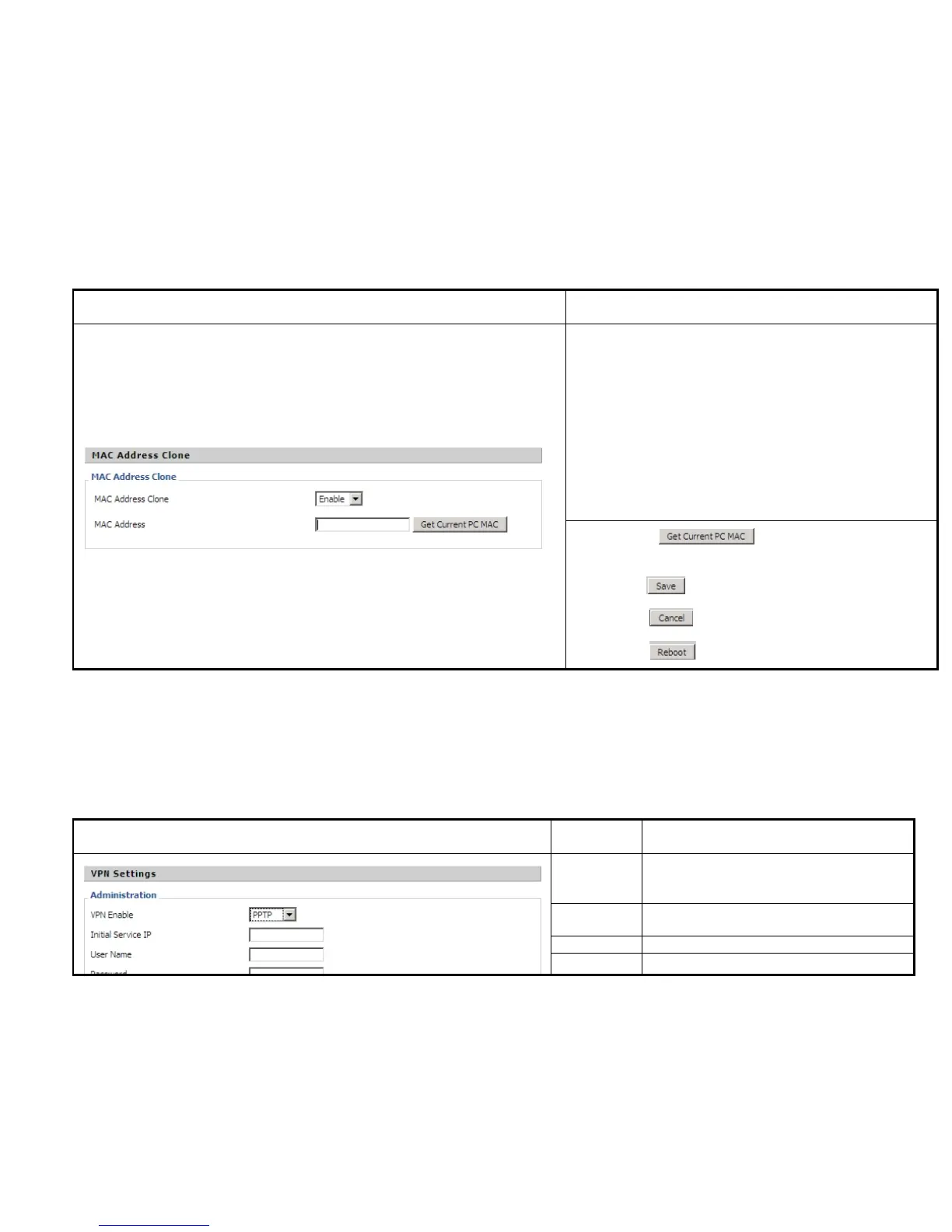
Description
MAC is the hardware address of network equipment. Sometimes,
network providers may bind network account with the network
equipment’s MAC address. So you may not pass the provider’s
authentication when you use a new IP622. In this case, you can use
MAC Clone to copy your PC’s MAC address to IP622’s Internet
port.
MAC is an important parameter for network equipments, so you
should make sure that the MAC is right, in order to prevent to make
IP622 unusable.
You can login IP622’s Web via PC port if you are incautious to make
it wrong. And then cloning the right MAC or resume the default
settings.
Step 1 Press button to get the PC’s MAC
address
Step 2 Press to save the changes
Step 3. Press to cancel MAC address clone.
Step 4. Press to reboot IP622.
A Virtual Private Network (VPN) is the extension of a private network that encompasses links across shared or public networks like the Internet.
In short, by VPN technology, you can send data between two computers across a shared or public network in a manner that emulates the
properties of a point-to-point private link.
Description
VPN Enable
If or not enable VPN.
And user can choose the VPN mode from PPTP
and L2TP.
Initial
Service IP
VPN server IP address
User Name The user name for authentication
Password Password for authentication


 To Next Page