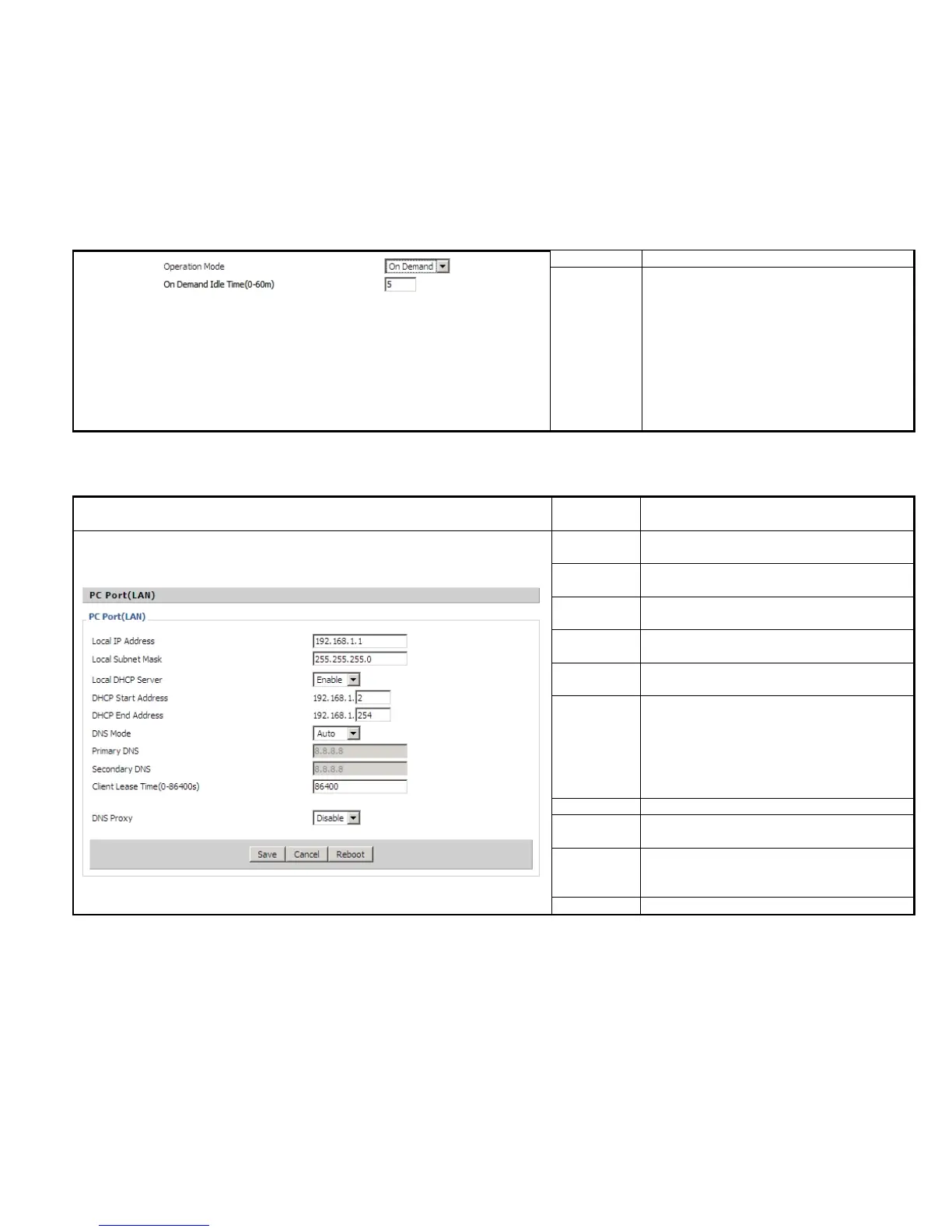
Select operation mode, options are Keep Alive,
On demand and Manual.
◆When the mode is Keep Alive, user need
specify the keep alive redial period, arranges are
0~3600s, default is 5min.
◆ When the mode is on demand, user need
specify the on demand idle time, arranges are
0~60min, default is 5min.
◆When the mode is manual, user need not to
input this.
Set the IP address of PC port.
Efficient when user choose NAT.
Set the subnet mask of PC port.
Efficient when user choose NAT.
If or not enable DHCP server.
This is the start IP address assigned by the DHCP
server.
This is the end IP address assigned by the DHCP
server.
Choose DNS type from Manual and Automatic
◆ In Manual: user should set the Primary DNS
and Second DNS manually.
◆
In Automatic: IP Phone will get the Primary
DNS and Second DNS from DHCP Server
automatically.
Client Lease
Time
(0-86400s)
The DHCP Client lease time, measured in
seconds, default is 86400s.
If or not enable DNS proxy.


 To Next Page