Step 1.During an active call (assuming party 1(IP622)’s phone number is 6221, party 2’s phone number is 111)
Step 2.Party 1 press the Exp Key 6 button (the configured multi-functional key) to park the current conversation and listen the voice prompt
patiently,
Step 3.Party 3 dialing 71 using another phone to retrieve the call with party 2.
There are two ways to enable MSG, one is from menu, and the other is from your PC to use IP622’s webpage.
From Menu:
Step 1.Press Menu button to enter menu items and then choose 12Voice Mail
Step 2.Highlight the line you want to configure, and then select it
Step 3.And then use the softkey buttons to configure it according to the prompt(Enable MWI and enter the voice mail number)
Step 4.Press the save softkey button to save the changes
From Webpage:
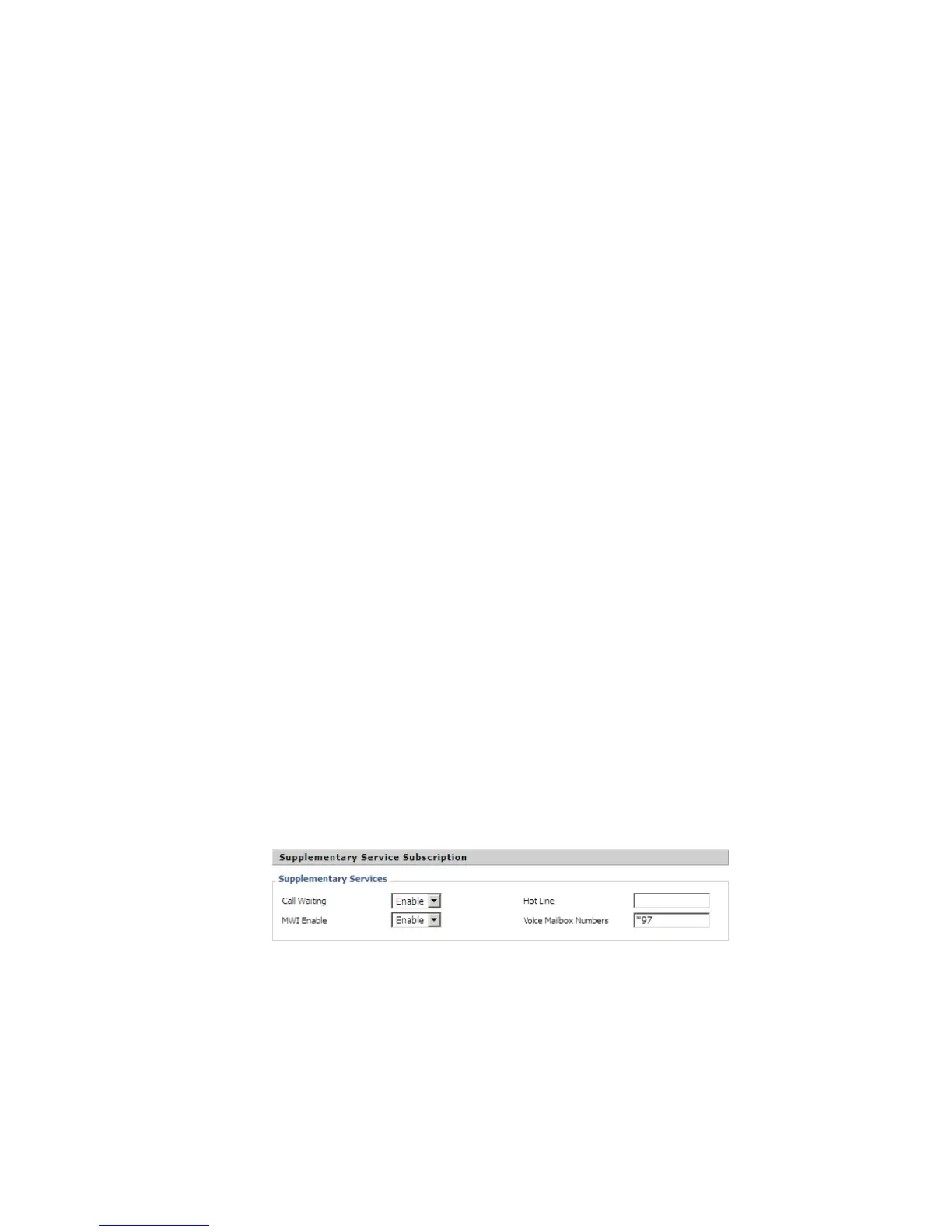
Step 1.Log into Web, open SIP Account Line 1/2webpage, go to Supplementary Service Subscription column.
Step 2.Enable MWI Enable and fill in the Voice Mailbox Numbers (get the number from your phone administrator), below is a settings
example based on Asterisk.


 To Next Page