28
Installation and Operation Manual
Normal Operation Summary
How to
Action
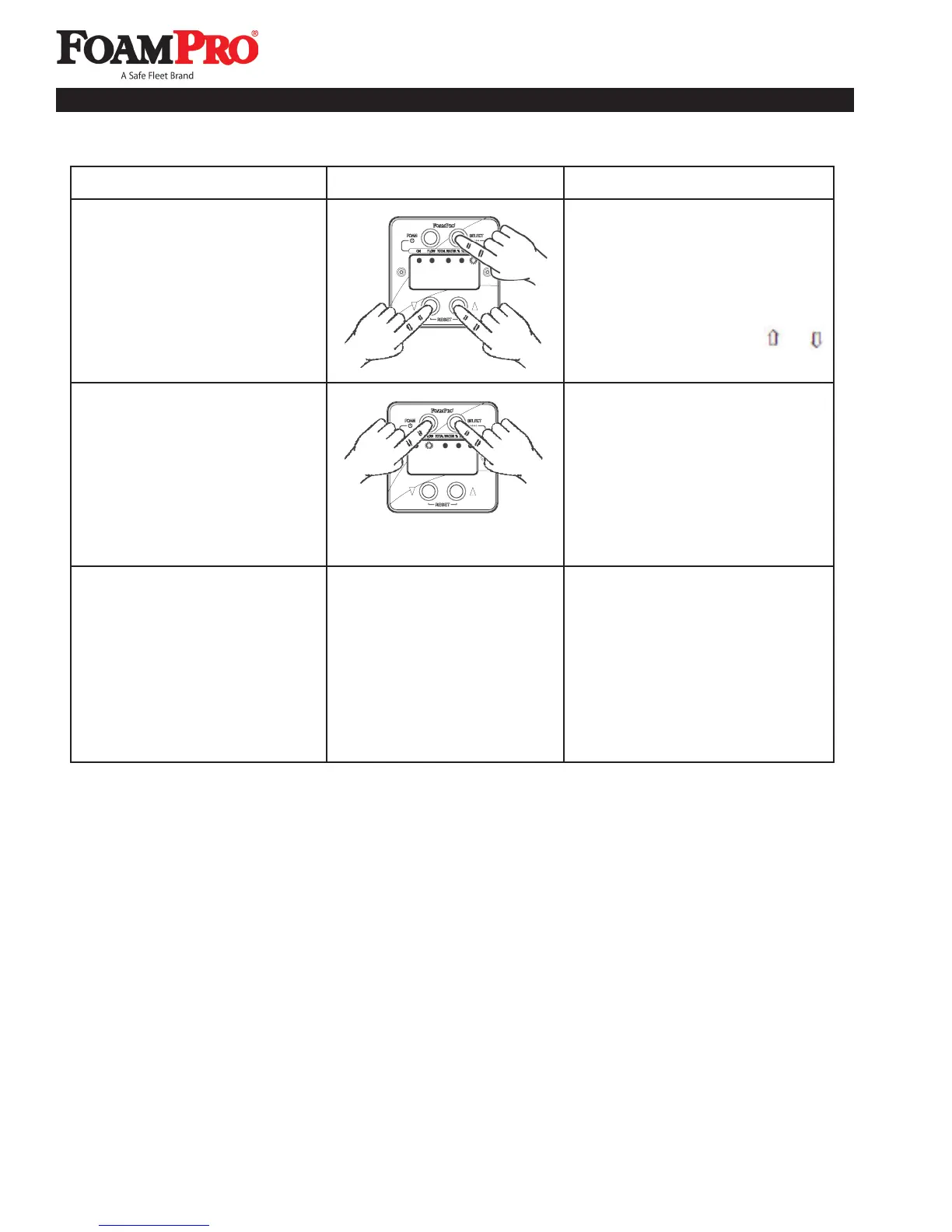
6. Press the SELECT button
(white upper-right button)
until the LED lamp below
the TOTAL FOAM label is
illuminated. The total amount
of foam concentrate used will
be displayed. Reset this value
to zero by pressing the
and .
buttons at the same time.
Display
7. If on, press the FOAM button,
the foam injection will stop.
Press the SELECT button
(white upper-right button) until
the LED lamp below FLOW is
illuminated. The water flow rate
through the foam discharge(s)
will be displayed whether foam
is being pumped or not.
8. Turn the apparatus Master or
Battery switch off. The system
can also be turned off by using
the circuit breaker switch on the
valve driver box.
6. Read the total amount of foam
concentrate used.
7. Read water flow without foam
injection.
NOTE: Any of these changes
can be made at anytime during,
before, or after water is flowing.
160
600
8. Turn the FoamPro system off.



 To Next Page