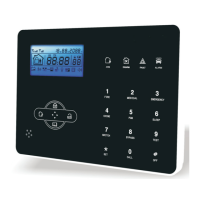
Arm led: Light on under armed status, Light flashes under stay status.
Disarm led: Light on under disarmed status
Trouble led: Light on when with zone trouble. Light flashes when AC cut.
Alarm led: Light flashes when alarm.
1
2
3
4
5
6
8
9
10
Press 3 seconds to enter or exit sleep mode.
Bypass zone: bypassed zones means zones disabled. The bypass will be
restored when users disarm systems under home armed or armed status.
Siren test: to test if siren working normal
Walk test: to test if the detectors are working normally with the panel and alarm
User manual
Press 3 seconds to tirgger fire alarm
Press 3 seconds for medical help
Press 3 seconds for SOS
Press 3 seconds then enter user code to enable or disable delay
zone doorbell(Refer to page 36)
Press 3 seconds then enter user code to enable or disable PGM
output(refer to page 30)
Press 3 seconds to make phone call through GSM, the longest
talk time is 240 seconds. the call will be interrupted when alarm
occurs.
Press 3 seconds then enter user code to proceed normal testing,
siren testing and walk testing.
Press 3 seconds then enter user code to bypass zones or
activate zones.
Press 3 seconds then enter user code to enable or disable
eletrical switch.
Sleep mode: all led indicators, backlight, voice, remind tone will be disabled
under sleep mode, The panel will exit sleep mode automatically when users
enter system setting or when alarm occurs.
6
Communication test: To test the communication between the panel and the
CMS if normal


 To Next Page