#
4
#
9
#
0
1
#
3
2
1
0
5
4
2
#
5
*
#
4
#
9
#
1
#
3
2
1
0
5
4
3
#
*
#
4
#
9
#
2
#
3
2
1
0
5
4
4
#
*
User manual
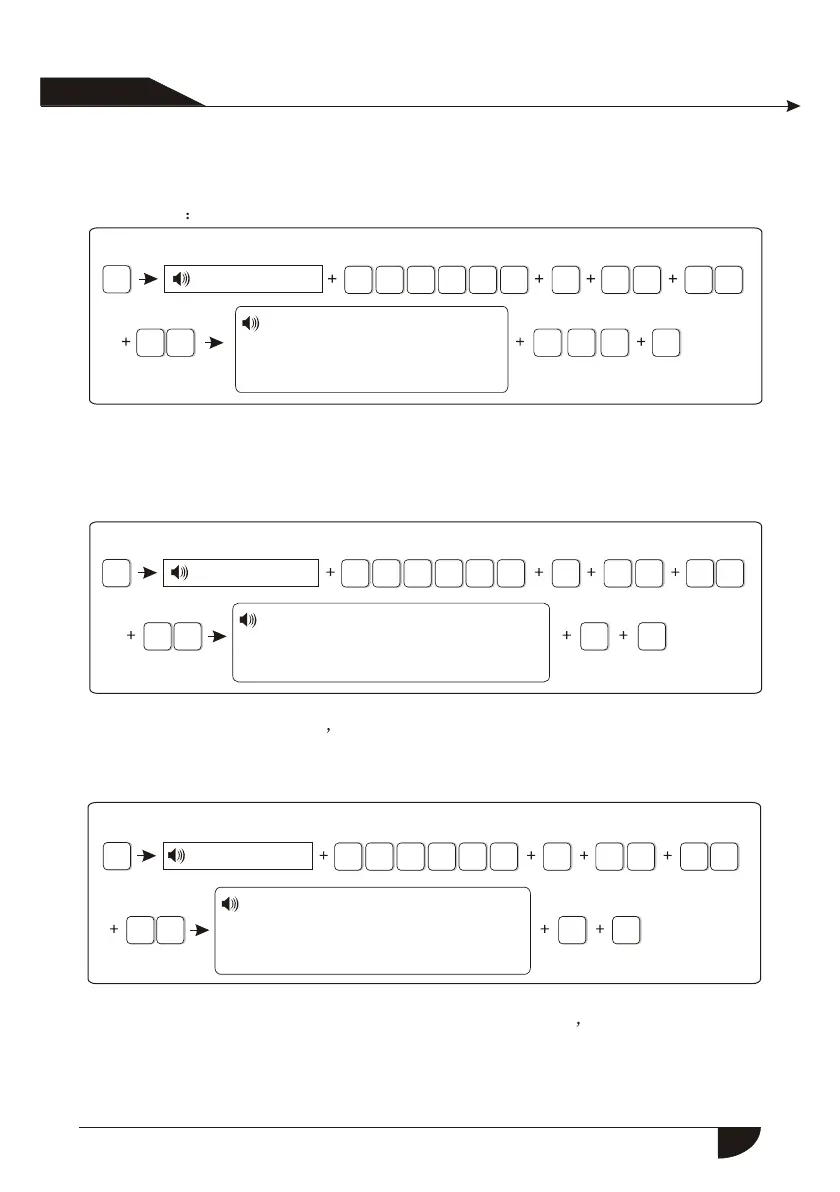
6.4.9.2 Ac off inspection time setting. When the AC power is off, delay to report
to CMS(factory default delay time is 30 min)
Example set AC off inspection time as 15 min
Press[*] for 3 seconds
Enter password
Plsease enter 0 to 255 minutes
AC off duration time.press
confirm key to save, press
back key to exit.
6.4.9.3 Magnetic contact inspection: Set if the alarm panel show zone trouble
on LCD screen or not when sperate the magnetic strip from transmitter.
(Factory default disable the inspection)
Example: enbale the magnetic contact inspection
Press[*] for 3 seconds
Enter password
6.4.9.4 Check wireless detector tamper: if the enable the checking when
trigger the detector s tamper , will trigger alarm. If disable the
checking, it will not trigger alarm.(factory default enable the checking)
Example: disable the checking of wireless detector tamper.
Press[*] for 3 seconds
Enter password
6.4.9.5 Set force arm: if enabel set force arm, when there is zone trouble, the
system can be armed and report the trouble zone s bypass message
to CMS. If disable the force arm, the system can not be armed(factory
default is disable forem arm)
Example: enabel force arm
Please choose: 1. Enable magnetic
contact inspection 2. Disable
Press confirm key to save,
Pressback key to exit.
Please choose : 1. Enable wireless
detector tamper inspection, 2. Disable
Press confirm key to save,
Pressback key to exit.
21


 To Next Page