#
5
#
3
#
3
2
1
0
5
4
2
#
4
#
1
2
*
#
5
#
4
#
3
2
1
0
5
4
#
5
#
4
#
3
2
1
0
5
4
1
#
#
#
*
*
#
5
#
4
#
3
2
1
0
5
4
2
#
#
*
User manual
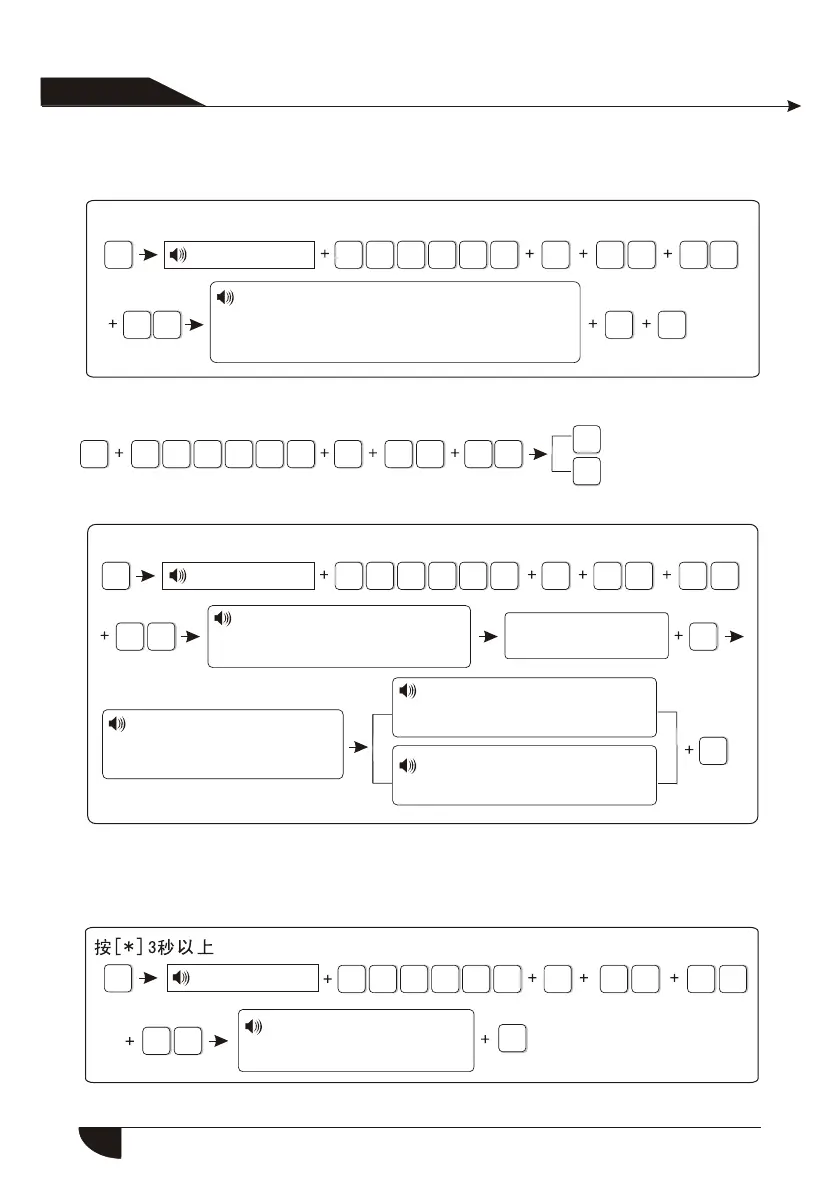
6.5.3.2 Delete appliance switch
Press[*] for 3 seconds
Enter password
Enroll wireless siren
Delete wireless siren
6.5.4 Enroll wireless siren
6.5.4.1 Enroll wireless siren
Press[*] for 3 seconds
Enter password
NOTE: when dual-way wireless siren make tamper alarming, the LCD screen
of alarm panel will display zone 41 alarming.
6.5.4.2 Delete wireless siren
Note: It is dual-way wireless siren deleted.
Please enter the serial number of appliance
switch to delete, enter 0 to delete all
Press confirm key to save,
Pressback key to exit.
Please make wireless siren
under coding status, then press
confirm key to start coding.
Make wireless siren
under coding status
Start siren coding, please
operate as voice prompting
Pressback key to exit.
This is one way wireless siren
Press confirm key to save,
Pressback key to exit.
This is 2-way wireless siren
Press confirm key to save,
Pressback key to exit.
Delete wireless siren
Press confirm key to save,
Pressback key to exit.
Enter password
26
Example: delete the # 4 appliance switch


 To Next Page