#
7
#
4
#
3
2
1
0
5
4
#
5
*
#
7
#
5
#
3
21
0
5
4
#
*
#
7
#
6
#
3
2
1
0
5
4
#
*
User manual
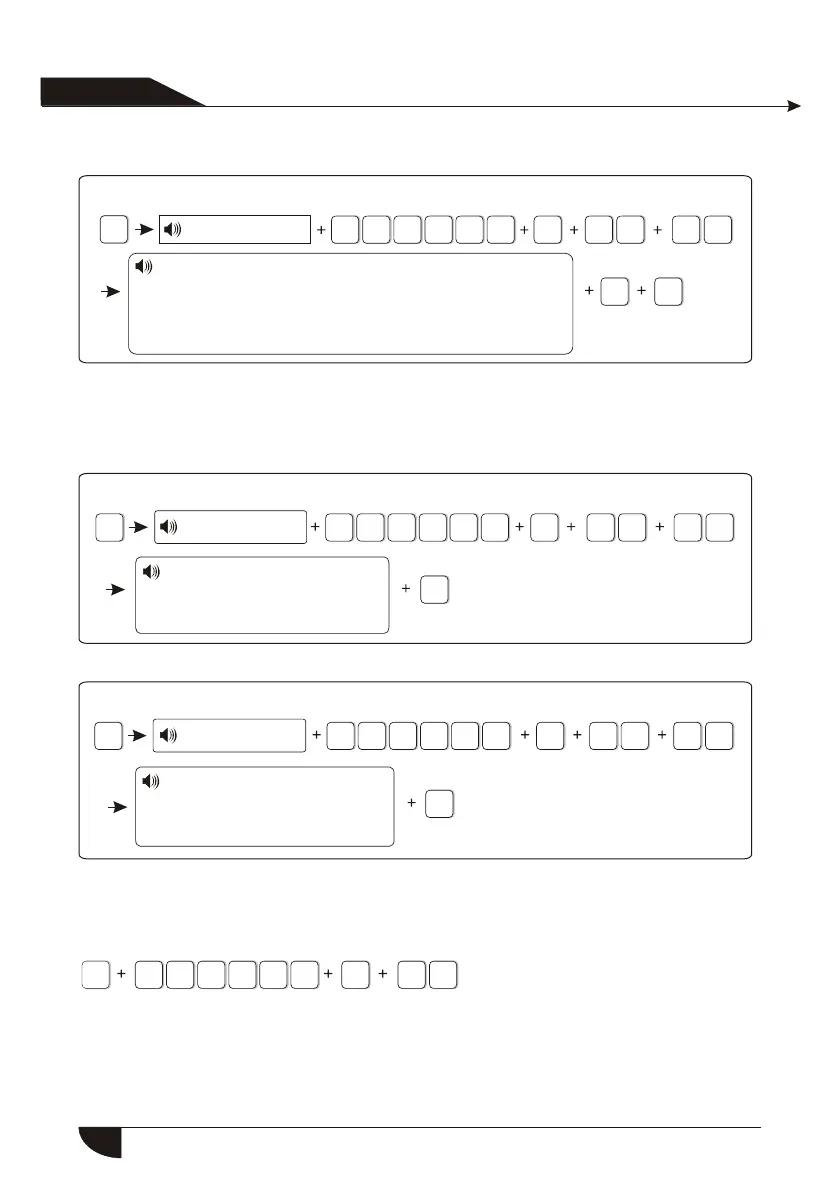
For example: Set as password control output
Press[*] for 3 seconds
Enter password
Please select programmable output port follow event
1.Follow alarm output 2.Follow arm output
3.Follow AC power fault output
4.Follow Communication fault output
5.Password control output
Hint: when setting as password control output, press key 5 for 3 seconds,
then enter the user password, the programme output port will be open
or closed. Voice phone or SMS also can open or close the outport.
Press[*] for 3 seconds
Enter password
6.7.6.Restore to factory default
Press * for 3 seconds
Enter password
Please re-confirm to restore
to factory default.
Press confirm key to save,
press back key to exit.
Please re-confirm to restore
to factory default.
Press confirm key to save,
press back key to exit.
*
#
8
#
3
2
1
0
5
4
6.8. Set GSM module
Press[*] for 3 seconds
For example: Set enable GSM module, telephone line priority, Set GSM bill
reminder time is 21st Dec. 2012.
The voice prompt will instruct you
to proceed below operations.
32
6.7.5.Delete system events


 To Next Page