focusrite.com Tell the world 12
Examples of use
Vocaster Two is the ideal audio interface
for podcasting or voice recording using
a Mac, PC, or iPad, and can be used by
one or two live contributors. A typical
set of connection possibilities is shown
below.
Recording with microphones
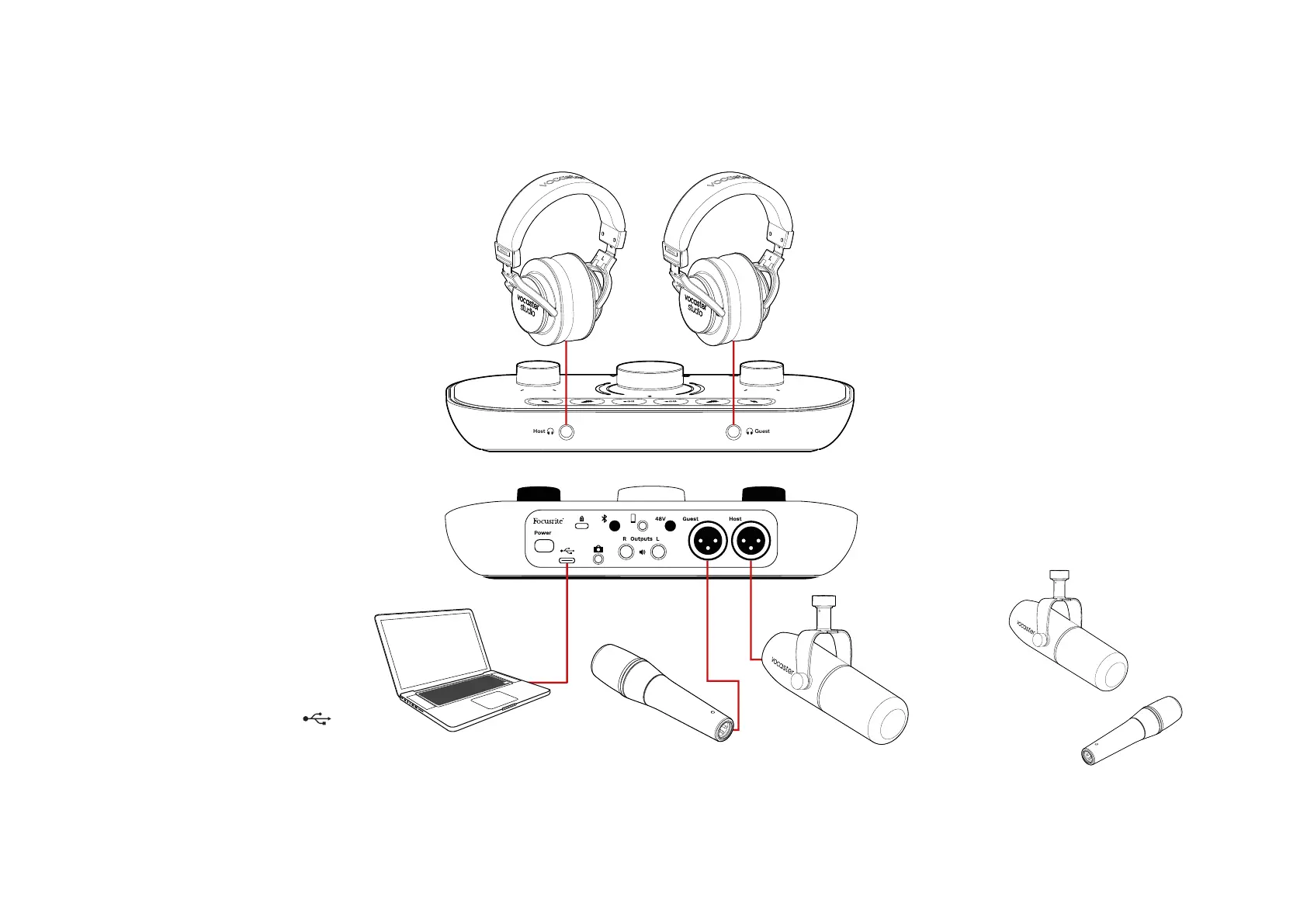
This setup shows a typical conguration
for recording from two microphones
using software on your Mac, PC or iPad.
You can record your voice (the Host)
and another person (the Guest), while
monitoring yourselves and any other
audio via headphones.
Apart from the headphone sockets, all
Vocaster Two’s connections are on the
rear panel. Connect your computer or
laptop to the USB port (marked )
using the USB cable supplied. Turn the
unit on with the Power button.
The microphone inputs are XLR sockets
and work with microphones with an
XLR connector. You can use Vocaster
Two with most models of microphone,
including dynamic and condenser types.
We recommend dynamic microphones
for speech recording, as they deliver
good quality in the frequency range of
the spoken word, and can help reduce
unwanted noises in your surroundings
from being picked up.
Two types of dynamic microphone
EXAMPLES OF USE












 To Next Page