focusrite.com Tell the world 9
iPad Users:
NOTE: Before connecting Vocaster Two
to your iPad, we recommend you follow
the ‘Getting Started’ section above
to ensure your hardware is up to date
through Vocaster Hub.
To connect your Vocaster Two to an
iPadOS device you need:
• iPad with USB-C port
• USB-C to USB-C cable(or the
included cable and an Apple
USB-A to C adaptor*)
*This method may require a separate USB hub to
provide enough power to your Vocaster.
48V
Host Guest
Host
Guest
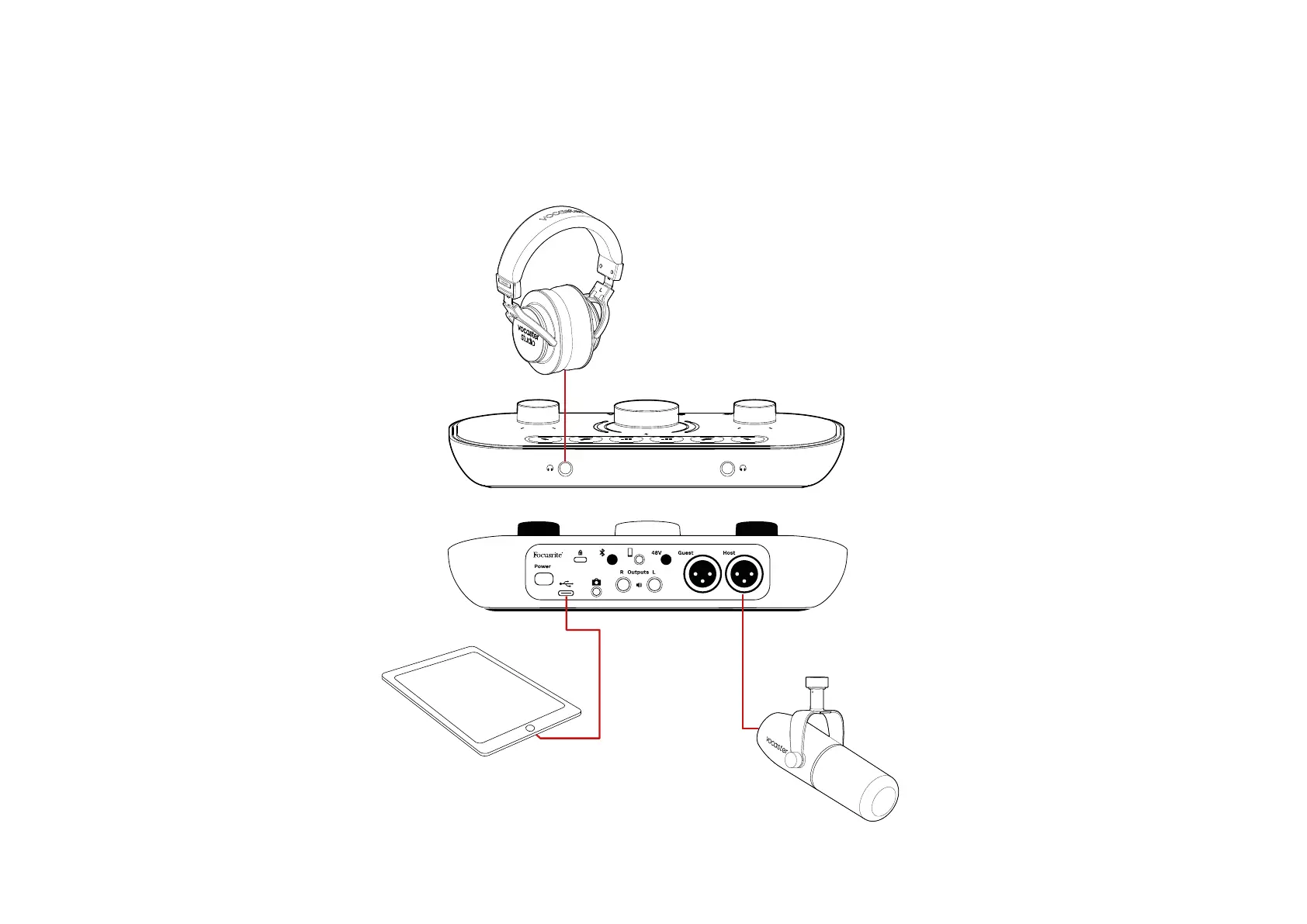
To make the connections:
1. Connect one end of the
USB Type-C to C cable (or
adaptor) to your iPad.
2. Connect the other end of the USB
type-C to your Vocaster Two’s USB
port.
3. Connect your headphones or
monitor speakers to the Vocaster
Two.
Sound from the iPad routes to
Vocaster Two’s outputs. You can route
the microphones and other sources
connected to the inputs of Vocaster
Two to iOS apps that support audio
recording.
GETTING STARTED












 To Next Page