focusrite.com Tell the world 29
Hardware Features
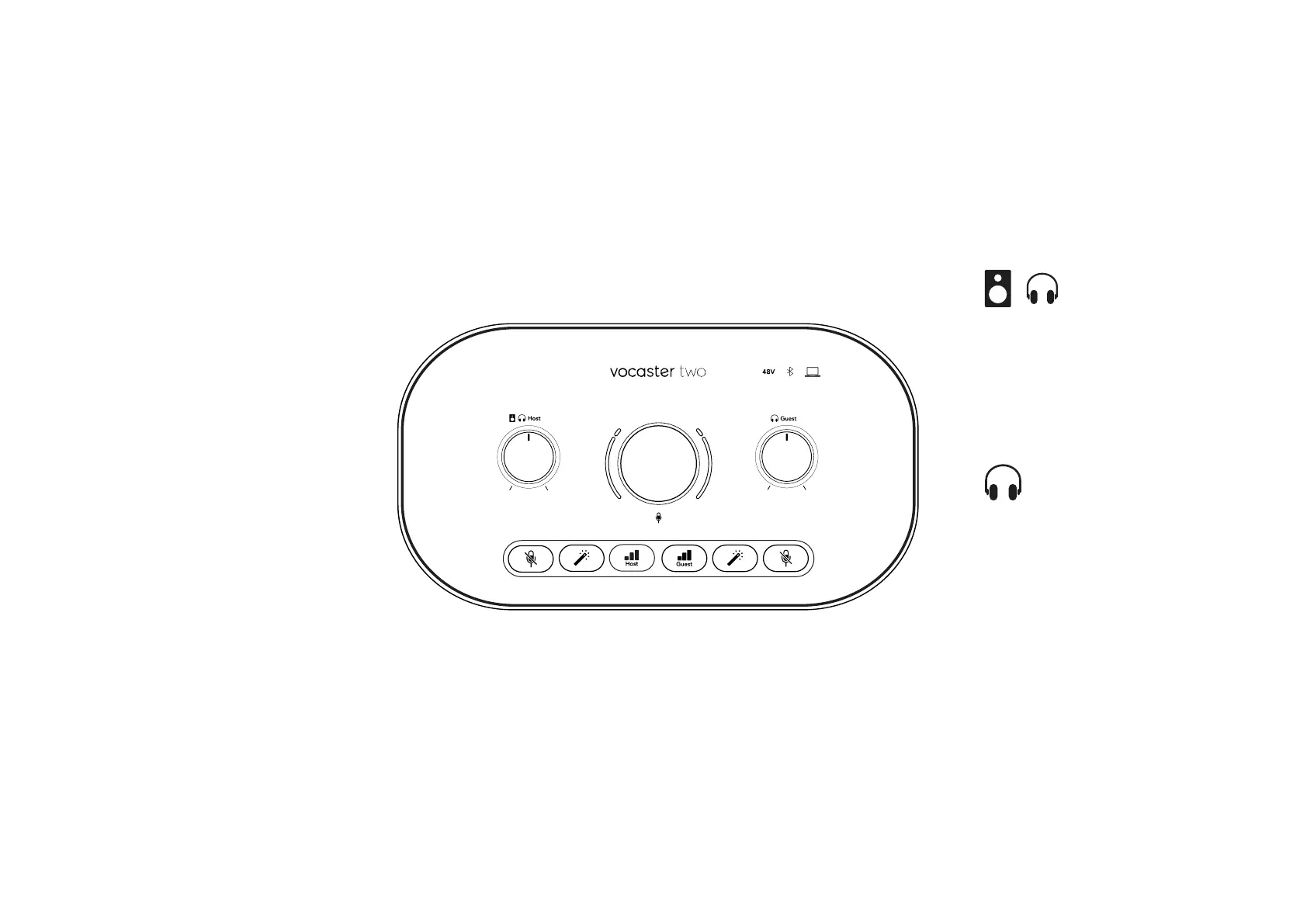
Top Panel
The large rotary control adjusts the gain
for either microphone input, as selected
by the Host and Guest buttons. The gain
control has two LED arcs. These have
several functions.
The outer LED arcs surrounding the gain
knob are ‘halo’ meters: the one on the left
is for the Host microphone input, the one
on the right is for the Guest microphone
input:
• They show microphone level: green
means normal operation, amber
shows the signal is close to clipping,
and red shows digital clipping, which
should always be avoided.
• In addition, each arc pulses red when
the corresponding microphone is
muted
The thinner inner ring surrounding the
gain knob is a multifunction ‘halo’ LED.
This has several functions:
• It illuminates white while microphone
gain is being adjusted, to show the
current gain setting
• It acts as a countdown timer during
an Auto Gain calibration
• Following an Auto Gain calibration
of either microphone preamp, it
will ash green or red to show a
successful or unsuccessful operation
(respectively)
Host monitor output level control -
sets the output level at both the front
panel Host headphone output and the
rear panel speaker outputs.
Guest monitor output level control -
sets the output level at the front panel
Guest headphone output.
HARDWARE FEATURES












 To Next Page