focusrite.com Tell the world 19
Listening with speakers
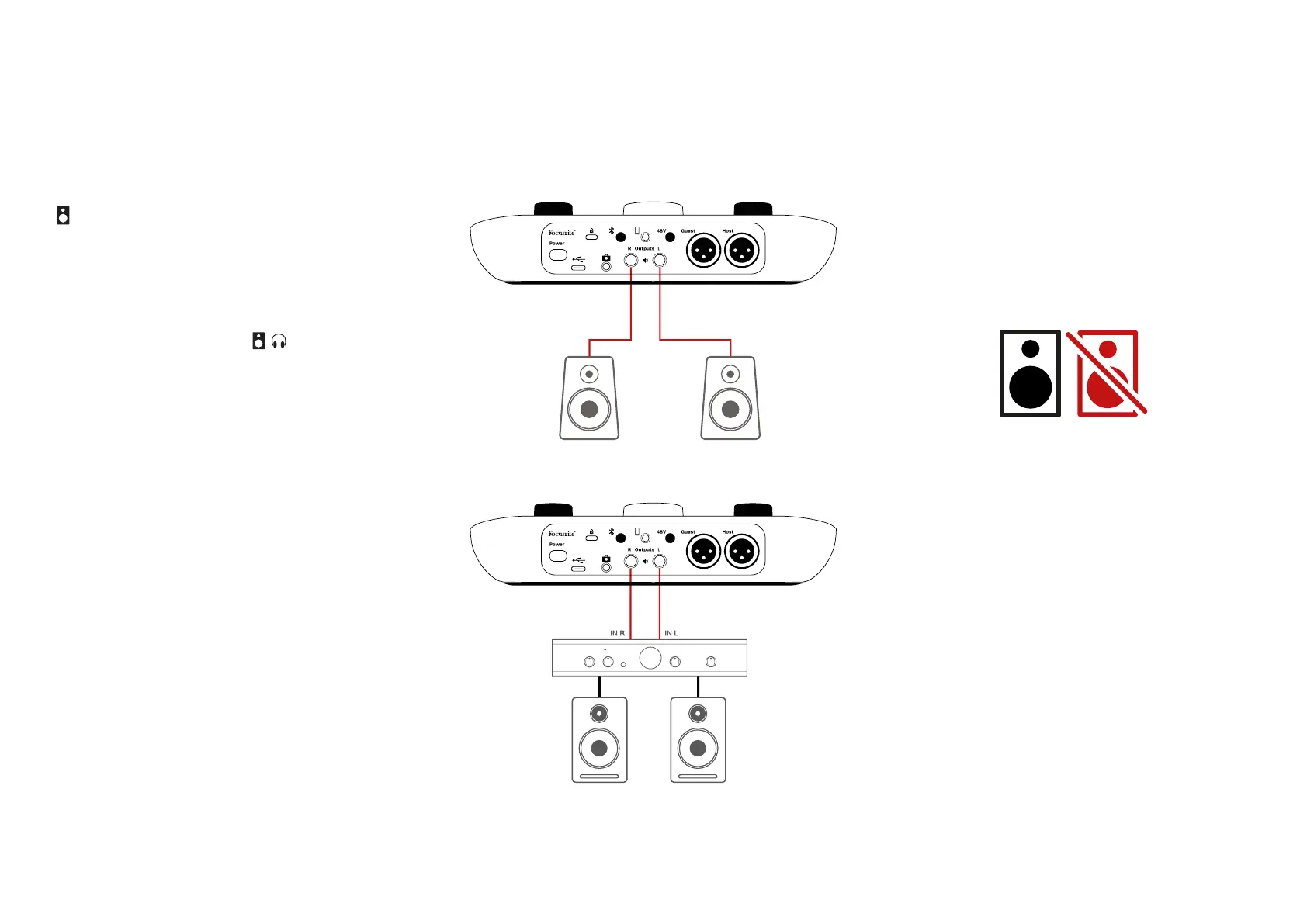
Use the ¼’ jacks marked Outputs R and L
to connect speakers.
You can connect powered monitors or an
amplier to these outputs. Speaker volume
is controlled by the same knob used for
headphones volume.
The outputs are balanced ¼’ TRS jack
sockets and provide line level. Small powered
monitors have unbalanced inputs, typically
a 3.5 mm jack plug intended for direct
connection to a computer. Separate power
ampliers are likely to have phono (RCA)
sockets.
You can also mute the speakers using
Vocaster Hub software. Click the speaker icon
in the top right of the Vocaster Hub software
to toggle mute on (red) or off (black)
NOTE: You can create an audio feedback loop
if your speakers are active at the same time
as a microphone! We recommend you turn off
your speakers while recording podcasts, and
use headphones for monitoring.
EXAMPLES OF USE












 To Next Page