focusrite.com Tell the world 31
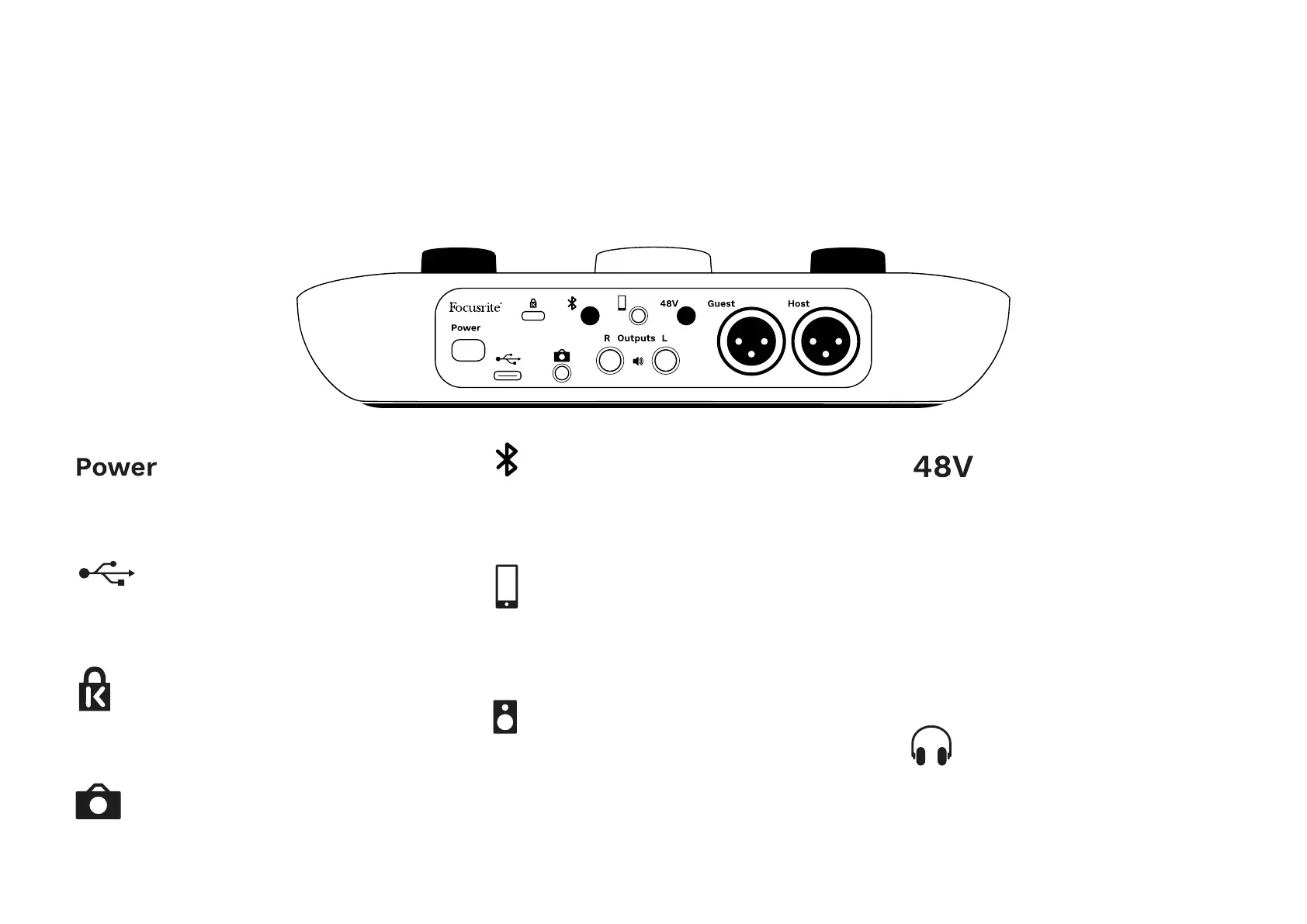
Press to turn Vocaster Two on and off.
USB 3.0 port – Type C connector; connect to your
laptop or computer with the USB cable supplied.
Kensington security slot – make your Vocaster Two
secure using a Kensington lock.
3.5 mm TRS jack socket for connecting Vocaster
Two to the external audio input of a video camera.
Enables Bluetooth connectivity: see ‘Using
Bluetooth’ section (page 21) for full details.
3.5 mm TRRS jack socket for a wired connection
to a compatible phone.
Outputs L and R – for connecting to
monitor loudspeakers. Two ¼’ TRS jack sockets;
electronically balanced. Either ¼’ TRS (balanced
connection) or TS (unbalanced connection) jack
plugs can be used.
Phantom power switch for microphone inputs –
press to enable 48V phantom power at the XLR
socket for the currently selected microphone
channel.
Host and Guest
XLR sockets for connecting microphones.
On the front:
Host and Guest headphone output sockets.
Connect headphones here. If your headphones
use a 3.5mm jack then you need to use a 3.5mm
to ¼’ jack adaptor.
HARDWARE FEATURES
Rear Panel












 To Next Page