Features
199
[FV62200( X)04/94]
17-1/2 pica
art:0021177-A
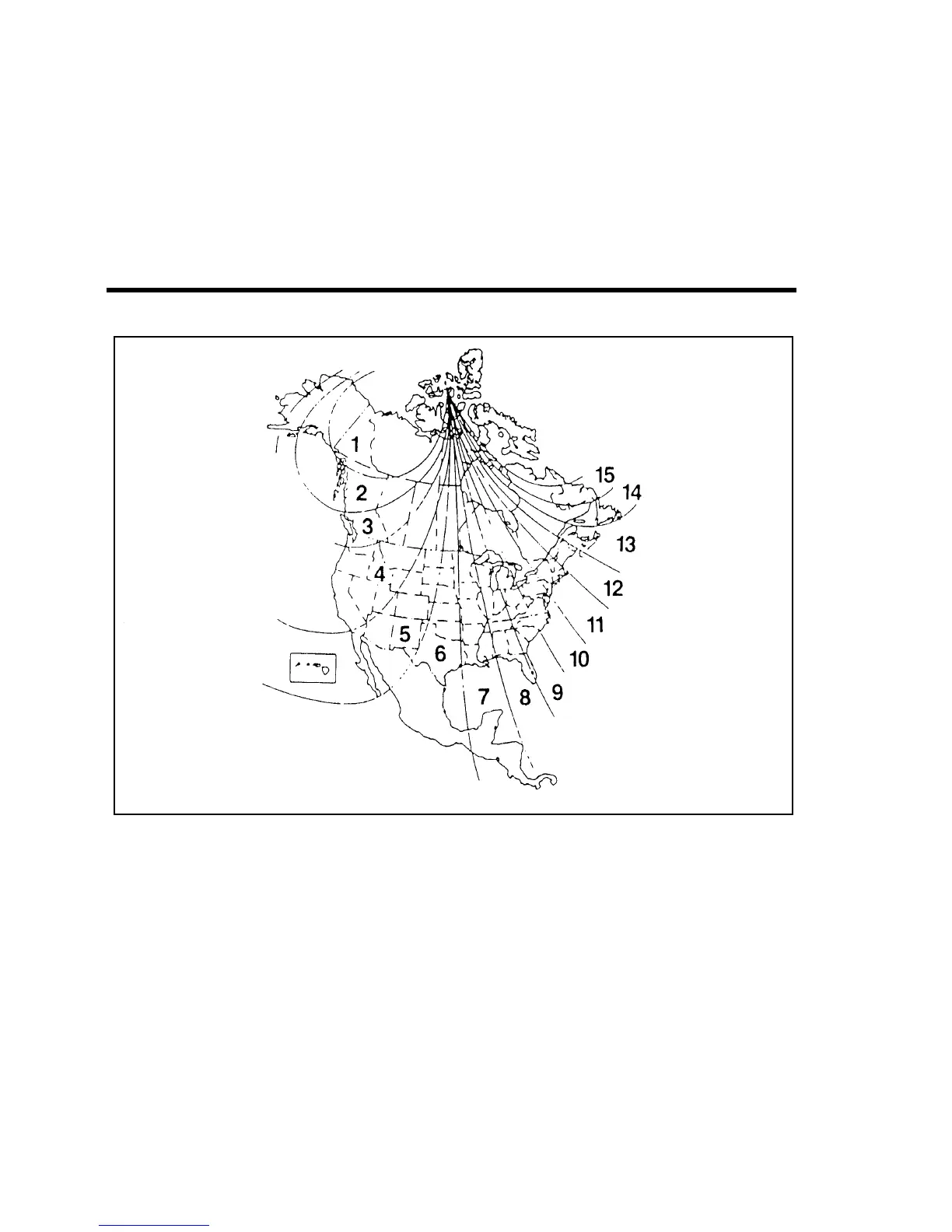
Zone map
*
[FV62300( X)03/93] 2. Press and hold the “MODE” button until the “VAR”
indicator appears in the display (approximately 4 seconds).
*
[FV62400( X)03/93] 3. Release the “MODE” button. The display will now show the
current zone number that is stored in the compass.
*
[FV62500( X)03/93] 4. Press the “MODE” button repeatedly (or press and hold in)
until the desired zone number appears in the display (once it
reaches 15, the next press of the button will set it to 1).
*
[FV62600( X)03/93] 5. Release the “MODE” button when the desired zone number
is displayed.
*
[FV62700( X)05/95]
After approximately three seconds the display will flash all
segments and then return to normal operation. Zone is now
updated.
File:08unfvx.ex
Update:Thu Feb 29 13:56:40 1996





 To Next Page