200
[FV62850( X)05/95]
Calibration adjustment:
*
[FV62900( X)03/93] 1. Find an open area that is free from steel structures and high
voltage lines. An open parking lot is a good example.
*
[FV63000( X)03/93] 2. Press and hold the “MODE” button until the “CAL”
indicator appears in the display (approximately 8 seconds).
*
[FV63050( X)05/95]
NOTE: You cannot perform calibration unless the display
reads “CAL.”
*
[FV63100( X)03/93] 3. Release the “MODE” button.
*
[FV63300( X)03/93] 4. Once the “CAL” indicator has appeared, drive the vehicle
slowly (less than 3 mph / 5 km/h) in 360˚ circles until the
“CAL” indicator turns off. This will happen within 2 to 3
complete circles.
%
*
[FV63800( X)03/93]
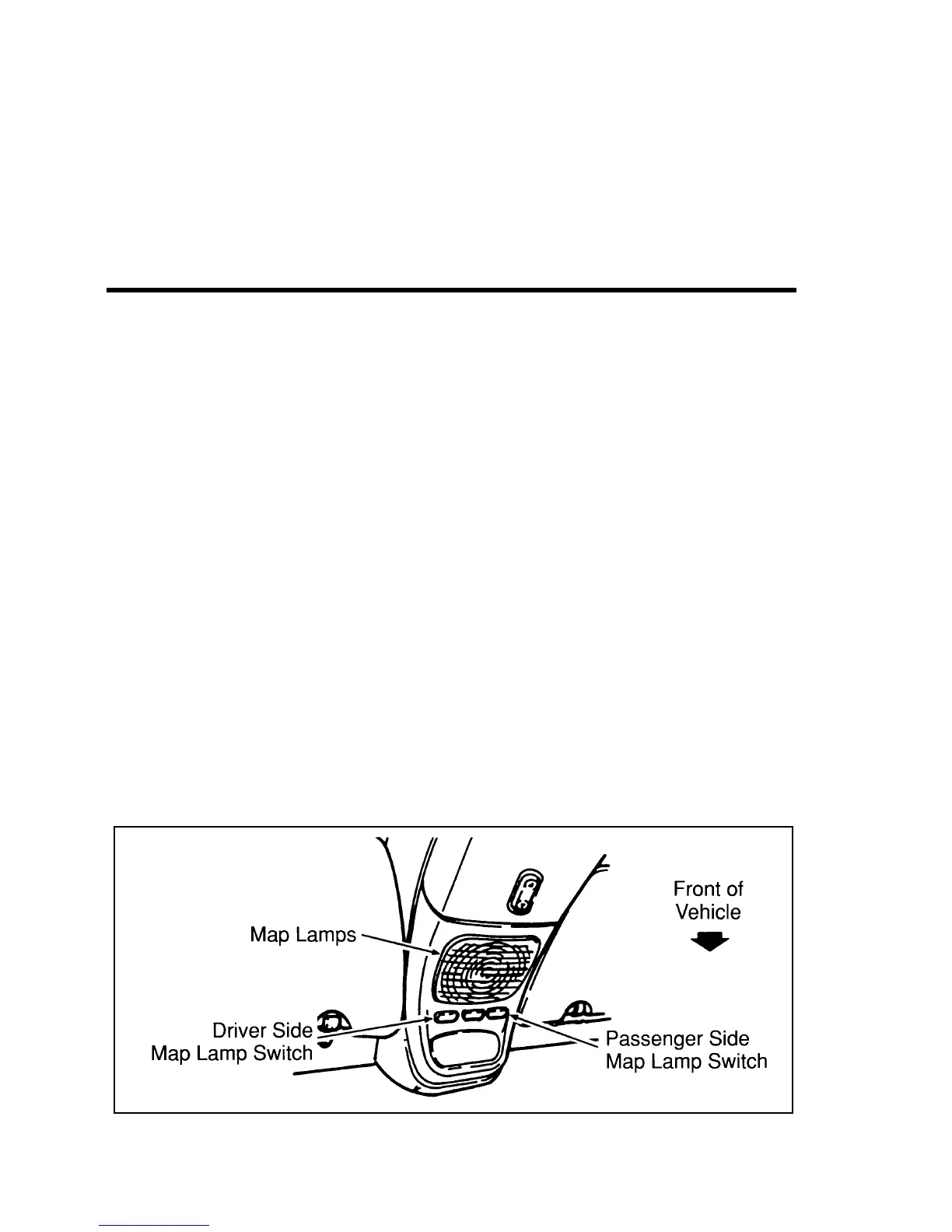
Map lamps
*
[FV63900( X)03/93]
The map lamps are located in the overhead console. The driver
and passenger side each has its own switch.
[FV64000( X)09/95]
10-1/2 pica
art:0020975-B
Map lamps (If equipped)
File:08unfvx.ex
Update:Thu Feb 29 13:56:40 1996




 To Next Page